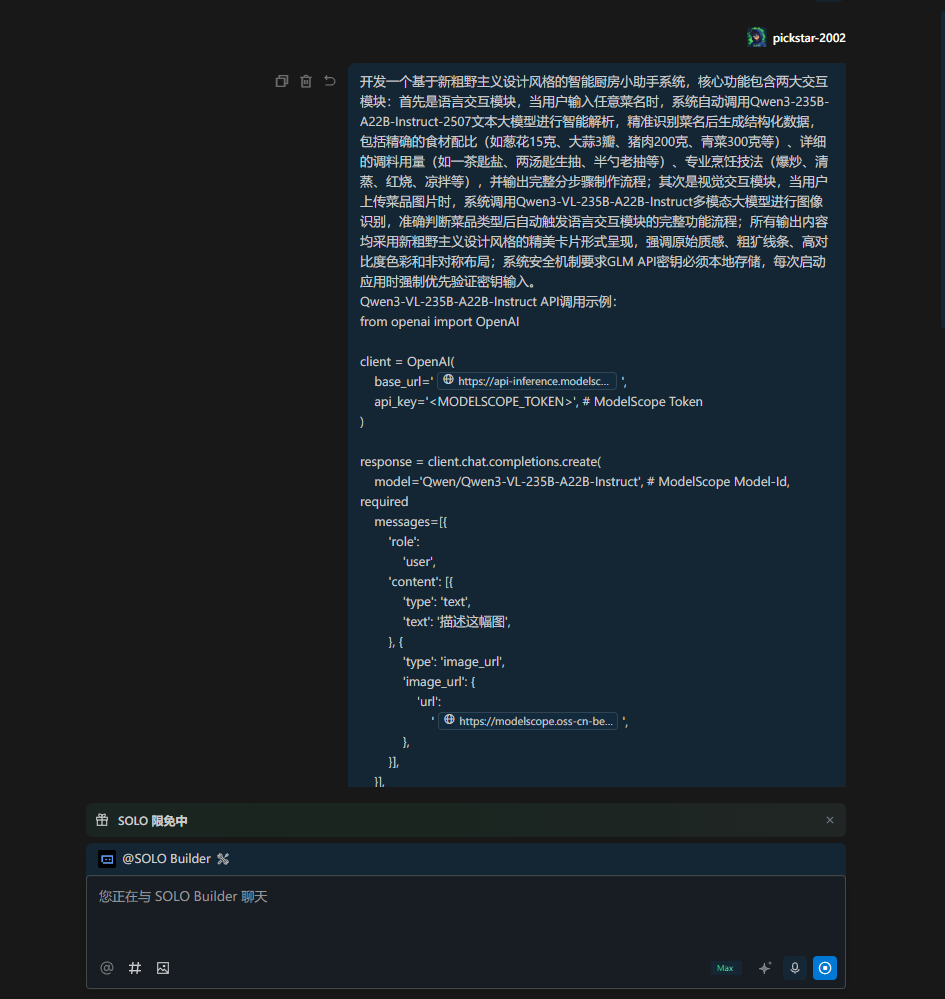
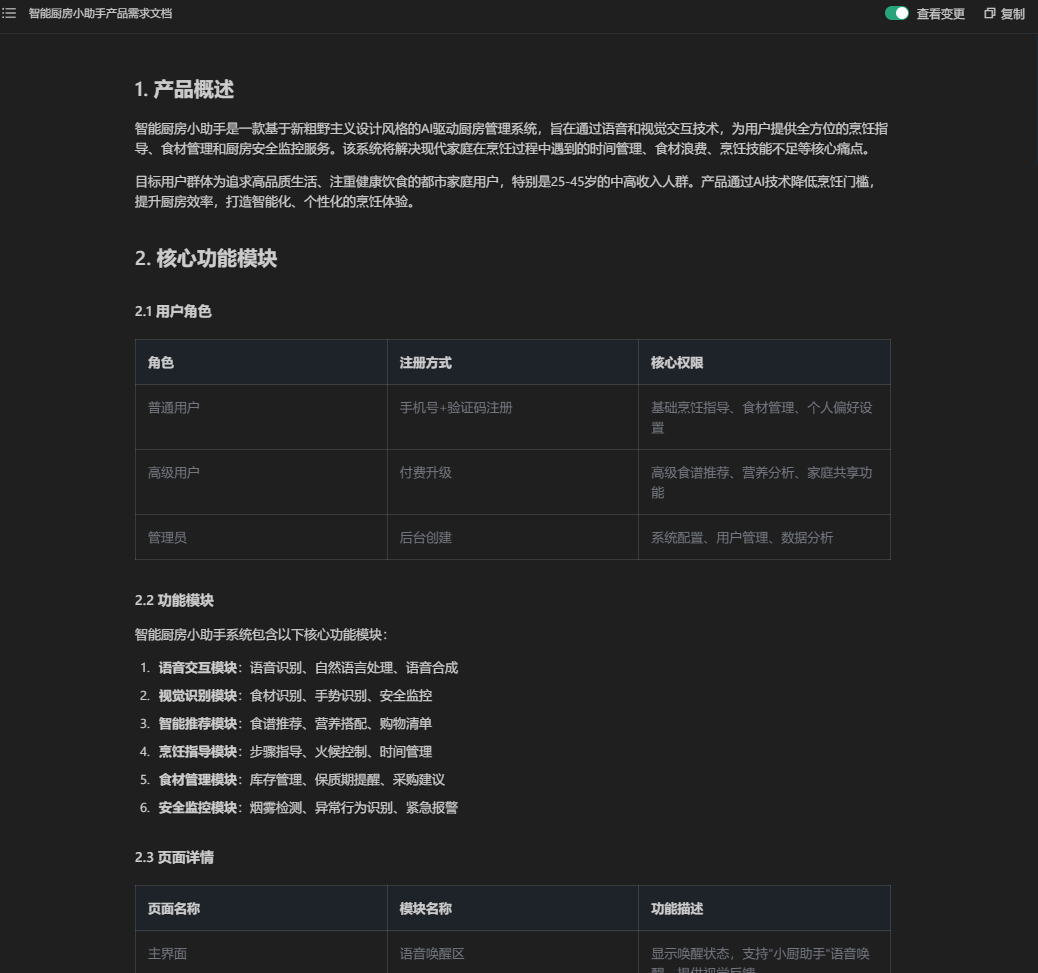
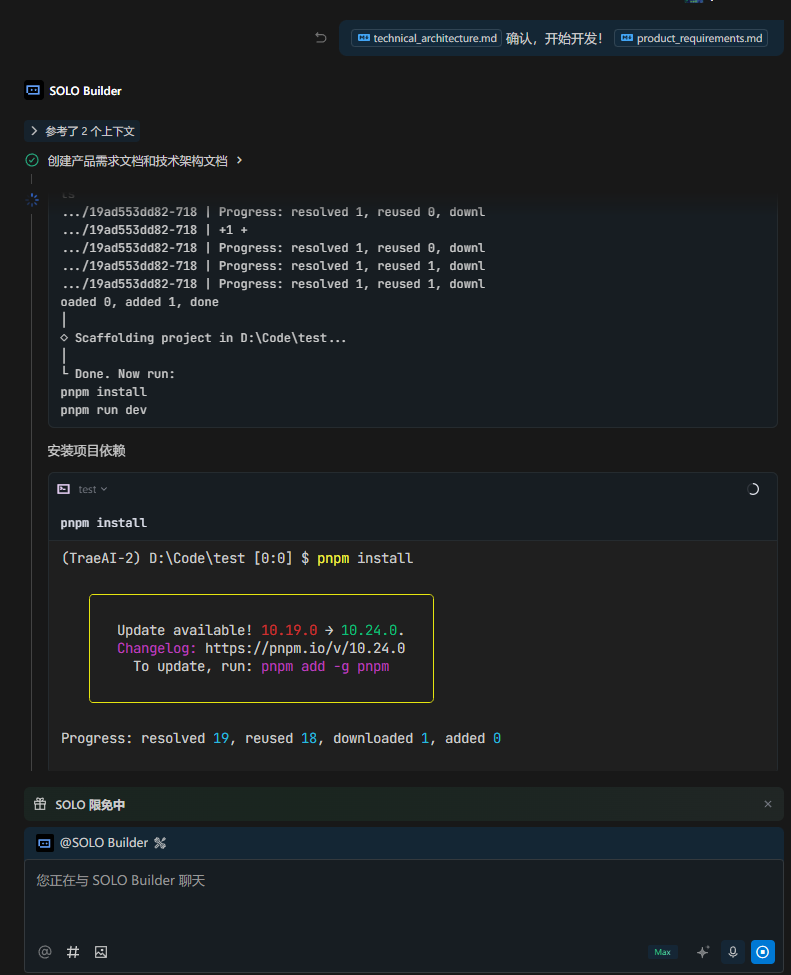
TRAE是一款深度融合AI能力的智能开发工具,如同一位全能的"AI开发工程师",能够理解开发需求、调用专业工具并独立完成从编码、调试到测试、重构、部署等全链路开发任务。它不仅提供基础的代码补全功能,更构建了开放的智能体生态,实现真正的人机协同高效开发。
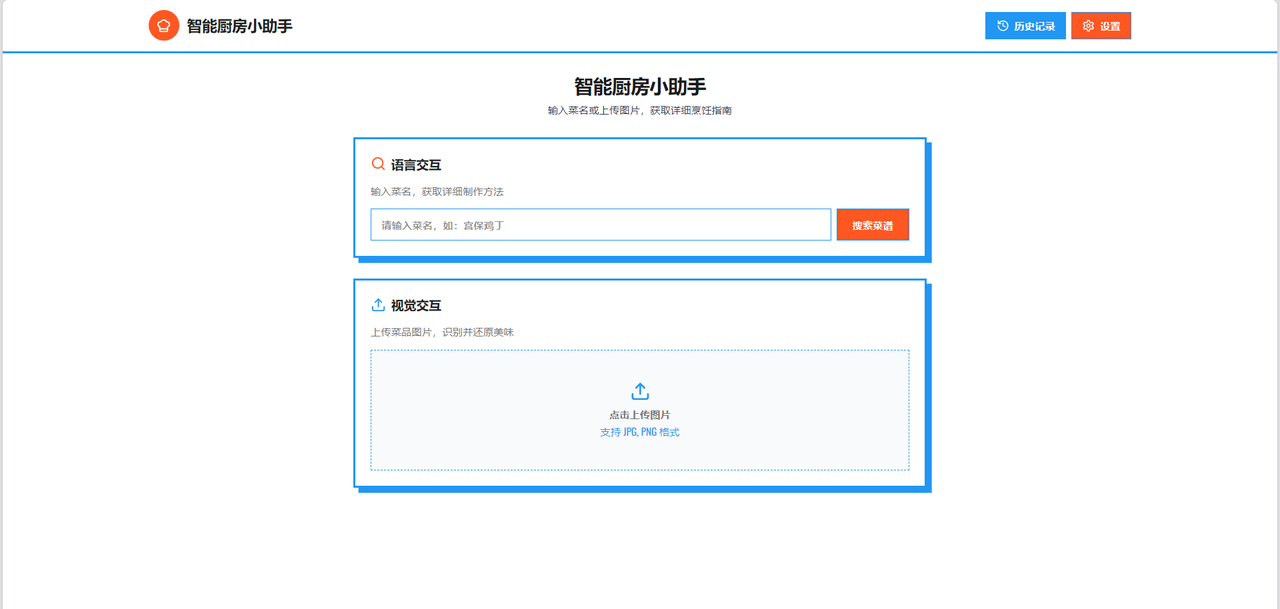
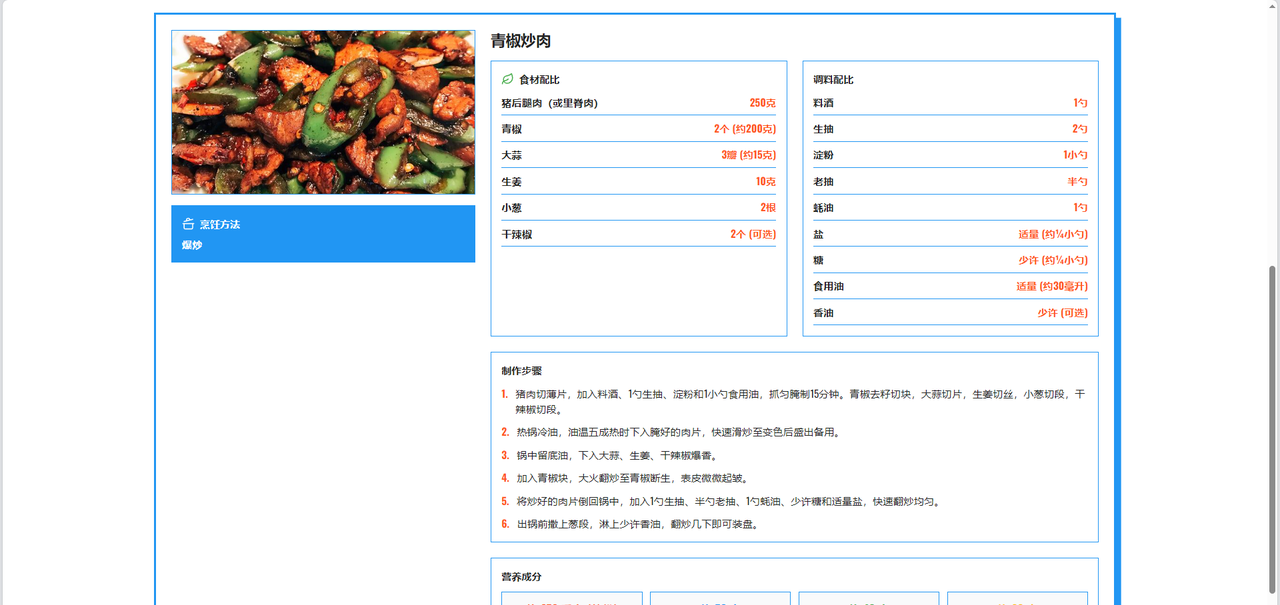
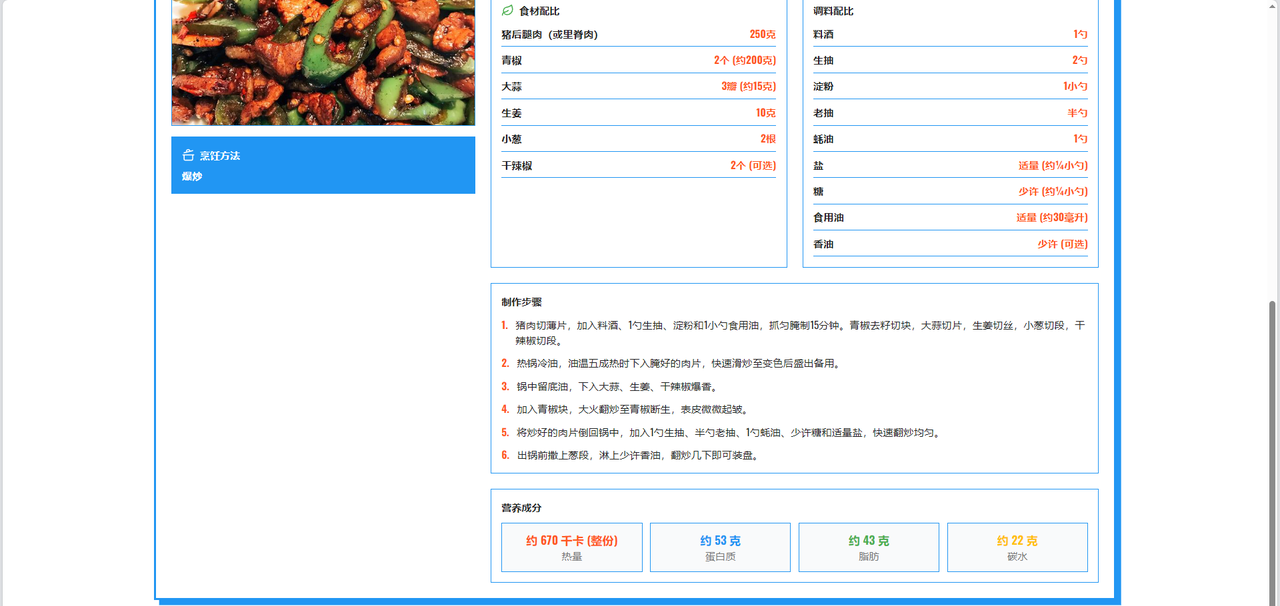
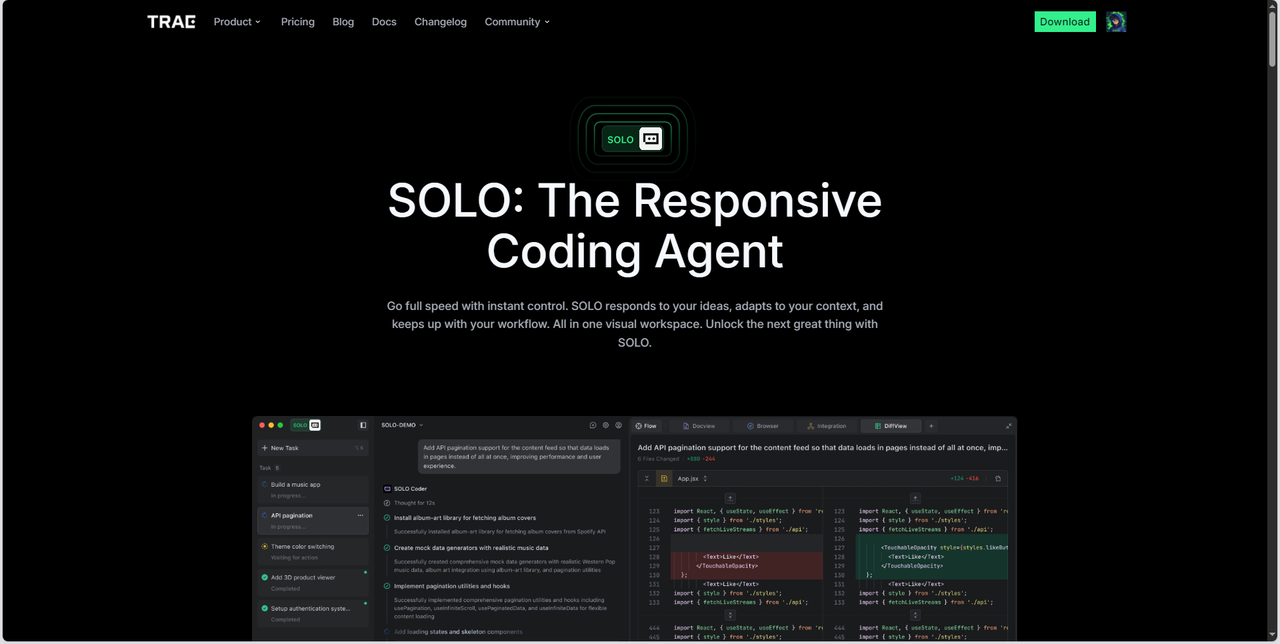
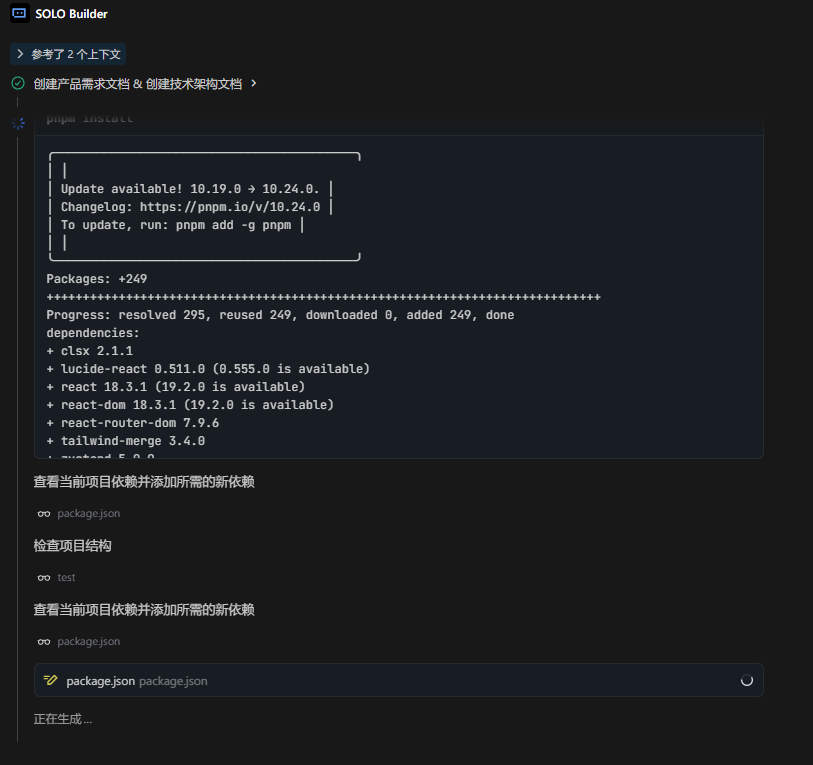
TRAE 2.0版本的核心创新SOLO模式基于"Context Engineering"理念设计,让用户只需通过自然语言描述需求,系统便会自动进行需求感知、任务拆解、代码生成与测试验证。在"AI识菜通"项目中,开发者仅需输入详细需求描述,TRAE便自动生成完整应用,包含需求文档、架构设计、代码实现与测试,将开发效率提升至全新高度。
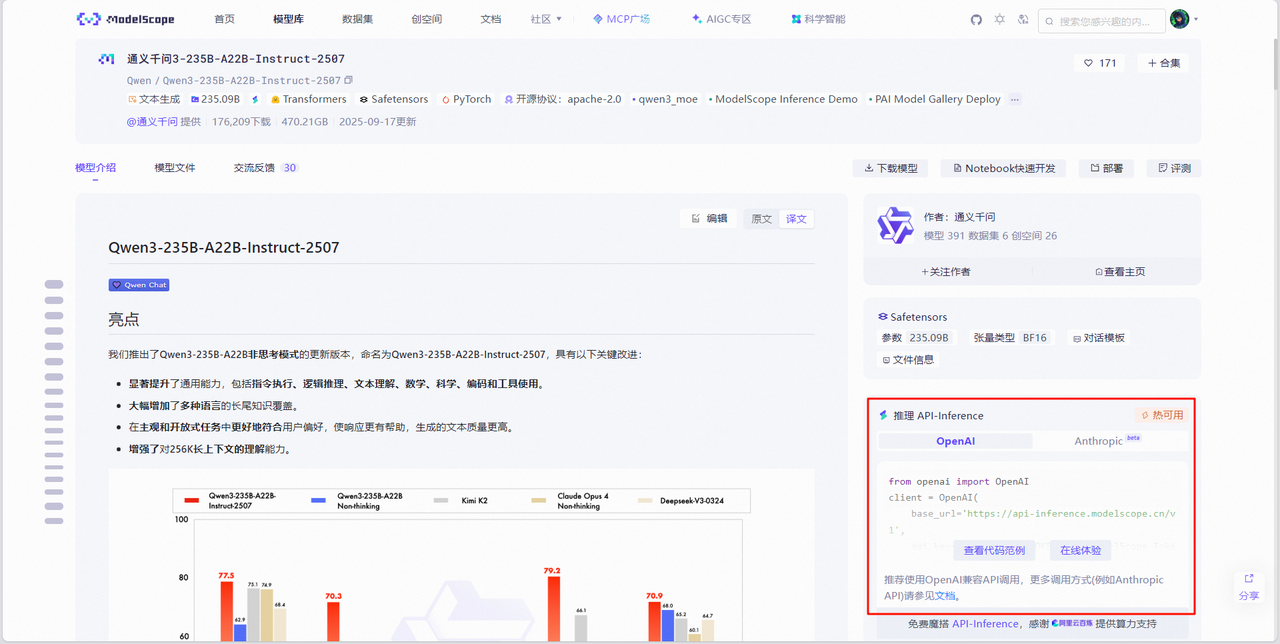
魔搭社区以"模型即服务"(MaaS)为核心理念,汇聚了数千个优质机器学习模型,覆盖计算机视觉、自然语言处理、语音识别、多模态理解等全领域。开发者只需几行代码即可调用这些经过工业级验证的AI能力,将复杂的算法能力快速集成到自己的应用中,为"AI识菜通"提供了强大的AI内核支撑。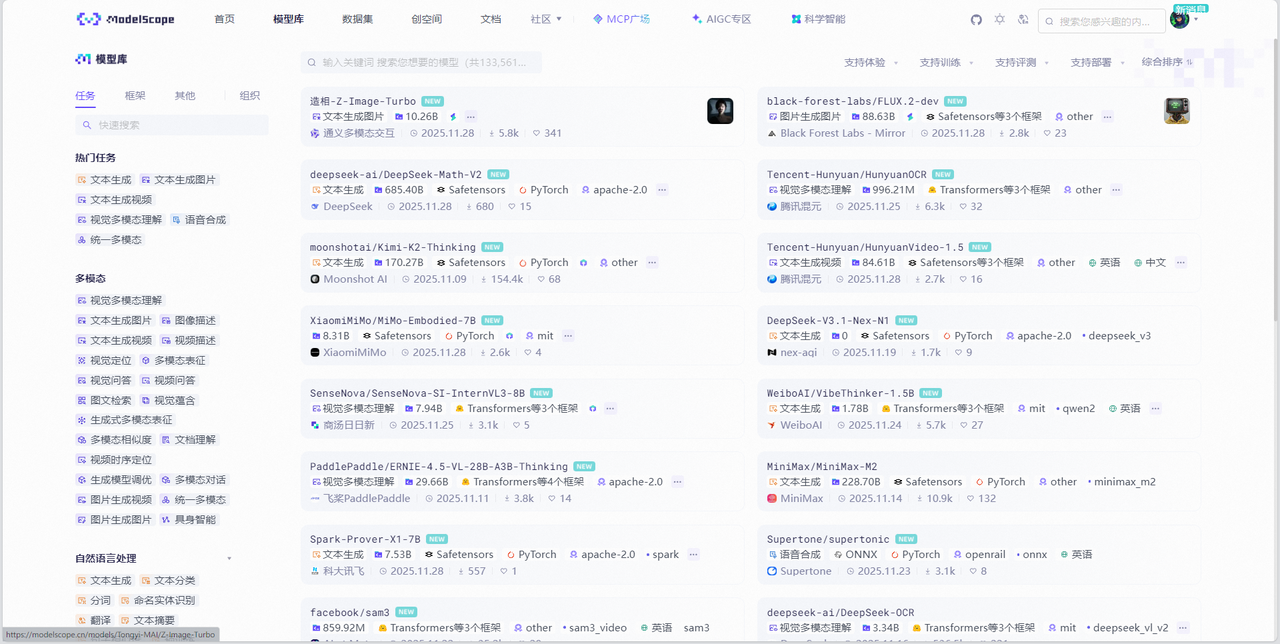
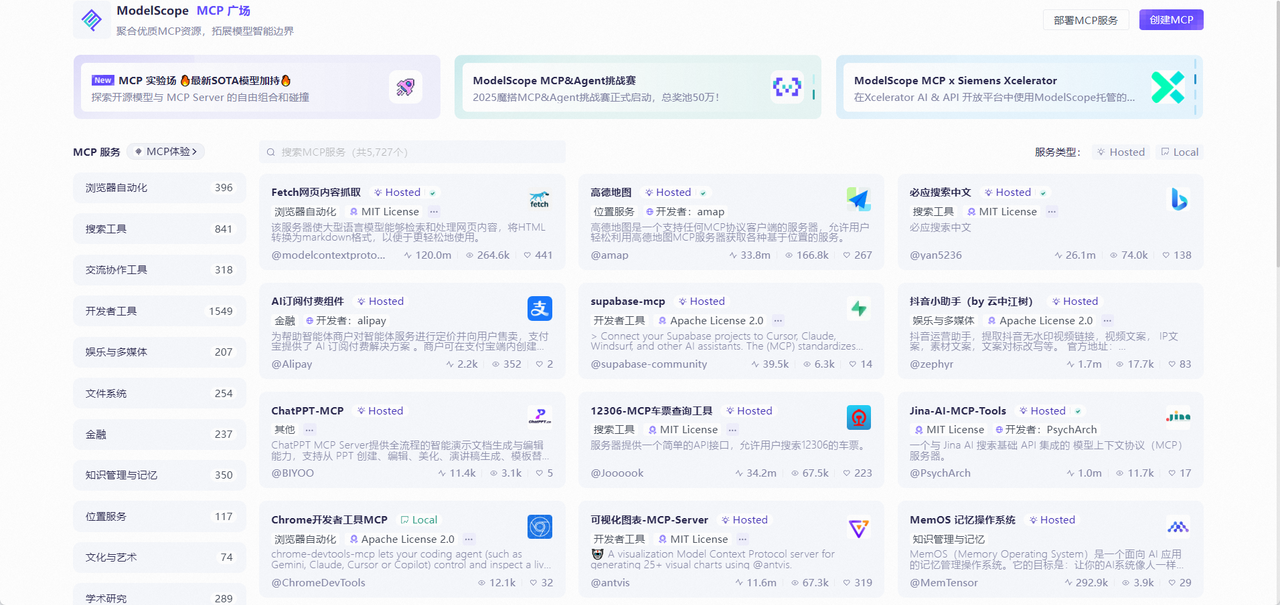
MCP广场基于Model Context Protocol协议,提供地图服务、支付接口、数据库连接等数百种即插即用的智能工具。这些MCP服务如同乐高积木,让开发者能够快速构建具备真实世界交互能力的AI应用。通过魔搭社区的开放生态,开发者能够专注于创意实现而非技术细节,真正实现"让AI触手可及"的愿景。
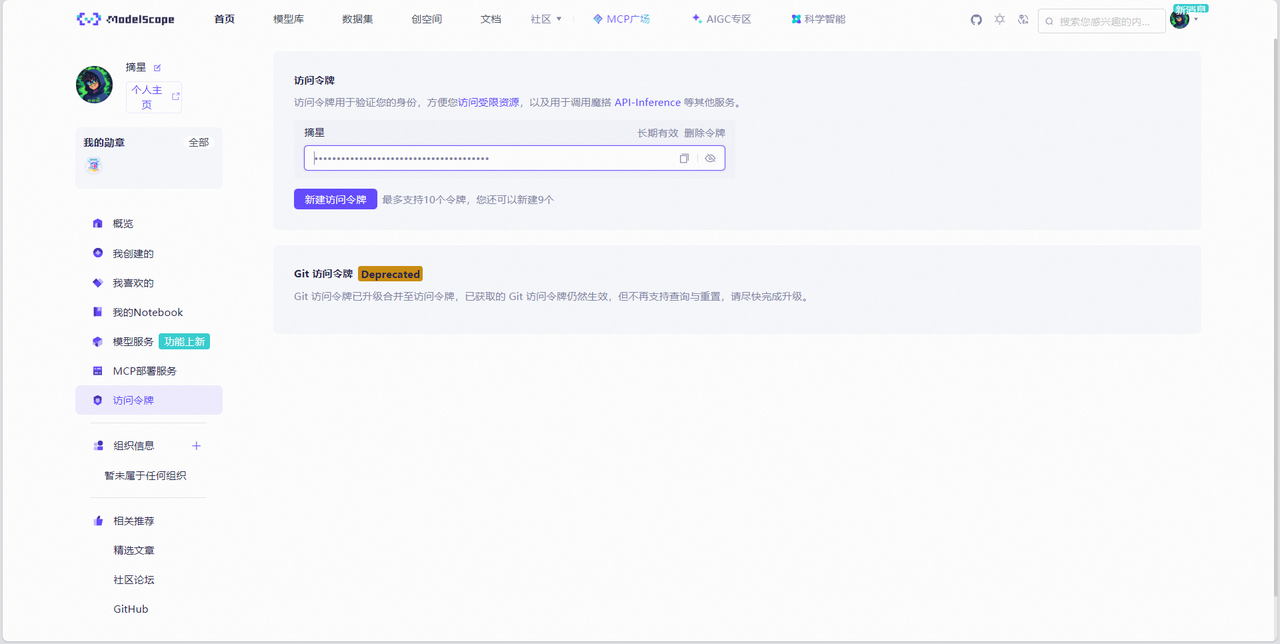
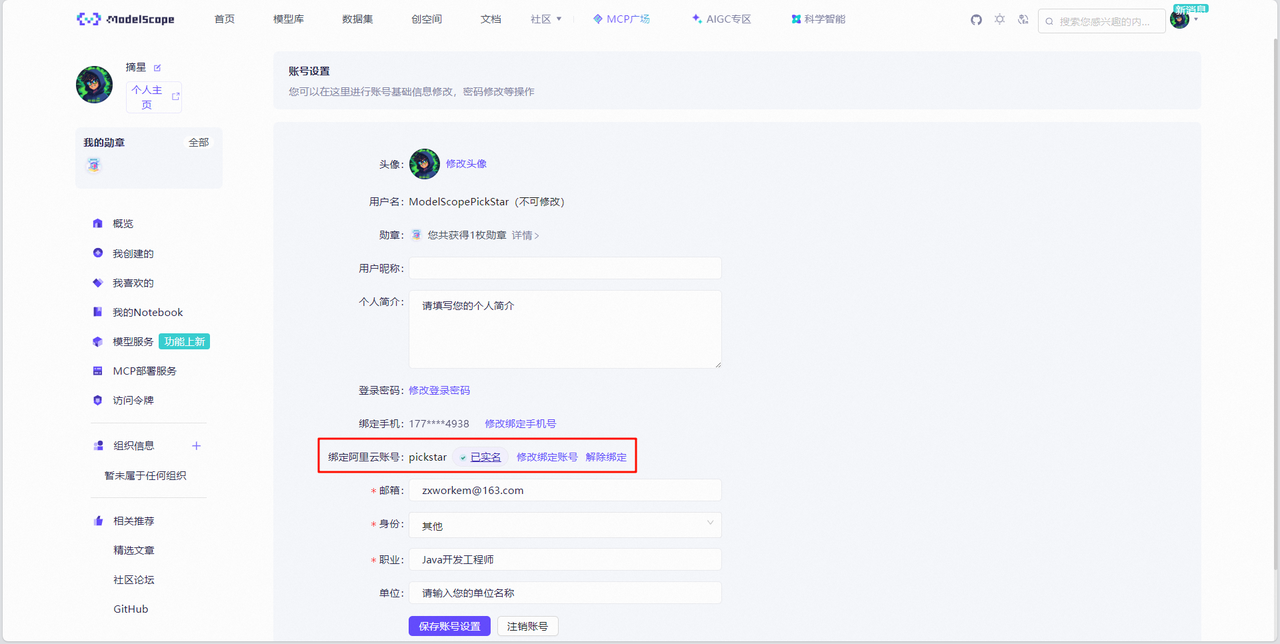
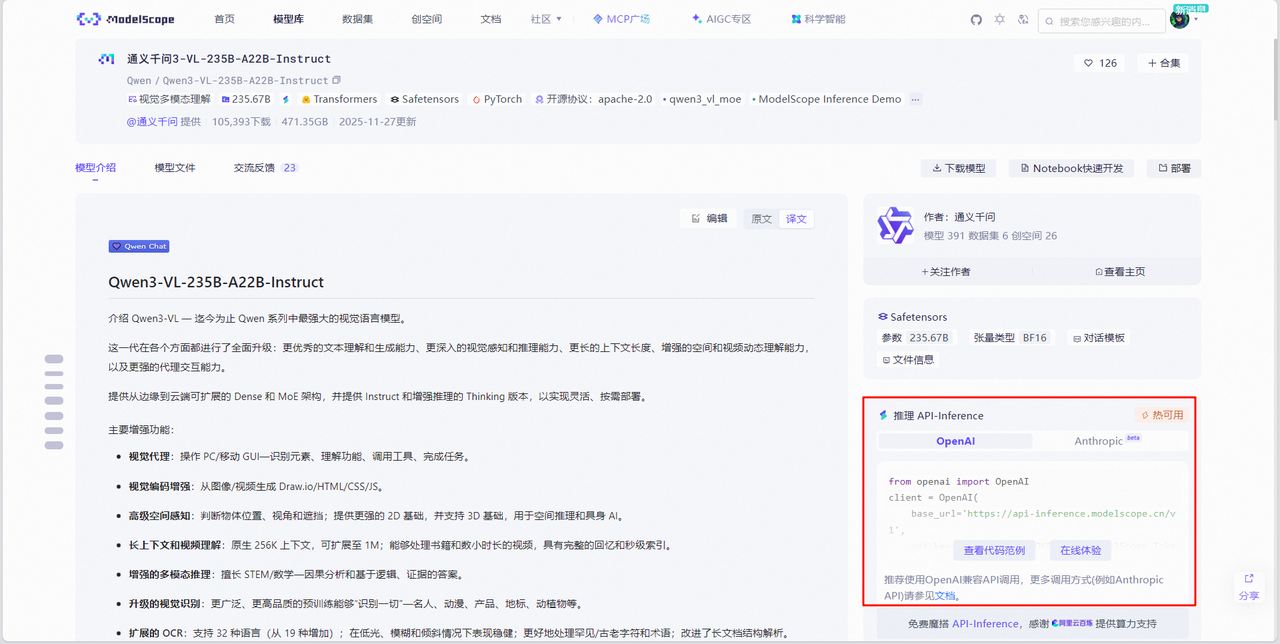
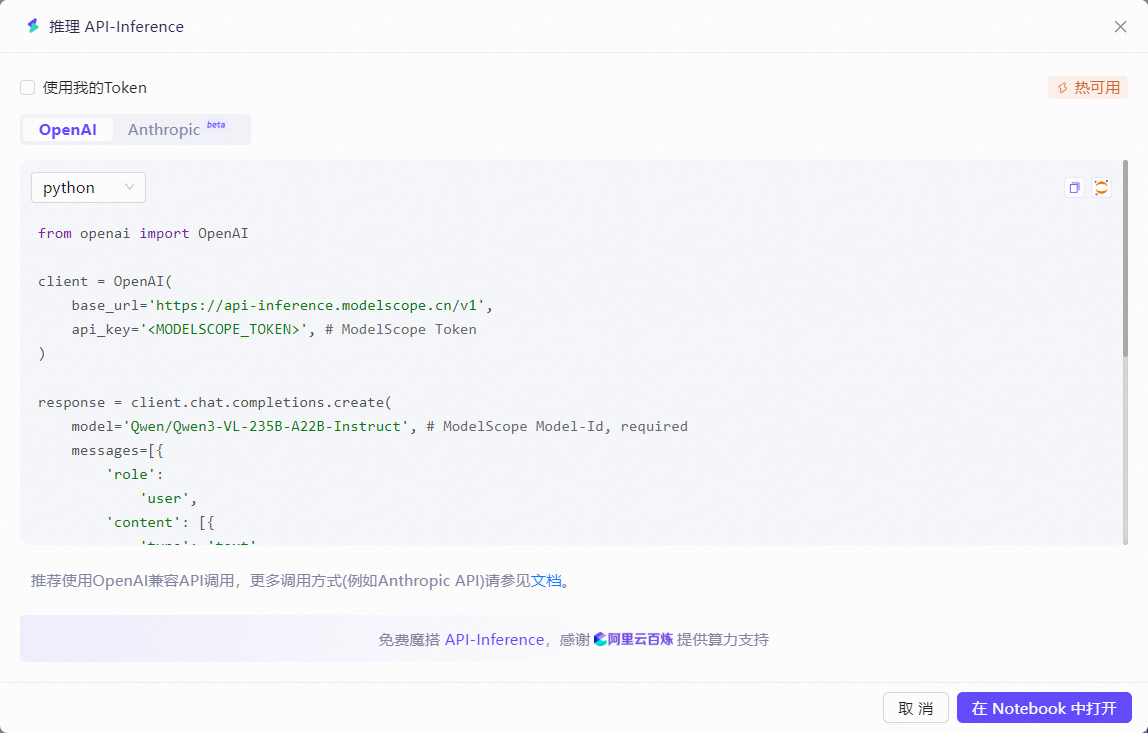
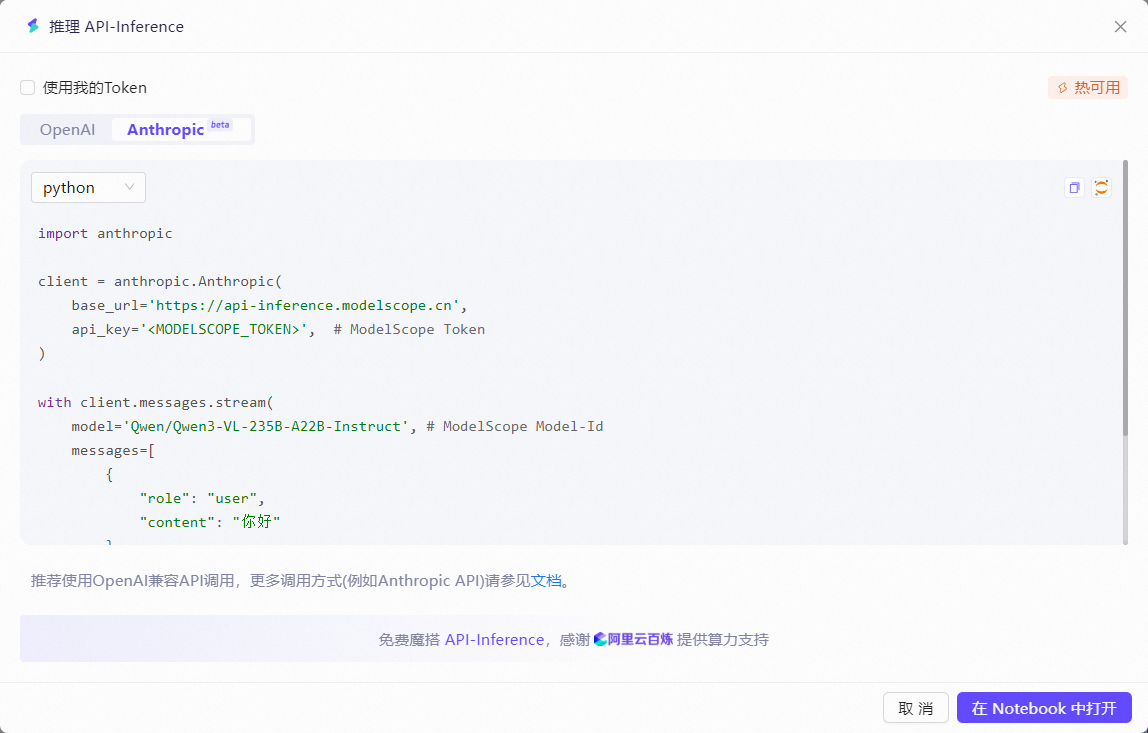
魔搭通过API-Inference,将开源模型服务化并通过API接口进行标准化,让开发者能以更轻量和迅捷的方式体验开源模型,并集成到不同的AI应用中,从而展开富有创造力的尝试,包括与工具结合调用,来构建多种多样的AI应用原型。
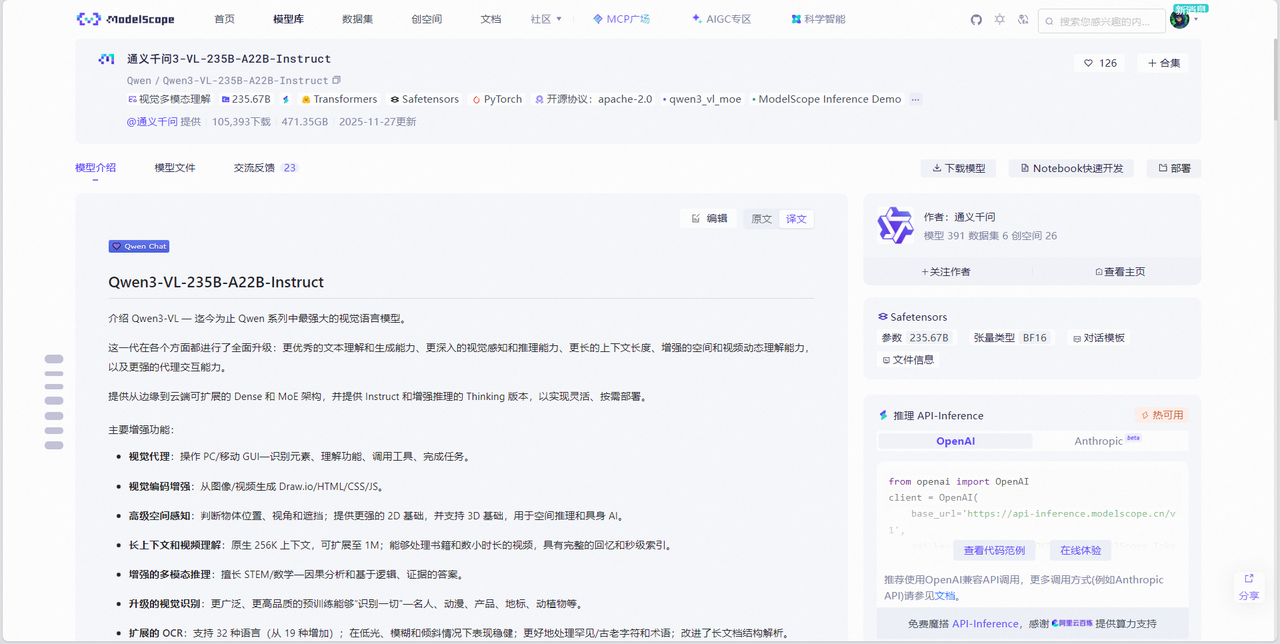
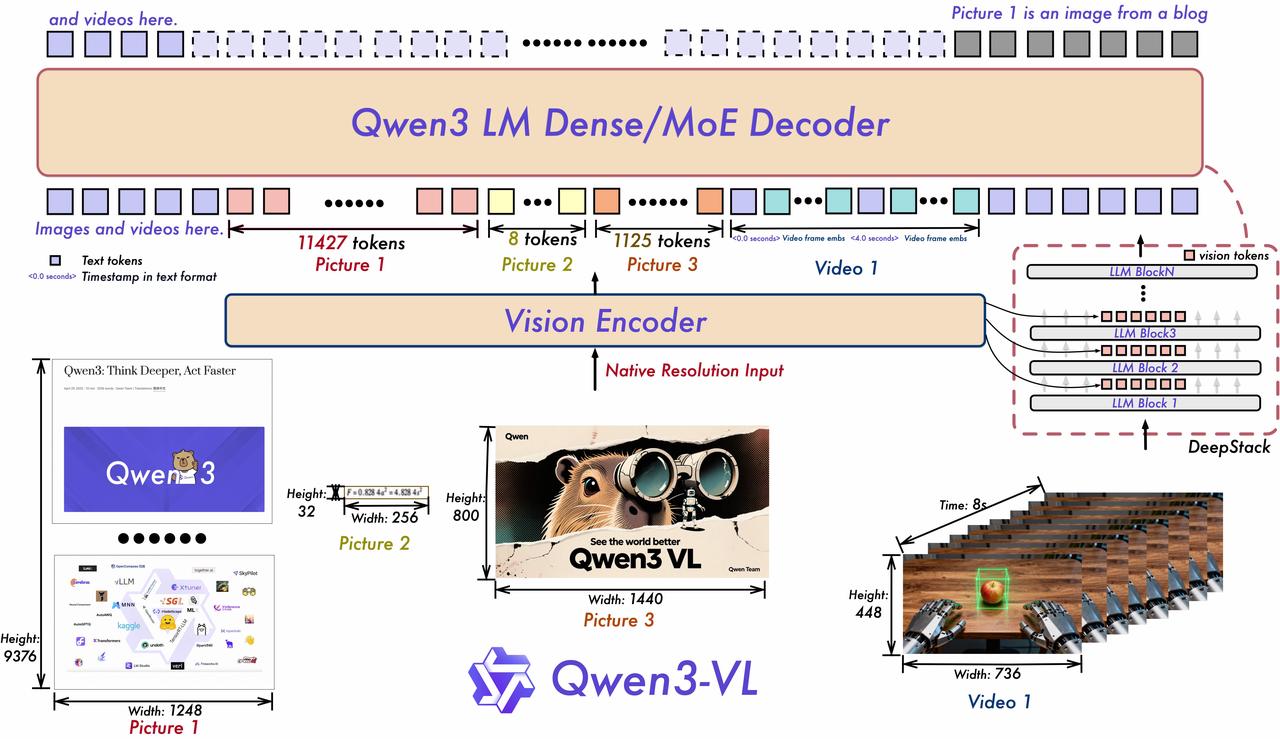
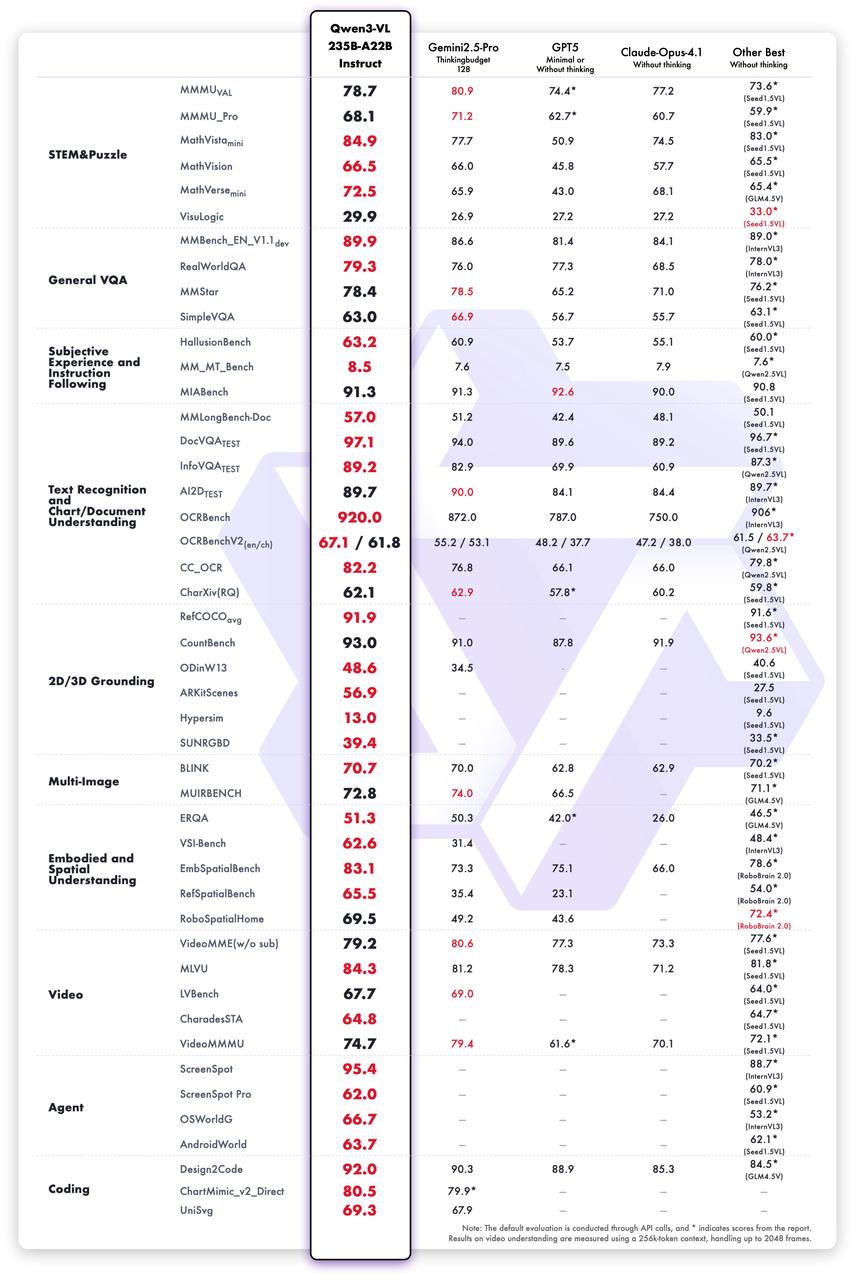
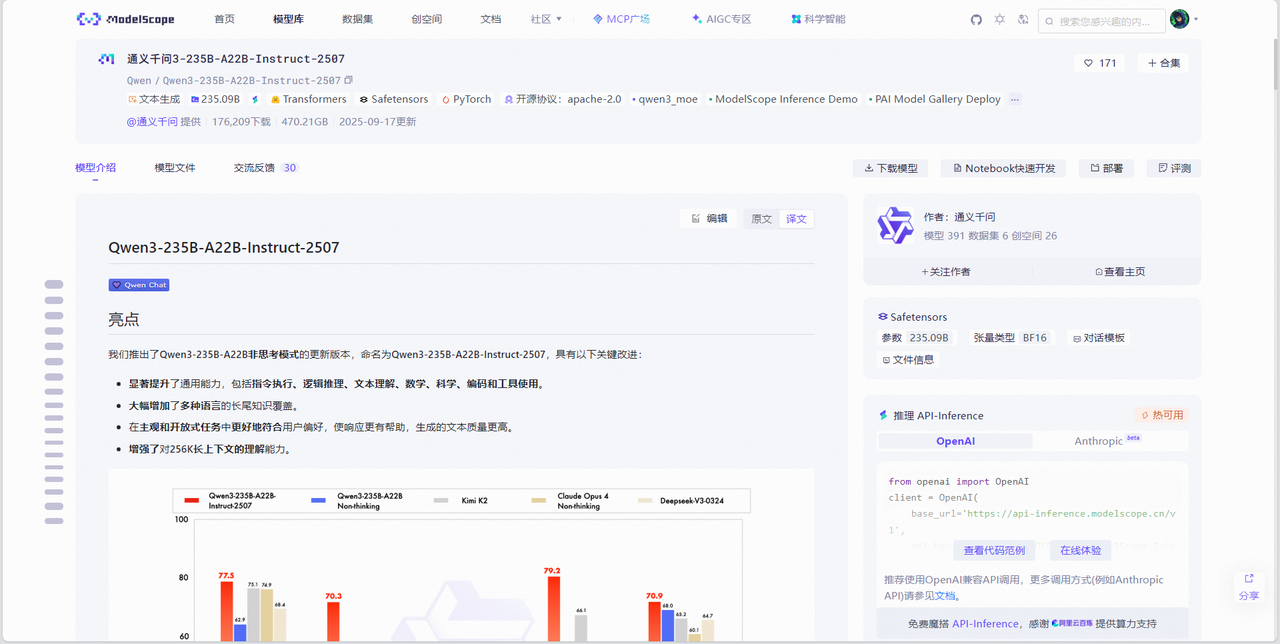
Qwen3-VL — 迄今为止 Qwen 系列中最强大的视觉语言模型。这一代在各个方面都进行了全面升级:更优秀的文本理解和生成能力、更深入的视觉感知和推理能力、更长的上下文长度、增强的空间和视频动态理解能力,以及更强的代理交互能力。提供从边缘到云端可扩展的 Dense 和 MoE 架构,并提供 Instruct 和增强推理的 Thinking 版本,以实现灵活、按需部署。
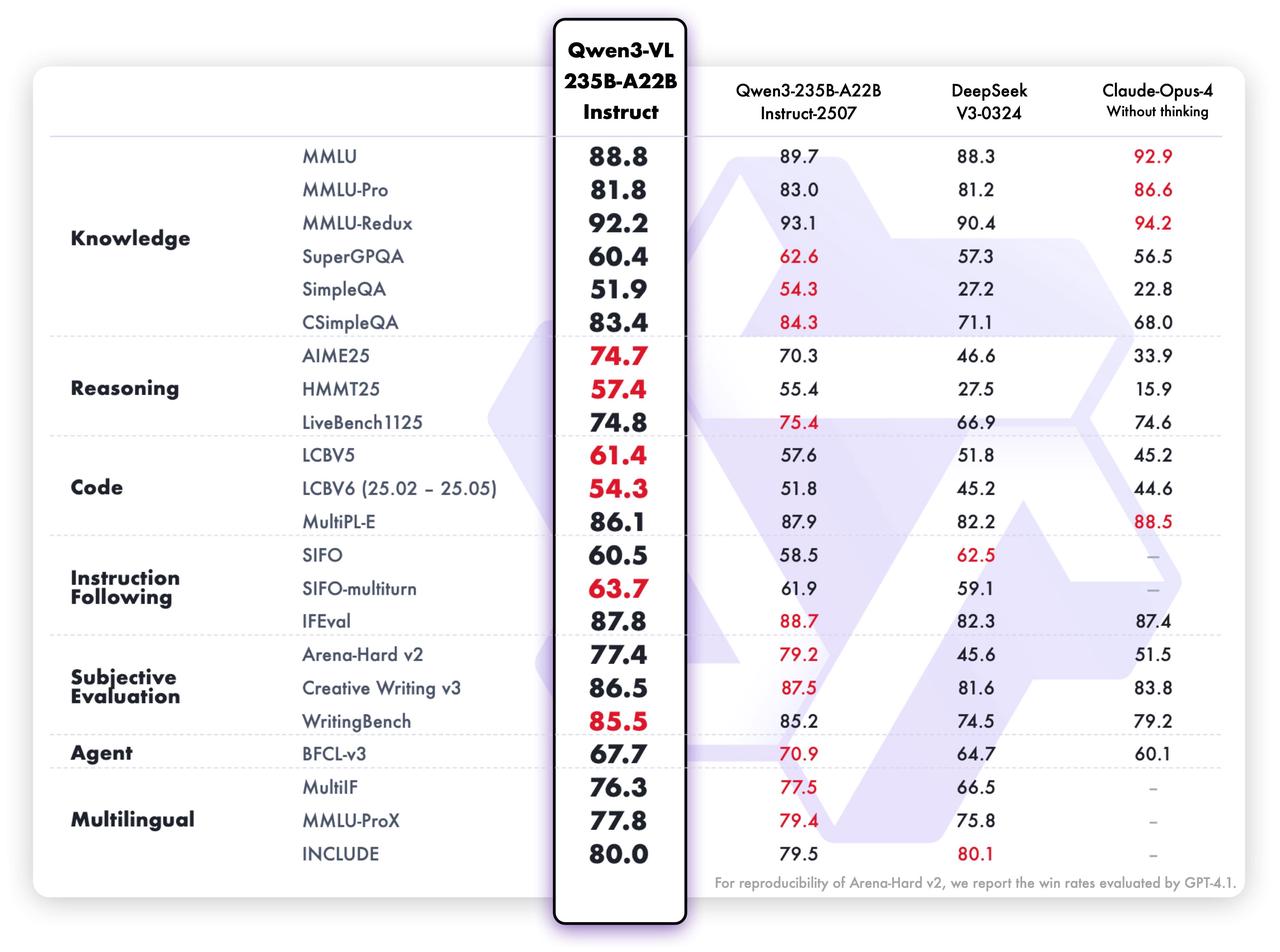
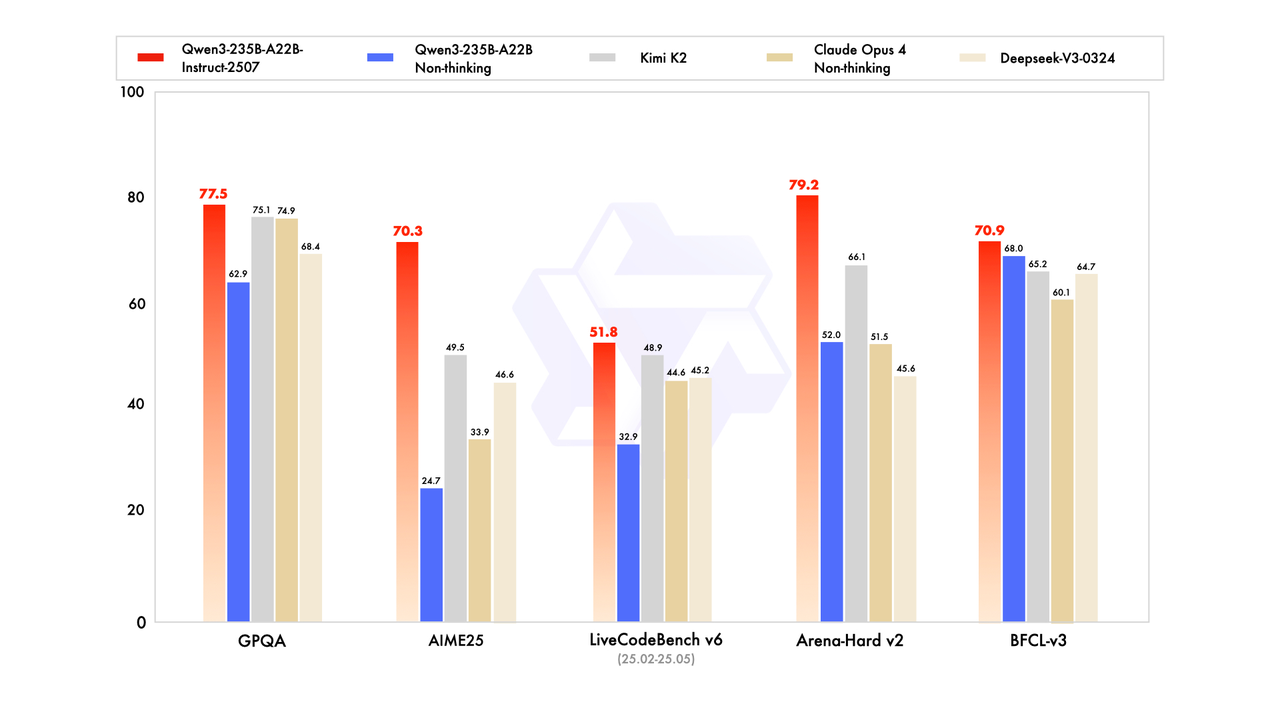
新的 Qwen3 模型通用能力显著提升,包括指令遵循、逻辑推理、文本理解、数学、科学、编程及工具使用等方面,在 GQPA(知识)、AIME25(数学)、LiveCodeBench(编程)、Arena-Hard(人类偏好对齐)、BFCL(Agent 能力)等众多测评中表现出色,超过 Kimi-K2、DeepSeek-V3 等顶级开源模型以及 Claude-Opus4-Non-thinking 等领先闭源模型。
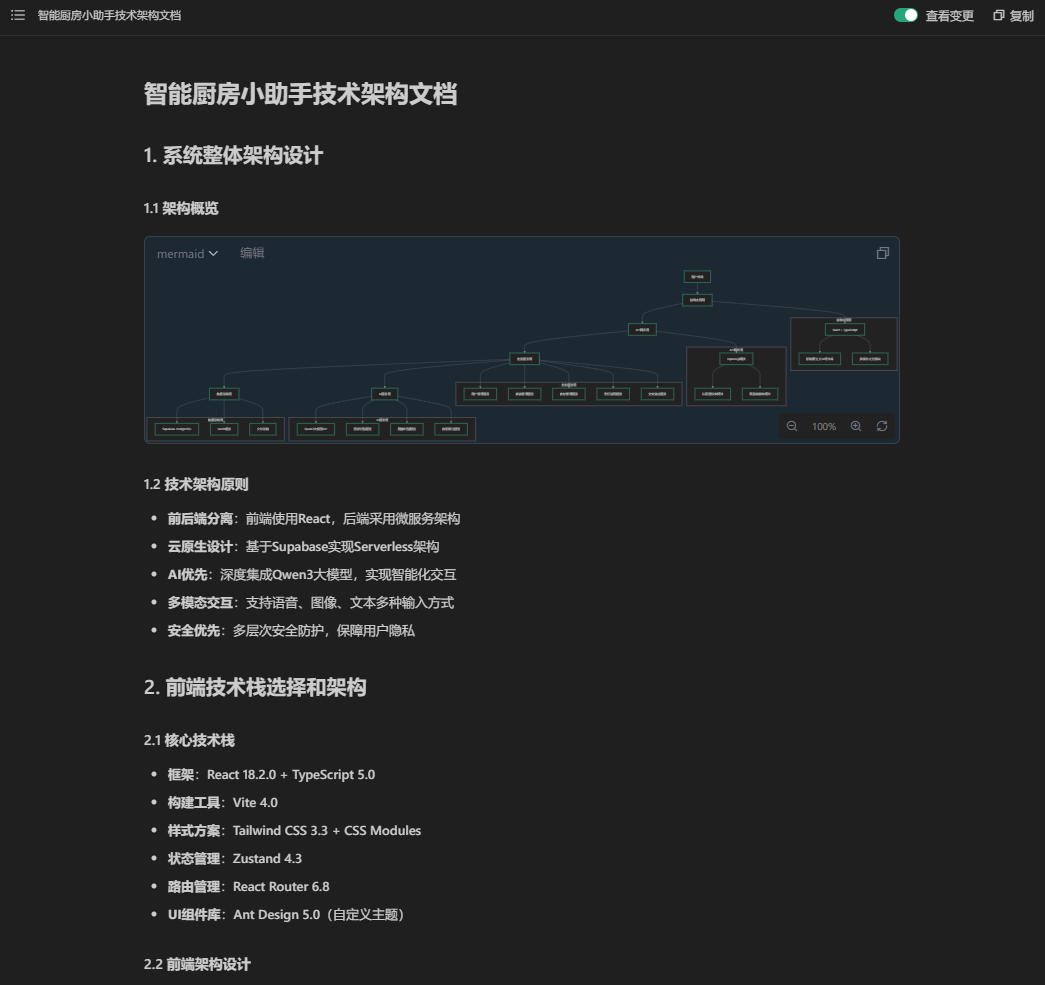
# 智能厨房小助手技术架构文档
## 1. 系统整体架构设计
### 1.1 架构概览
```mermaid
graph TD
A[用户终端] --> B[前端应用层]
B --> C[API网关层]
C --> D[业务服务层]
D --> E[数据存储层]
D --> F[AI服务层]
subgraph "前端应用层"
B1[React + TypeScript]
B2[新粗野主义UI组件库]
B3[多模态交互模块]
end
subgraph "API网关层"
C1[Express.js网关]
C2[认证授权中间件]
C3[限流熔断中间件]
end
subgraph "业务服务层"
D1[用户管理服务]
D2[食谱管理服务]
D3[食材管理服务]
D4[烹饪指导服务]
D5[安全监控服务]
end
subgraph "数据存储层"
E1[Supabase PostgreSQL]
E2[Redis缓存]
E3[文件存储]
end
subgraph "AI服务层"
F1[Qwen3大模型API]
F2[语音识别服务]
F3[图像识别服务]
F4[推荐算法服务]
end
B --> B1
B1 --> B2
B1 --> B3
C --> C1
C1 --> C2
C1 --> C3
D --> D1
D --> D2
D --> D3
D --> D4
D --> D5
E --> E1
E --> E2
E --> E3
F --> F1
F --> F2
F --> F3
F --> F4
```
### 1.2 技术架构原则
- **前后端分离**:前端使用React,后端采用微服务架构
- **云原生设计**:基于Supabase实现Serverless架构
- **AI优先**:深度集成Qwen3大模型,实现智能化交互
- **多模态交互**:支持语音、图像、文本多种输入方式
- **安全优先**:多层次安全防护,保障用户隐私
## 2. 前端技术栈选择和架构
### 2.1 核心技术栈
- **框架**:React 18.2.0 + TypeScript 5.0
- **构建工具**:Vite 4.0
- **样式方案**:Tailwind CSS 3.3 + CSS Modules
- **状态管理**:Zustand 4.3
- **路由管理**:React Router 6.8
- **UI组件库**:Ant Design 5.0(自定义主题)
### 2.2 前端架构设计
```mermaid
graph TD
A[应用入口] --> B[路由层]
B --> C[页面组件层]
C --> D[业务组件层]
D --> E[基础组件层]
E --> F[工具库层]
subgraph "页面组件层"
C1[主界面]
C2[烹饪指导页]
C3[食材管理页]
C4[安全监控页]
C5[个人中心页]
end
subgraph "业务组件层"
D1[语音交互组件]
D2[图像识别组件]
D3[食谱展示组件]
D4[计时器组件]
D5[状态监控组件]
end
subgraph "基础组件层"
E1[新粗野主义按钮]
E2[响应式布局]
E3[动画效果]
E4[图标库]
end
subgraph "工具库层"
F1[API请求封装]
F2[语音处理工具]
F3[图像处理工具]
F4[本地存储工具]
F5[权限管理工具]
end
```
### 2.3 新粗野主义UI组件架构
```typescript
// 核心设计系统
type BrutalistTheme = {
colors: {
primary: '#2D2D2D', // 深灰色
secondary: '#8B8680', // 混凝土色
accent: '#FFD700', // 亮黄色
background: '#F5F5F5', // 浅灰色背景
text: '#1A1A1A', // 深黑色文字
};
spacing: {
unit: 8;
brutal: 16; // 粗野主义大间距
};
borderRadius: {
none: 0; // 直角设计
small: 2;
brutal: 0; // 无圆角
};
shadows: {
brutal: '4px 4px 0px rgba(0,0,0,0.3)'; // 厚重阴影
};
};
// 核心组件定义
interface BrutalistButtonProps {
variant: 'primary' | 'secondary' | 'danger';
size: 'small' | 'medium' | 'large' | 'brutal';
brutal?: boolean; // 是否启用粗野主义风格
shadow?: boolean; // 是否显示厚重阴影
}
```
### 2.4 多模态交互架构
```typescript
// 交互管理器
class MultimodalInteractionManager {
private speechRecognizer: SpeechRecognitionService;
private imageProcessor: ImageProcessingService;
private gestureDetector: GestureDetectionService;
async processInput(input: MultimodalInput): Promise<InteractionResult> {
// 并行处理多种输入模式
const results = await Promise.all([
this.processSpeech(input.speech),
this.processImage(input.image),
this.processGesture(input.gesture)
]);
return this.fuseResults(results);
}
}
// 输入类型定义
interface MultimodalInput {
speech?: SpeechInput;
image?: ImageInput;
gesture?: GestureInput;
text?: TextInput;
}
```
## 3. 后端服务架构(Supabase集成)
### 3.1 Supabase服务架构
```mermaid
graph TD
A[前端应用] --> B[Supabase客户端]
B --> C[Supabase服务]
subgraph "Supabase服务"
C1[PostgreSQL数据库]
C2[身份认证服务]
C3[实时订阅服务]
C4[文件存储服务]
C5[边缘函数]
end
C --> C1
C --> C2
C --> C3
C --> C4
C --> C5
D[后端API服务] --> C
D --> E[Qwen3 AI服务]
D --> F[第三方AI服务]
```
### 3.2 核心业务服务设计
```typescript
// 用户管理服务
interface UserService {
// 用户注册和认证
register(userData: UserRegistrationData): Promise<User>;
authenticate(credentials: LoginCredentials): Promise<AuthResult>;
updateProfile(userId: string, profile: UserProfile): Promise<User>;
// 偏好设置管理
setPreferences(userId: string, preferences: UserPreferences): Promise<void>;
getPreferences(userId: string): Promise<UserPreferences>;
}
// 食谱管理服务
interface RecipeService {
// 食谱搜索和推荐
searchRecipes(query: RecipeQuery): Promise<Recipe[]>;
getRecommendations(userId: string, context: RecommendationContext): Promise<Recipe[]>;
// 食谱详情和步骤
getRecipeDetails(recipeId: string): Promise<RecipeDetails>;
getCookingSteps(recipeId: string): Promise<CookingStep[]>;
// 用户交互
rateRecipe(userId: string, recipeId: string, rating: number): Promise<void>;
saveRecipe(userId: string, recipeId: string): Promise<void>;
}
// 食材管理服务
interface IngredientService {
// 食材识别和管理
recognizeIngredients(image: File): Promise<IngredientRecognitionResult>;
addIngredient(userId: string, ingredient: IngredientData): Promise<Ingredient>;
getUserIngredients(userId: string): Promise<Ingredient[]>;
// 库存和保质期管理
updateStock(userId: string, ingredientId: string, quantity: number): Promise<void>;
checkExpiringItems(userId: string): Promise<ExpiringItem[]>;
generateShoppingList(userId: string): Promise<ShoppingItem[]>;
}
```
### 3.3 API网关层设计
```typescript
// 统一API响应格式
interface ApiResponse<T> {
success: boolean;
data?: T;
error?: {
code: string;
message: string;
details?: any;
};
timestamp: number;
requestId: string;
}
// 认证中间件
class AuthMiddleware {
async validateToken(req: Request, res: Response, next: NextFunction): Promise<void> {
const token = req.headers.authorization?.split(' ')[1];
if (!token) {
return res.status(401).json({ error: 'Missing authentication token' });
}
try {
const decoded = await supabase.auth.getUser(token);
req.user = decoded.data.user;
next();
} catch (error) {
res.status(401).json({ error: 'Invalid token' });
}
}
}
```
## 4. AI服务集成架构(Qwen3模型API)
### 4.1 Qwen3大模型集成架构
```mermaid
graph TD
A[前端请求] --> B[AI服务网关]
B --> C[提示词工程层]
C --> D[Qwen3 API调用]
D --> E[响应处理层]
E --> F[前端响应]
subgraph "提示词工程层"
C1[意图识别模板]
C2[食谱生成模板]
C3[营养分析模板]
C4[对话管理模板]
end
subgraph "响应处理层"
E1[JSON解析]
E2[安全检查]
E3[缓存处理]
E4[错误处理]
end
```
### 4.2 提示词工程系统设计
```typescript
// 提示词模板管理器
class PromptTemplateManager {
private templates: Map<string, PromptTemplate> = new Map();
constructor() {
this.initializeTemplates();
}
private initializeTemplates(): void {
// 食谱推荐提示词模板
this.templates.set('recipe_recommendation', {
template: `基于以下用户信息推荐合适的食谱:
用户偏好:{{preferences}}
可用食材:{{availableIngredients}}
饮食限制:{{dietaryRestrictions}}
烹饪时间:{{cookingTime}}
请返回3-5个食谱推荐,包含以下信息:
- 食谱名称
- 预计烹饪时间
- 难度等级
- 主要食材
- 营养价值评分
响应格式为JSON数组。`,
parameters: ['preferences', 'availableIngredients', 'dietaryRestrictions', 'cookingTime']
});
// 烹饪步骤生成模板
this.templates.set('cooking_steps', {
template: `为食谱"{{recipeName}}"生成详细的烹饪步骤:
食材清单:{{ingredients}}
厨具可用性:{{availableEquipment}}
用户技能水平:{{skillLevel}}
请提供:
1. 详细的步骤说明(每步2-3句话)
2. 关键技巧提示
3. 时间控制建议
4. 安全注意事项
响应格式为JSON对象,包含steps数组。`,
parameters: ['recipeName', 'ingredients', 'availableEquipment', 'skillLevel']
});
}
generatePrompt(templateName: string, context: Record<string, any>): string {
const template = this.templates.get(templateName);
if (!template) {
throw new Error(`Template ${templateName} not found`);
}
return this.renderTemplate(template.template, context);
}
}
```
### 4.3 AI服务调用封装
```typescript
// Qwen3 API客户端封装
class Qwen3Client {
private apiKey: string;
private baseURL: string = 'https://api.qwen3.com/v1';
private maxRetries: number = 3;
constructor(apiKey: string) {
this.apiKey = apiKey;
}
async generateResponse(
prompt: string,
options: Qwen3Options = {}
): Promise<Qwen3Response> {
const requestBody = {
model: options.model || 'qwen3-72b',
messages: [{ role: 'user', content: prompt }],
temperature: options.temperature || 0.7,
max_tokens: options.maxTokens || 2000,
top_p: options.topP || 0.9,
stream: false
};
try {
const response = await fetch(`${this.baseURL}/chat/completions`, {
method: 'POST',
headers: {
'Authorization': `Bearer ${this.apiKey}`,
'Content-Type': 'application/json'
},
body: JSON.stringify(requestBody)
});
if (!response.ok) {
throw new Error(`Qwen3 API error: ${response.status}`);
}
const data = await response.json();
return this.parseResponse(data);
} catch (error) {
throw new Error(`Failed to generate response: ${error.message}`);
}
}
private parseResponse(data: any): Qwen3Response {
const content = data.choices[0]?.message?.content;
try {
// 尝试解析JSON响应
const parsedContent = JSON.parse(content);
return {
success: true,
data: parsedContent,
rawContent: content,
usage: data.usage
};
} catch (error) {
// 如果不是JSON,返回原始文本
return {
success: true,
data: { text: content },
rawContent: content,
usage: data.usage
};
}
}
}
```
## 5. 数据库设计
### 5.1 数据库实体关系图
```mermaid
erDiagram
USER ||--o{ USER_PREFERENCE : has
USER ||--o{ INGREDIENT : manages
USER ||--o{ RECIPE_FAVORITE : favorites
USER ||--o{ COOKING_HISTORY : creates
USER ||--o{ SHOPPING_LIST : generates
RECIPE ||--o{ RECIPE_INGREDIENT : contains
RECIPE ||--o{ COOKING_STEP : has
RECIPE ||--o{ RECIPE_FAVORITE : favorites
RECIPE ||--o{ COOKING_HISTORY : used_in
INGREDIENT ||--o{ RECIPE_INGREDIENT : used_in
INGREDIENT ||--o{ USER_INGREDIENT : stocked_by
INGREDIENT ||--o{ SHOPPING_LIST_ITEM : included_in
USER {
uuid id PK
string email UK
string phone UK
string password_hash
string name
string role
boolean is_premium
timestamp created_at
timestamp updated_at
}
USER_PREFERENCE {
uuid id PK
uuid user_id FK
json dietary_restrictions
json cuisine_preferences
integer cooking_skill_level
integer max_cooking_time
integer family_size
json allergen_info
}
RECIPE {
uuid id PK
string name
text description
integer prep_time
integer cook_time
integer difficulty_level
json nutrition_info
string cuisine_type
integer servings
float rating
integer rating_count
timestamp created_at
}
RECIPE_INGREDIENT {
uuid id PK
uuid recipe_id FK
uuid ingredient_id FK
float quantity
string unit
boolean is_optional
string notes
}
COOKING_STEP {
uuid id PK
uuid recipe_id FK
integer step_number
text instruction
string image_url
integer duration_seconds
string temperature_info
json tips
}
INGREDIENT {
uuid id PK
string name
string category
string storage_info
integer shelf_life_days
json nutrition_per_100g
string image_url
}
USER_INGREDIENT {
uuid id PK
uuid user_id FK
uuid ingredient_id FK
float quantity
string unit
date purchase_date
date expiry_date
string storage_location
boolean is_frozen
timestamp updated_at
}
COOKING_HISTORY {
uuid id PK
uuid user_id FK
uuid recipe_id FK
timestamp started_at
timestamp completed_at
boolean was_successful
json modifications_made
float user_rating
text notes
}
RECIPE_FAVORITE {
uuid id PK
uuid user_id FK
uuid recipe_id FK
timestamp created_at
}
SHOPPING_LIST {
uuid id PK
uuid user_id FK
string name
boolean is_completed
timestamp created_at
timestamp completed_at
}
SHOPPING_LIST_ITEM {
uuid id PK
uuid shopping_list_id FK
uuid ingredient_id FK
float quantity
string unit
boolean is_purchased
float estimated_price
string notes
}
```
### 5.2 数据库表结构设计
```sql
-- 用户表
CREATE TABLE users (
id UUID PRIMARY KEY DEFAULT gen_random_uuid(),
email VARCHAR(255) UNIQUE NOT NULL,
phone VARCHAR(20) UNIQUE,
password_hash VARCHAR(255) NOT NULL,
name VARCHAR(100) NOT NULL,
role VARCHAR(20) DEFAULT 'user' CHECK (role IN ('user', 'admin')),
is_premium BOOLEAN DEFAULT FALSE,
created_at TIMESTAMP WITH TIME ZONE DEFAULT NOW(),
updated_at TIMESTAMP WITH TIME ZONE DEFAULT NOW()
);
-- 用户偏好表
CREATE TABLE user_preferences (
id UUID PRIMARY KEY DEFAULT gen_random_uuid(),
user_id UUID REFERENCES users(id) ON DELETE CASCADE,
dietary_restrictions JSONB DEFAULT '[]',
cuisine_preferences JSONB DEFAULT '[]',
cooking_skill_level INTEGER CHECK (cooking_skill_level BETWEEN 1 AND 5),
max_cooking_time INTEGER DEFAULT 60,
family_size INTEGER DEFAULT 1 CHECK (family_size > 0),
allergen_info JSONB DEFAULT '[]',
created_at TIMESTAMP WITH TIME ZONE DEFAULT NOW(),
updated_at TIMESTAMP WITH TIME ZONE DEFAULT NOW()
);
-- 食谱表
CREATE TABLE recipes (
id UUID PRIMARY KEY DEFAULT gen_random_uuid(),
name VARCHAR(200) NOT NULL,
description TEXT,
prep_time INTEGER NOT NULL, -- 准备时间(分钟)
cook_time INTEGER NOT NULL, -- 烹饪时间(分钟)
difficulty_level INTEGER CHECK (difficulty_level BETWEEN 1 AND 5),
nutrition_info JSONB DEFAULT '{}',
cuisine_type VARCHAR(50),
servings INTEGER DEFAULT 1 CHECK (servings > 0),
rating FLOAT DEFAULT 0 CHECK (rating BETWEEN 0 AND 5),
rating_count INTEGER DEFAULT 0,
created_at TIMESTAMP WITH TIME ZONE DEFAULT NOW(),
updated_at TIMESTAMP WITH TIME ZONE DEFAULT NOW()
);
-- 食材表
CREATE TABLE ingredients (
id UUID PRIMARY KEY DEFAULT gen_random_uuid(),
name VARCHAR(100) NOT NULL,
category VARCHAR(50) NOT NULL,
storage_info TEXT,
shelf_life_days INTEGER,
nutrition_per_100g JSONB DEFAULT '{}',
image_url TEXT,
created_at TIMESTAMP WITH TIME ZONE DEFAULT NOW()
);
-- 用户食材库存表
CREATE TABLE user_ingredients (
id UUID PRIMARY KEY DEFAULT gen_random_uuid(),
user_id UUID REFERENCES users(id) ON DELETE CASCADE,
ingredient_id UUID REFERENCES ingredients(id) ON DELETE CASCADE,
quantity FLOAT NOT NULL,
unit VARCHAR(20) NOT NULL,
purchase_date DATE DEFAULT CURRENT_DATE,
expiry_date DATE,
storage_location VARCHAR(50),
is_frozen BOOLEAN DEFAULT FALSE,
updated_at TIMESTAMP WITH TIME ZONE DEFAULT NOW(),
UNIQUE(user_id, ingredient_id, purchase_date)
);
-- 烹饪历史表
CREATE TABLE cooking_history (
id UUID PRIMARY KEY DEFAULT gen_random_uuid(),
user_id UUID REFERENCES users(id) ON DELETE CASCADE,
recipe_id UUID REFERENCES recipes(id) ON DELETE CASCADE,
started_at TIMESTAMP WITH TIME ZONE NOT NULL,
completed_at TIMESTAMP WITH TIME ZONE,
was_successful BOOLEAN,
modifications_made JSONB DEFAULT '{}',
user_rating FLOAT CHECK (user_rating BETWEEN 1 AND 5),
notes TEXT,
created_at TIMESTAMP WITH TIME ZONE DEFAULT NOW()
);
-- 创建索引
CREATE INDEX idx_users_email ON users(email);
CREATE INDEX idx_users_phone ON users(phone);
CREATE INDEX idx_user_preferences_user_id ON user_preferences(user_id);
CREATE INDEX idx_recipes_name ON recipes(name);
CREATE INDEX idx_recipes_cuisine_type ON recipes(cuisine_type);
CREATE INDEX idx_recipes_difficulty ON recipes(difficulty_level);
CREATE INDEX idx_user_ingredients_user_id ON user_ingredients(user_id);
CREATE INDEX idx_user_ingredients_expiry ON user_ingredients(expiry_date);
CREATE INDEX idx_cooking_history_user_id ON cooking_history(user_id);
CREATE INDEX idx_cooking_history_recipe_id ON cooking_history(recipe_id);
CREATE INDEX idx_cooking_history_created_at ON cooking_history(created_at DESC);
-- Supabase RLS策略
-- 用户只能查看和修改自己的数据
ALTER TABLE user_preferences ENABLE ROW LEVEL SECURITY;
CREATE POLICY "用户只能查看自己的偏好" ON user_preferences
FOR SELECT USING (auth.uid() = user_id);
CREATE POLICY "用户只能修改自己的偏好" ON user_preferences
FOR UPDATE USING (auth.uid() = user_id);
ALTER TABLE user_ingredients ENABLE ROW LEVEL SECURITY;
CREATE POLICY "用户只能管理自己的食材" ON user_ingredients
FOR ALL USING (auth.uid() = user_id);
ALTER TABLE cooking_history ENABLE ROW LEVEL SECURITY;
CREATE POLICY "用户只能查看自己的烹饪历史" ON cooking_history
FOR ALL USING (auth.uid() = user_id);
```
## 6. 安全架构设计
### 6.1 API密钥管理架构
```mermaid
graph TD
A[应用启动] --> B[密钥管理服务]
B --> C[环境变量加载]
B --> D[密钥加密存储]
B --> E[密钥轮换机制]
C --> C1[开发环境]
C --> C2[测试环境]
C --> C3[生产环境]
D --> D1[本地加密存储]
D --> D2[云端密钥管理]
D --> D3[硬件安全模块]
E --> E1[定期轮换]
E --> E2[异常监控]
E --> E3[紧急撤销]
```
### 6.2 用户认证架构
```typescript
// 多层认证体系
interface AuthenticationService {
// 基础认证
loginWithPhone(phone: string, code: string): Promise<AuthResult>;
loginWithEmail(email: string, password: string): Promise<AuthResult>;
// 多因子认证
enableMFA(userId: string): Promise<MFASecret>;
verifyMFA(userId: string, token: string): Promise<boolean>;
// 生物识别
setupBiometric(userId: string, biometricData: BiometricData): Promise<void>;
authenticateWithBiometric(biometricData: BiometricData): Promise<AuthResult>;
// 会话管理
createSession(userId: string, deviceInfo: DeviceInfo): Promise<Session>;
validateSession(sessionId: string): Promise<SessionValidationResult>;
revokeSession(sessionId: string): Promise<void>;
}
// JWT Token管理
interface TokenManager {
generateAccessToken(userId: string, permissions: string[]): string;
generateRefreshToken(userId: string, deviceId: string): string;
validateToken(token: string): TokenValidationResult;
revokeToken(token: string): Promise<void>;
}
```
### 6.3 数据安全保护
```typescript
// 数据加密服务
class DataEncryptionService {
private encryptionKey: string;
constructor(encryptionKey: string) {
this.encryptionKey = encryptionKey;
}
// AES-256加密
encryptSensitiveData(data: string): EncryptedData {
const algorithm = 'aes-256-gcm';
const iv = crypto.randomBytes(16);
const cipher = crypto.createCipher(algorithm, this.encryptionKey);
let encrypted = cipher.update(data, 'utf8', 'hex');
encrypted += cipher.final('hex');
return {
encryptedData: encrypted,
iv: iv.toString('hex'),
authTag: cipher.getAuthTag().toString('hex')
};
}
// 敏感数据脱敏
maskSensitiveData(data: string, type: SensitiveDataType): string {
switch (type) {
case 'phone':
return data.replace(/(\d{3})\d{4}(\d{4})/, '$1****$2');
case 'email':
const [username, domain] = data.split('@');
return `${username.slice(0, 3)}***@${domain}`;
case 'address':
return data.slice(0, 6) + '***';
default:
return data;
}
}
}
```
### 6.4 安全监控和防护
```typescript
// 安全事件监控
class SecurityMonitor {
private anomalyDetector: AnomalyDetector;
private alertService: AlertService;
async monitorSecurityEvent(event: SecurityEvent): Promise<void> {
// 检测异常行为
const isAnomalous = await this.anomalyDetector.detect(event);
if (isAnomalous) {
// 记录安全日志
await this.logSecurityEvent(event);
// 触发安全警报
await this.alertService.sendAlert({
type: 'SECURITY_ANOMALY',
severity: this.calculateSeverity(event),
details: event
});
// 执行防护措施
await this.executeProtectionMeasures(event);
}
}
private async executeProtectionMeasures(event: SecurityEvent): Promise<void> {
switch (event.type) {
case 'BRUTE_FORCE_ATTACK':
await this.blockIP(event.sourceIP);
await this.increaseAuthenticationDelay(event.userId);
break;
case 'SUSPICIOUS_API_ACCESS':
await this.rateLimitIP(event.sourceIP);
await this.verifyHuman(event.sessionId);
break;
case 'DATA_EXFILTRATION':
await this.blockUser(event.userId);
await this.revokeAllSessions(event.userId);
break;
}
}
}
```
## 7. 新粗野主义UI组件架构
### 7.1 设计系统架构
```typescript
// 新粗野主义设计令牌
const brutalistDesignTokens = {
colors: {
// 主色调 - 深灰色和混凝土色
primary: {
900: '#1A1A1A',
800: '#2D2D2D',
700: '#404040',
600: '#525252',
},
// 强调色 - 亮黄色
accent: {
500: '#FFD700',
600: '#FFC700',
700: '#FFB700',
},
// 中性色 - 混凝土色调
neutral: {
900: '#2C2B28',
800: '#8B8680',
700: '#A9A29D',
200: '#E7E5E4',
},
// 功能色
functional: {
success: '#22C55E',
warning: '#F59E0B',
error: '#EF4444',
info: '#3B82F6',
}
},
typography: {
fontFamily: {
primary: 'Inter, -apple-system, BlinkMacSystemFont, sans-serif',
mono: 'JetBrains Mono, monospace',
},
fontSize: {
xs: '0.75rem', // 12px
sm: '0.875rem', // 14px
base: '1rem', // 16px
lg: '1.125rem', // 18px
xl: '1.25rem', // 20px
'2xl': '1.5rem', // 24px
'3xl': '1.875rem', // 30px
'4xl': '2.25rem', // 36px
'5xl': '3rem', // 48px
},
fontWeight: {
normal: 400,
medium: 500,
semibold: 600,
bold: 700,
extrabold: 800,
},
lineHeight: {
tight: 1.25,
normal: 1.5,
relaxed: 1.75,
}
},
spacing: {
0: '0',
1: '0.25rem', // 4px
2: '0.5rem', // 8px
3: '0.75rem', // 12px
4: '1rem', // 16px
5: '1.25rem', // 20px
6: '1.5rem', // 24px
8: '2rem', // 32px
10: '2.5rem', // 40px
12: '3rem', // 48px
16: '4rem', // 64px
20: '5rem', // 80px
24: '6rem', // 96px
32: '8rem', // 128px
40: '10rem', // 160px
48: '12rem', // 192px
56: '14rem', // 224px
64: '16rem', // 256px
},
borderRadius: {
none: '0',
sm: '0.125rem', // 2px
DEFAULT: '0.25rem', // 4px
md: '0.375rem', // 6px
lg: '0.5rem', // 8px
xl: '0.75rem', // 12px
'2xl': '1rem', // 16px
'3xl': '1.5rem', // 24px
full: '9999px',
},
shadows: {
// 粗野主义特有的厚重阴影
brutal: '4px 4px 0px 0px rgba(0, 0, 0, 0.3)',
brutal-lg: '8px 8px 0px 0px rgba(0, 0, 0, 0.3)',
brutal-xl: '12px 12px 0px 0px rgba(0, 0, 0, 0.3)',
// 内阴影
brutal-inner: 'inset 2px 2px 0px 0px rgba(0, 0, 0, 0.2)',
},
borders: {
brutal: '3px solid',
brutal thick: '5px solid',
}
};
```
### 7.2 核心组件实现
```typescript
// 新粗野主义按钮组件
interface BrutalistButtonProps {
children: React.ReactNode;
variant?: 'primary' | 'secondary' | 'accent' | 'danger';
size?: 'sm' | 'md' | 'lg' | 'xl';
brutal?: boolean;
shadow?: 'none' | 'sm' | 'md' | 'lg';
border?: 'none' | 'thin' | 'thick';
disabled?: boolean;
loading?: boolean;
onClick?: () => void;
className?: string;
}
const BrutalistButton: React.FC<BrutalistButtonProps> = ({
children,
variant = 'primary',
size = 'md',
brutal = true,
shadow = 'md',
border = 'thick',
disabled = false,
loading = false,
onClick,
className = '',
}) => {
const baseClasses = `
font-bold uppercase tracking-wider
transition-all duration-200 ease-out
focus:outline-none focus:ring-4
disabled:opacity-50 disabled:cursor-not-allowed
transform hover:translate-y-[-2px]
active:translate-y-[0px]
`;
const variantClasses = {
primary: `
bg-neutral-800 text-neutral-100
hover:bg-neutral-900
focus:ring-neutral-300
${brutal ? 'border-3 border-neutral-900' : ''}
`,
secondary: `
bg-neutral-200 text-neutral-900
hover:bg-neutral-300
focus:ring-neutral-400
${brutal ? 'border-3 border-neutral-800' : ''}
`,
accent: `
bg-accent-500 text-neutral-900
hover:bg-accent-600
focus:ring-accent-300
${brutal ? 'border-3 border-neutral-900' : ''}
`,
danger: `
bg-red-600 text-white
hover:bg-red-700
focus:ring-red-300
${brutal ? 'border-3 border-red-800' : ''}
`,
};
const sizeClasses = {
sm: 'px-3 py-2 text-sm',
md: 'px-4 py-3 text-base',
lg: 'px-6 py-4 text-lg',
xl: 'px-8 py-5 text-xl',
};
const shadowClasses = {
none: '',
sm: 'shadow-brutal hover:shadow-brutal-lg',
md: 'shadow-brutal-lg hover:shadow-brutal-xl',
lg: 'shadow-brutal-xl hover:shadow-2xl',
};
const classes = `
${baseClasses}
${variantClasses[variant]}
${sizeClasses[size]}
${shadowClasses[shadow]}
${className}
`;
return (
<button
className={classes}
disabled={disabled || loading}
onClick={onClick}
>
{loading && (
<span className="mr-2">
<svg className="animate-spin h-4 w-4 inline" viewBox="0 0 24 24">
<circle className="opacity-25" cx="12" cy="12" r="10" stroke="currentColor" strokeWidth="4" fill="none" />
<path className="opacity-75" fill="currentColor" d="M4 12a8 8 0 018-8V0C5.373 0 0 5.373 0 12h4zm2 5.291A7.962 7.962 0 014 12H0c0 3.042 1.135 5.824 3 7.938l3-2.647z" />
</svg>
</span>
)}
{children}
</button>
);
};
```
### 7.3 响应式布局系统
```typescript
// 粗野主义网格系统
interface BrutalistGridProps {
children: React.ReactNode;
cols?: 1 | 2 | 3 | 4 | 6 | 12;
gap?: 'none' | 'sm' | 'md' | 'lg' | 'xl';
brutal?: boolean;
className?: string;
}
const BrutalistGrid: React.FC<BrutalistGridProps> = ({
children,
cols = 1,
gap = 'md',
brutal = true,
className = '',
}) => {
const gridClasses = `
grid
${brutal ? 'border-3 border-neutral-900' : ''}
${{
1: 'grid-cols-1',
2: 'grid-cols-2',
3: 'grid-cols-3',
4: 'grid-cols-4',
6: 'grid-cols-6',
12: 'grid-cols-12',
}[cols]}
${{
none: 'gap-0',
sm: 'gap-2',
md: 'gap-4',
lg: 'gap-6',
xl: 'gap-8',
}[gap]}
${className}
`;
return (
<div className={gridClasses}>
{React.Children.map(children, (child, index) => (
<div
key={index}
className={`
${brutal ? 'border-r-3 border-b-3 border-neutral-900' : ''}
${brutal && index % cols === cols - 1 ? 'border-r-0' : ''}
p-4
`}
>
{child}
</div>
))}
</div>
);
};
```
## 8. 多模态交互架构
### 8.1 交互管理架构
```mermaid
graph TD
A[用户输入] --> B[输入路由器]
B --> C[语音处理模块]
B --> D[图像处理模块]
B --> E[文本处理模块]
B --> F[手势处理模块]
C --> G[语音识别]
C --> H[语义理解]
C --> I[语音合成]
D --> J[图像识别]
D --> K[物体检测]
D --> L[场景理解]
E --> M[自然语言处理]
E --> N[意图识别]
E --> O[实体提取]
F --> P[手势识别]
F --> Q[动作分析]
F --> R[意图推断]
G --> S[融合决策引擎]
H --> S
I --> S
J --> S
K --> S
L --> S
M --> S
N --> S
O --> S
P --> S
Q --> S
R --> S
S --> T[响应生成]
T --> U[多模态输出]
```
### 8.2 语音交互系统
```typescript
// 语音交互管理器
class SpeechInteractionManager {
private recognition: SpeechRecognition;
private synthesis: SpeechSynthesis;
private audioContext: AudioContext;
private qwen3Client: Qwen3Client;
constructor(qwen3Client: Qwen3Client) {
this.qwen3Client = qwen3Client;
this.initializeSpeechServices();
}
private initializeSpeechServices(): void {
// 初始化语音识别
if ('webkitSpeechRecognition' in window) {
this.recognition = new webkitSpeechRecognition();
} else if ('SpeechRecognition' in window) {
this.recognition = new SpeechRecognition();
}
// 初始化语音合成
this.synthesis = window.speechSynthesis;
// 初始化音频上下文
this.audioContext = new AudioContext();
this.setupRecognitionConfig();
}
private setupRecognitionConfig(): void {
this.recognition.continuous = true;
this.recognition.interimResults = true;
this.recognition.lang = 'zh-CN';
this.recognition.maxAlternatives = 3;
// 设置事件监听器
this.recognition.onresult = this.handleRecognitionResult.bind(this);
this.recognition.onerror = this.handleRecognitionError.bind(this);
this.recognition.onend = this.handleRecognitionEnd.bind(this);
}
async startListening(wakeWord: string = '小厨助手'): Promise<void> {
// 使用唤醒词检测
const wakeWordDetector = new WakeWordDetector(wakeWord);
// 监听麦克风输入
const stream = await navigator.mediaDevices.getUserMedia({ audio: true });
const source = this.audioContext.createMediaStreamSource(stream);
// 连接到唤醒词检测器
wakeWordDetector.onWakeWordDetected = () => {
this.startContinuousRecognition();
};
source.connect(wakeWordDetector.getAudioNode());
}
private async handleRecognitionResult(event: SpeechRecognitionEvent): Promise<void> {
const lastResult = event.results[event.results.length - 1];
if (lastResult.isFinal) {
const transcript = lastResult[0].transcript;
const confidence = lastResult[0].confidence;
// 处理语音输入
await this.processVoiceInput(transcript, confidence);
}
}
private async processVoiceInput(text: string, confidence: number): Promise<void> {
try {
// 使用Qwen3进行意图识别和响应生成
const prompt = `用户语音输入:"${text}"\n置信度:${confidence}\n\n请识别用户意图并提供适当的响应。`;
const response = await this.qwen3Client.generateResponse(prompt);
// 语音合成回复
await this.speakResponse(response.data.text);
} catch (error) {
console.error('语音处理错误:', error);
await this.speakResponse('抱歉,我没有理解您的意思,请再说一遍。');
}
}
private async speakResponse(text: string): Promise<void> {
return new Promise((resolve) => {
const utterance = new SpeechSynthesisUtterance(text);
utterance.lang = 'zh-CN';
utterance.rate = 0.9;
utterance.pitch = 1.1;
utterance.volume = 0.8;
utterance.onend = () => resolve();
this.synthesis.speak(utterance);
});
}
private handleRecognitionError(event: SpeechRecognitionErrorEvent): void {
console.error('语音识别错误:', event.error);
// 根据错误类型采取不同措施
switch (event.error) {
case 'no-speech':
// 无语音输入,继续监听
setTimeout(() => this.recognition.start(), 1000);
break;
case 'audio-capture':
// 音频捕获失败
this.speakResponse('无法访问麦克风,请检查设备权限。');
break;
case 'network':
// 网络错误
this.speakResponse('网络连接出现问题,请检查网络设置。');
break;
default:
// 其他错误,重新开始识别
this.recognition.start();
}
}
private handleRecognitionEnd(): void {
// 识别结束,重新开始监听
setTimeout(() => {
this.recognition.start();
}, 100);
}
}
// 唤醒词检测器
class WakeWordDetector {
private wakeWord: string;
private audioWorklet: AudioWorkletNode;
private onWakeWordDetectedCallback?: () => void;
constructor(wakeWord: string) {
this.wakeWord = wakeWord;
this.initializeAudioWorklet();
}
private async initializeAudioWorklet(): Promise<void> {
// 实现唤醒词检测算法
// 这里使用简单的能量检测作为示例
this.audioWorklet = new AudioWorkletNode(this.audioContext, 'wake-word-detector');
this.audioWorklet.port.onmessage = (event) => {
if (event.data.wakeWordDetected) {
this.onWakeWordDetectedCallback?.();
}
};
}
set onWakeWordDetected(callback: () => void) {
this.onWakeWordDetectedCallback = callback;
}
getAudioNode(): AudioNode {
return this.audioWorklet;
}
}
```
### 8.3 图像识别系统
```typescript
// 图像识别管理器
class ImageRecognitionManager {
private visionAPI: VisionAPIService;
private qwen3Client: Qwen3Client;
private canvas: HTMLCanvasElement;
constructor(visionAPI: VisionAPIService, qwen3Client: Qwen3Client) {
this.visionAPI = visionAPI;
this.qwen3Client = qwen3Client;
this.canvas = document.createElement('canvas');
}
async recognizeIngredients(image: File | Blob): Promise<IngredientRecognitionResult> {
try {
// 图像预处理
const processedImage = await this.preprocessImage(image);
// 调用视觉API进行物体检测
const detectionResult = await this.visionAPI.detectObjects(processedImage);
// 使用Qwen3进行食材识别
const ingredients = await this.identifyIngredients(detectionResult);
return {
success: true,
ingredients: ingredients,
confidence: this.calculateOverallConfidence(ingredients),
imageUrl: URL.createObjectURL(processedImage)
};
} catch (error) {
console.error('食材识别错误:', error);
return {
success: false,
error: '食材识别失败,请重新拍照',
ingredients: []
};
}
}
private async preprocessImage(image: File | Blob): Promise<Blob> {
return new Promise((resolve) => {
const img = new Image();
img.onload = () => {
// 设置画布尺寸
this.canvas.width = 800;
this.canvas.height = 600;
const ctx = this.canvas.getContext('2d');
// 图像增强
ctx.filter = 'contrast(1.2) brightness(1.1) saturate(1.1)';
ctx.drawImage(img, 0, 0, this.canvas.width, this.canvas.height);
// 转换为Blob
this.canvas.toBlob((blob) => {
resolve(blob);
}, 'image/jpeg', 0.9);
};
img.src = URL.createObjectURL(image);
});
}
private async identifyIngredients(detectionResult: ObjectDetectionResult): Promise<RecognizedIngredient[]> {
// 构建提示词
const prompt = `
根据以下检测到的物体,识别可能的食材:
${JSON.stringify(detectionResult.objects, null, 2)}
请返回识别的食材列表,包含:
- 食材名称
- 置信度(0-1)
- 估计重量/数量
- 保质期信息
- 存储建议
响应格式为JSON数组。
`;
const response = await this.qwen3Client.generateResponse(prompt);
if (response.success && response.data) {
return response.data.ingredients || [];
}
return [];
}
async startCameraStream(videoElement: HTMLVideoElement): Promise<void> {
try {
const stream = await navigator.mediaDevices.getUserMedia({
video: {
width: { ideal: 1280 },
height: { ideal: 720 },
facingMode: 'environment' // 使用后置摄像头
}
});
videoElement.srcObject = stream;
return new Promise((resolve) => {
videoElement.onloadedmetadata = () => {
videoElement.play();
resolve();
};
});
} catch (error) {
console.error('摄像头访问错误:', error);
throw new Error('无法访问摄像头,请检查权限设置');
}
}
captureFrame(videoElement: HTMLVideoElement): Promise<Blob> {
this.canvas.width = videoElement.videoWidth;
this.canvas.height = videoElement.videoHeight;
const ctx = this.canvas.getContext('2d');
ctx.drawImage(videoElement, 0, 0);
return new Promise((resolve) => {
this.canvas.toBlob((blob) => {
resolve(blob);
}, 'image/jpeg', 0.9);
});
}
}
// 手势识别系统
class GestureRecognitionManager {
private handPoseModel: HandPoseModel;
private gestureDefinitions: Map<string, GestureDefinition>;
constructor(handPoseModel: HandPoseModel) {
this.handPoseModel = handPoseModel;
this.initializeGestureDefinitions();
}
private initializeGestureDefinitions(): void {
// 定义厨房常用手势
this.gestureDefinitions = new Map([
['point_up', {
name: '向上指',
description: '选择上一个选项或增加数值',
landmarks: [/* 手势关键点定义 */]
}],
['point_down', {
name: '向下指',
description: '选择下一个选项或减少数值',
landmarks: [/* 手势关键点定义 */]
}],
['thumbs_up', {
name: '竖起大拇指',
description: '确认或点赞',
landmarks: [/* 手势关键点定义 */]
}],
['open_palm', {
name: '张开手掌',
description: '停止或取消',
landmarks: [/* 手势关键点定义 */]
}],
['fist', {
name: '握拳',
description: '抓取或确认选择',
landmarks: [/* 手势关键点定义 */]
}]
]);
}
async recognizeGesture(videoElement: HTMLVideoElement): Promise<GestureRecognitionResult> {
try {
// 检测手部关键点
const handLandmarks = await this.handPoseModel.estimateHands(videoElement);
if (handLandmarks.length === 0) {
return { gesture: null, confidence: 0 };
}
// 匹配手势定义
const recognizedGesture = await this.matchGesture(handLandmarks[0]);
return {
gesture: recognizedGesture?.name || null,
confidence: recognizedGesture?.confidence || 0,
landmarks: handLandmarks[0]
};
} catch (error) {
console.error('手势识别错误:', error);
return { gesture: null, confidence: 0 };
}
}
private async matchGesture(handLandmarks: HandLandmarks): Promise<MatchedGesture | null> {
let bestMatch: MatchedGesture | null = null;
let highestConfidence = 0;
// 遍历所有手势定义,找到最佳匹配
for (const [gestureId, definition] of this.gestureDefinitions) {
const confidence = this.calculateGestureConfidence(handLandmarks, definition.landmarks);
if (confidence > highestConfidence && confidence > 0.8) { // 置信度阈值
highestConfidence = confidence;
bestMatch = {
name: definition.name,
id: gestureId,
confidence: confidence
};
}
}
return bestMatch;
}
private calculateGestureConfidence(detected: HandLandmarks, template: number[][]): number {
// 计算手势相似度
// 这里使用简化的欧几里得距离计算
let totalDistance = 0;
let maxDistance = 0;
for (let i = 0; i < detected.length; i++) {
const distance = Math.sqrt(
Math.pow(detected[i].x - template[i][0], 2) +
Math.pow(detected[i].y - template[i][1], 2) +
Math.pow(detected[i].z - template[i][2], 2)
);
totalDistance += distance;
maxDistance = Math.max(maxDistance, distance);
}
const averageDistance = totalDistance / detected.length;
const confidence = 1 - (averageDistance / maxDistance);
return Math.max(0, Math.min(1, confidence));
}
}
```
## 9. 性能优化策略
### 9.1 前端性能优化
```typescript
// 资源预加载管理器
class ResourcePreloader {
private preloadedResources: Map<string, any> = new Map();
private loadingPromises: Map<string, Promise<any>> = new Map();
async preloadCriticalResources(): Promise<void> {
const criticalResources = [
// 核心JS模块
{ name: 'mainApp', url: '/js/main.bundle.js', type: 'script' },
{ name: 'voiceRecognition', url: '/js/voice-recognition.worker.js', type: 'worker' },
{ name: 'imageProcessing', url: '/js/image-processing.worker.js', type: 'worker' },
// 核心CSS
{ name: 'mainStyles', url: '/css/main.css', type: 'style' },
{ name: 'brutalistTheme', url: '/css/brutalist-theme.css', type: 'style' },
// 关键数据
{ name: 'userPreferences', url: '/api/user/preferences', type: 'json' },
{ name: 'popularRecipes', url: '/api/recipes/popular', type: 'json' },
// 字体文件
{ name: 'interFont', url: '/fonts/inter-var.woff2', type: 'font' },
{ name: 'jetBrainsFont', url: '/fonts/jetbrains-mono-var.woff2', type: 'font' }
];
// 并行预加载所有关键资源
const preloadPromises = criticalResources.map(resource =>
this.preloadResource(resource)
);
await Promise.allSettled(preloadPromises);
}
private async preloadResource(resource: ResourceDefinition): Promise<void> {
if (this.loadingPromises.has(resource.name)) {
return this.loadingPromises.get(resource.name);
}
const loadingPromise = this.loadResource(resource);
this.loadingPromises.set(resource.name, loadingPromise);
try {
const result = await loadingPromise;
this.preloadedResources.set(resource.name, result);
} catch (error) {
console.error(`资源预加载失败: ${resource.name}`, error);
}
}
private async loadResource(resource: ResourceDefinition): Promise<any> {
switch (resource.type) {
case 'script':
return this.loadScript(resource.url);
case 'style':
return this.loadStyle(resource.url);
case 'worker':
return this.loadWorker(resource.url);
case 'json':
return this.loadJSON(resource.url);
case 'font':
return this.loadFont(resource.url);
default:
throw new Error(`不支持的资源类型: ${resource.type}`);
}
}
private loadScript(url: string): Promise<void> {
return new Promise((resolve, reject) => {
const script = document.createElement('script');
script.src = url;
script.async = true;
script.onload = () => resolve();
script.onerror = () => reject(new Error(`脚本加载失败: ${url}`));
document.head.appendChild(script);
});
}
private loadStyle(url: string): Promise<void> {
return new Promise((resolve, reject) => {
const link = document.createElement('link');
link.rel = 'stylesheet';
link.href = url;
link.onload = () => resolve();
link.onerror = () => reject(new Error(`样式加载失败: ${url}`));
document.head.appendChild(link);
});
}
private loadWorker(url: string): Promise<Worker> {
return new Promise((resolve, reject) => {
try {
const worker = new Worker(url);
resolve(worker);
} catch (error) {
reject(new Error(`Worker加载失败: ${url}`));
}
});
}
private async loadJSON(url: string): Promise<any> {
const response = await fetch(url);
if (!response.ok) {
throw new Error(`JSON加载失败: ${url}`);
}
return response.json();
}
private loadFont(url: string): Promise<void> {
return new Promise((resolve, reject) => {
const font = new FontFace('CustomFont', `url(${url})`);
font.load().then(() => {
document.fonts.add(font);
resolve();
}).catch(reject);
});
}
getResource(name: string): any {
return this.preloadedResources.get(name);
}
}
// 组件懒加载优化
const LazyComponentLoader = {
// 食谱卡片组件懒加载
RecipeCard: lazy(() =>
import(/* webpackChunkName: "recipe-card" */ './components/RecipeCard')
),
// 语音交互组件懒加载
VoiceInteraction: lazy(() =>
import(/* webpackChunkName: "voice-interaction" */ './components/VoiceInteraction')
),
// 图像识别组件懒加载
ImageRecognition: lazy(() =>
import(/* webpackChunkName: "image-recognition" */ './components/ImageRecognition')
),
// 安全监控组件懒加载
SecurityMonitor: lazy(() =>
import(/* webpackChunkName: "security-monitor" */ './components/SecurityMonitor')
),
};
// 虚拟滚动优化
interface VirtualScrollConfig {
itemHeight: number;
containerHeight: number;
bufferSize: number;
items: any[];
renderItem: (item: any, index: number) => React.ReactNode;
}
class VirtualScrollManager {
private config: VirtualScrollConfig;
private scrollTop: number = 0;
private visibleRange: { start: number; end: number } = { start: 0, end: 0 };
constructor(config: VirtualScrollConfig) {
this.config = config;
this.calculateVisibleRange();
}
private calculateVisibleRange(): void {
const { itemHeight, containerHeight, bufferSize, items } = this.config;
const visibleStart = Math.floor(this.scrollTop / itemHeight);
const visibleEnd = Math.ceil((this.scrollTop + containerHeight) / itemHeight);
const bufferedStart = Math.max(0, visibleStart - bufferSize);
const bufferedEnd = Math.min(items.length, visibleEnd + bufferSize);
this.visibleRange = { start: bufferedStart, end: bufferedEnd };
}
onScroll(scrollTop: number): void {
this.scrollTop = scrollTop;
this.calculateVisibleRange();
}
getVisibleItems(): React.ReactNode[] {
const { items, renderItem } = this.config;
const { start, end } = this.visibleRange;
return items.slice(start, end).map((item, index) =>
renderItem(item, start + index)
);
}
getTotalHeight(): number {
return this.config.items.length * this.config.itemHeight;
}
getOffsetY(): number {
return this.visibleRange.start * this.config.itemHeight;
}
}
```
### 9.2 后端性能优化
```typescript
// 数据库查询优化
class DatabaseQueryOptimizer {
private cacheManager: CacheManager;
private connectionPool: ConnectionPool;
constructor(cacheManager: CacheManager, connectionPool: ConnectionPool) {
this.cacheManager = cacheManager;
this.connectionPool = connectionPool;
}
// 查询结果缓存
async cachedQuery<T>(
query: string,
params: any[],
cacheKey: string,
ttl: number = 300 // 5分钟默认缓存
): Promise<T> {
// 先检查缓存
const cachedResult = await this.cacheManager.get<T>(cacheKey);
if (cachedResult) {
return cachedResult;
}
// 执行查询
const result = await this.executeQuery<T>(query, params);
// 缓存结果
await this.cacheManager.set(cacheKey, result, ttl);
return result;
}
// 批量查询优化
async batchQuery<T>(
queries: QueryDefinition[]
): Promise<Record<string, T>> {
// 将多个查询合并为单个查询
const combinedQuery = this.combineQueries(queries);
// 执行组合查询
const results = await this.executeQuery<any[]>(combinedQuery.sql, combinedQuery.params);
// 拆分结果
return this.splitResults(results, queries);
}
// 分页查询优化
async paginatedQuery<T>(
baseQuery: string,
countQuery: string,
params: any[],
page: number,
pageSize: number
): Promise<PaginatedResult<T>> {
const offset = (page - 1) * pageSize;
// 并行执行总数查询和分页查询
const [countResult, dataResult] = await Promise.all([
this.executeQuery<{ count: number }>(countQuery, params),
this.executeQuery<T>(`${baseQuery} LIMIT ${pageSize} OFFSET ${offset}`, params)
]);
const totalCount = countResult[0].count;
const totalPages = Math.ceil(totalCount / pageSize);
return {
data: dataResult,
pagination: {
page,
pageSize,
totalCount,
totalPages,
hasNext: page < totalPages,
hasPrev: page > 1
}
};
}
// 索引优化建议
analyzeQueryPerformance(query: string, executionPlan: any): IndexRecommendation[] {
const recommendations: IndexRecommendation[] = [];
// 分析执行计划
if (executionPlan.type === 'seq_scan' && executionPlan.rows > 10000) {
recommendations.push({
type: 'missing_index',
table: executionPlan.table,
columns: this.extractWhereColumns(query),
priority: 'high',
estimatedBenefit: `可减少 ${Math.round(executionPlan.rows * 0.8)} 行扫描`
});
}
if (executionPlan.type === 'nested_loop' && executionPlan.rows > 1000) {
recommendations.push({
type: 'join_optimization',
table: executionPlan.table,
columns: this.extractJoinColumns(query),
priority: 'medium',
estimatedBenefit: '优化连接查询性能'
});
}
return recommendations;
}
private combineQueries(queries: QueryDefinition[]): CombinedQuery {
let sql = '';
const params: any[] = [];
const resultMappings: ResultMapping[] = [];
queries.forEach((query, index) => {
sql += `-- Query ${index + 1}\n`;
sql += `${query.sql};\n`;
params.push(...query.params);
resultMappings.push({
queryIndex: index,
key: query.key,
startIndex: params.length - query.params.length
});
});
return { sql, params, mappings: resultMappings };
}
private splitResults(results: any[], queries: QueryDefinition[]): Record<string, any> {
const splitResults: Record<string, any> = {};
let currentIndex = 0;
queries.forEach((query, index) => {
const queryResults = results.slice(currentIndex, currentIndex + 1);
splitResults[query.key] = queryResults[0] || [];
currentIndex += 1;
});
return splitResults;
}
}
// 缓存策略管理器
class CacheStrategyManager {
private redisClient: RedisClient;
private memoryCache: Map<string, CacheEntry>;
private cacheStats: CacheStatistics;
constructor(redisClient: RedisClient) {
this.redisClient = redisClient;
this.memoryCache = new Map();
this.cacheStats = { hits: 0, misses: 0, evictions: 0 };
}
// 多级缓存策略
async get<T>(key: string): Promise<T | null> {
// L1: 内存缓存
const memoryEntry = this.memoryCache.get(key);
if (memoryEntry && !this.isExpired(memoryEntry)) {
this.cacheStats.hits++;
return memoryEntry.value as T;
}
// L2: Redis缓存
try {
const redisValue = await this.redisClient.get(key);
if (redisValue) {
this.cacheStats.h
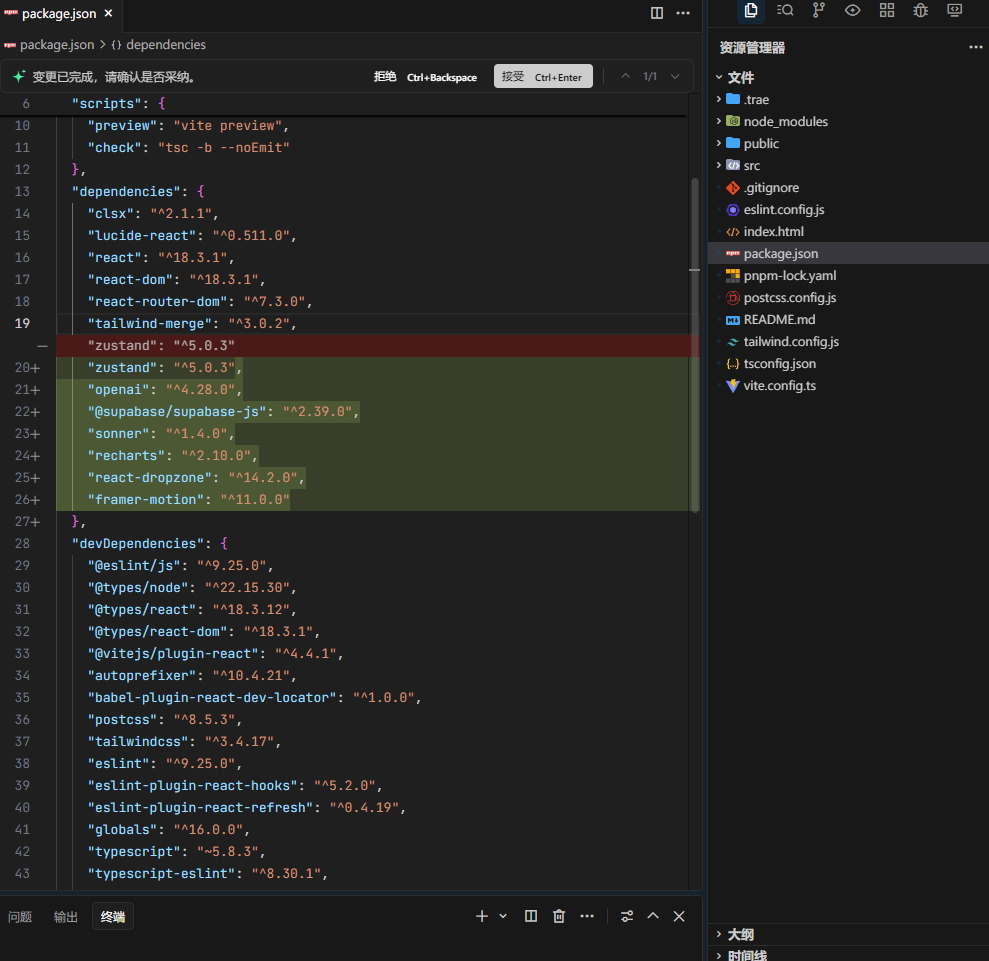
Solo不仅会自动定义需要实现的要点和任务,还会初始化项目基础架构——包括下载依赖、配置环境等全部打包完成,无需你操心;更重要的是,Solo严格遵循上下文工程理念,始终根据当前项目状态整合所有信息进行开发,因此在开发过程中,若发现方向有误或需要补充,你可随时打断并输入新需求,Solo会无缝衔接,绝不会因中断而影响开发连贯性与进度。
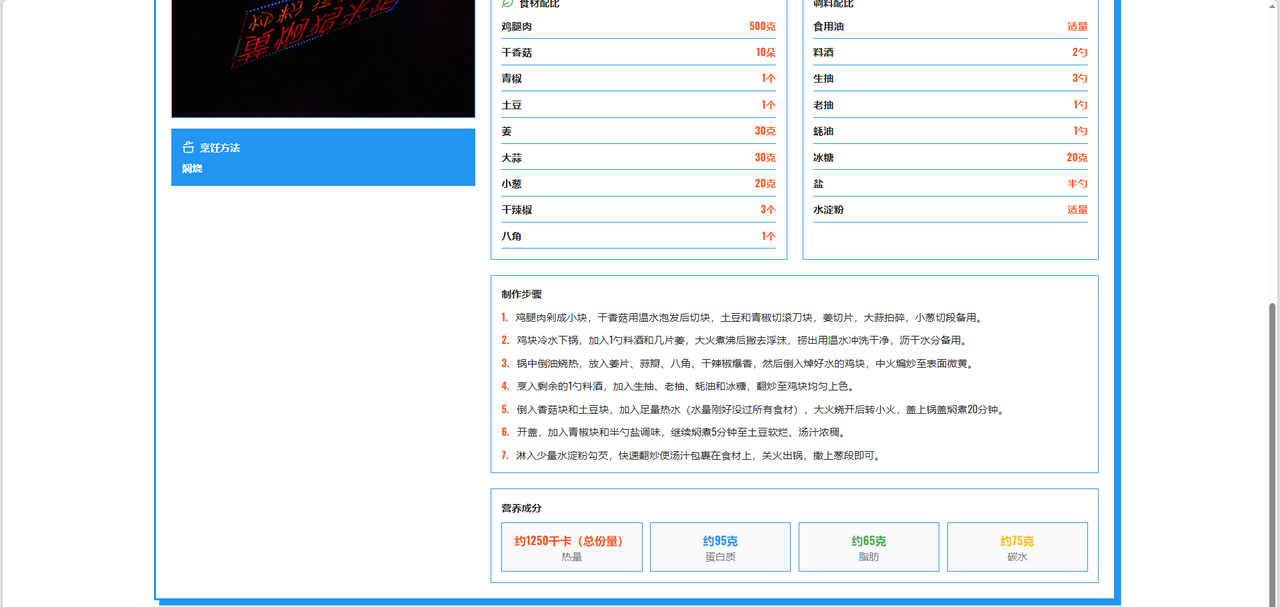
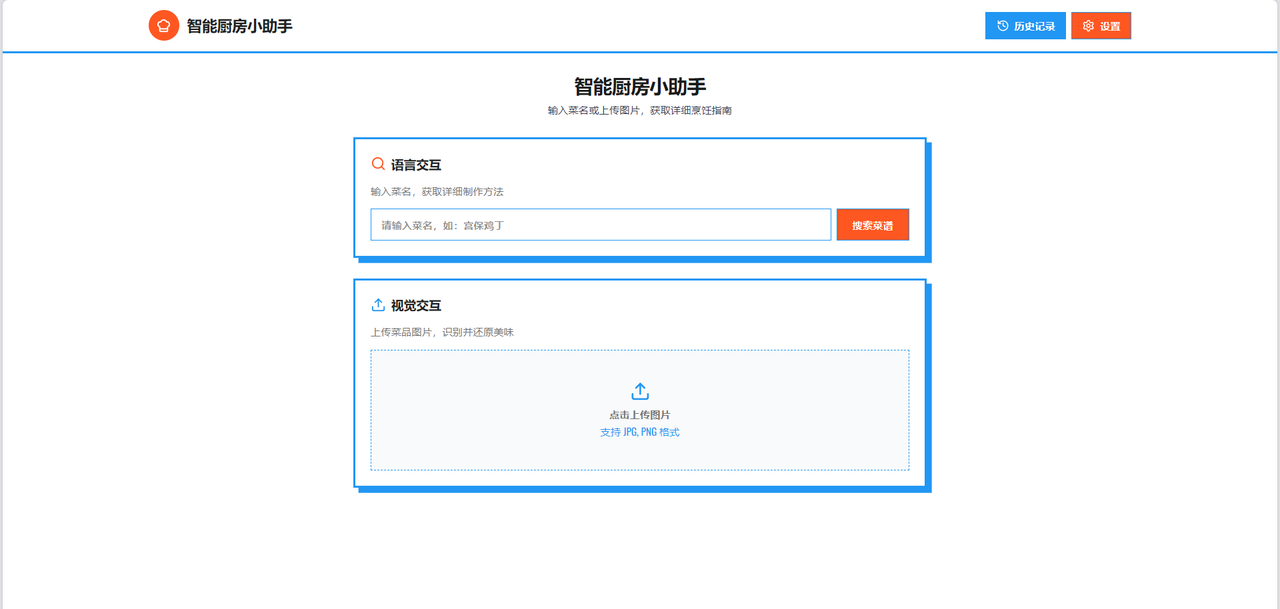
项目成功开发出具备工业级品质的智能厨房助手应用,实现从AI模型调用到用户界面的完整链路,验证了现代AI开发工具与方法论在实际应用中的高效性与可行性。通过魔搭社区的模型能力与TRAE平台的开发效率,大幅降低了AI应用的开发门槛,为未来AI应用开发提供了可复用的范式。