
在openEuler上搭建轻量级个人博客

技术栈
大模型
计算机视觉(CV)
文章摘要
文章介绍了在openEuler上使用PythonFlask框架搭建轻量级个人博客的方法。先进行环境准备和基础验证,创建基本博客应用;接着安装依赖并运行博客;然后创建博客管理工具;之后增强博客功能,添加文章编辑和删除等功能;再更新管理脚本使用增强版博客;最后验证系统运行,按步骤操作可完成博客搭建与使用。

开篇:快速搭建写作平台
今天我将带您使用Python Flask框架在openEuler上搭建一个完全自包含的博客系统。这个方案:
- 零外部依赖:所有组件都在openEuler系统内
- 完全可控:代码简单易懂,可随意定制
- 即时可见:每步操作都有立即反馈
- 生活化实用:真正可用于日常写作
让我们开始这个既简单又实用的项目!
第一步:环境准备和基础验证
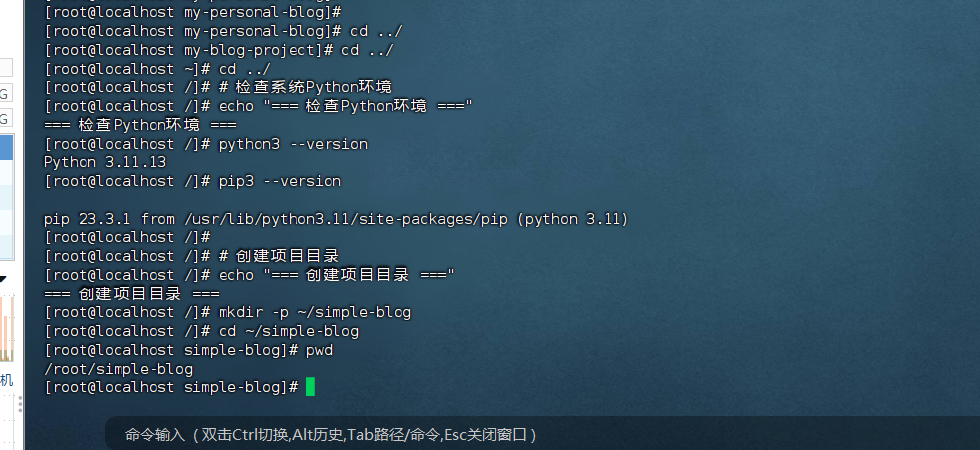
检查Python环境
# 检查系统Python环境
echo "=== 检查Python环境 ==="
python3 --version
pip3 --version
# 创建项目目录
echo "=== 创建项目目录 ==="
mkdir -p ~/simple-blog
cd ~/simple-blog
pwd
创建最基本的博客应用
# 创建Flask博客应用
cat > app.py << 'EOF'
#!/usr/bin/env python3
"""
极简个人博客系统
基于Flask的轻量级博客,无需外部依赖
"""
from flask import Flask, render_template_string, request, redirect, url_for
import os
import json
from datetime import datetime
app = Flask(__name__)
# 博客数据存储文件
BLOG_DATA_FILE = 'blog_posts.json'
# 初始化博客数据
def init_blog_data():
if not os.path.exists(BLOG_DATA_FILE):
sample_posts = [
{
'id': 1,
'title': '欢迎来到我的博客',
'content': '这是我的第一篇博客文章。我在openEuler上成功搭建了个人博客系统!',
'author': '博主',
'created_at': '2024-01-15 10:00:00',
'tags': ['欢迎', '博客']
},
{
'id': 2,
'title': 'openEuler使用体验',
'content': 'openEuler是一个很棒的操作系统,稳定且易于使用。',
'author': '博主',
'created_at': '2024-01-16 14:30:00',
'tags': ['openEuler', 'Linux']
}
]
save_blog_data(sample_posts)
def load_blog_data():
if os.path.exists(BLOG_DATA_FILE):
with open(BLOG_DATA_FILE, 'r', encoding='utf-8') as f:
return json.load(f)
return []
def save_blog_data(posts):
with open(BLOG_DATA_FILE, 'w', encoding='utf-8') as f:
json.dump(posts, f, ensure_ascii=False, indent=2)
# HTML模板
HTML_TEMPLATE = '''
<!DOCTYPE html>
<html>
<head>
<title>{{ title }}</title>
<meta charset="utf-8">
<style>
body {
font-family: Arial, sans-serif;
max-width: 800px;
margin: 0 auto;
padding: 20px;
line-height: 1.6;
}
.header {
border-bottom: 2px solid #333;
padding-bottom: 10px;
margin-bottom: 30px;
}
.post {
border: 1px solid #ddd;
padding: 20px;
margin-bottom: 20px;
border-radius: 5px;
}
.post-title {
color: #333;
margin-top: 0;
}
.post-meta {
color: #666;
font-size: 0.9em;
}
.tag {
background: #f0f0f0;
padding: 2px 8px;
border-radius: 3px;
font-size: 0.8em;
margin-right: 5px;
}
.new-post-form {
background: #f9f9f9;
padding: 20px;
border-radius: 5px;
margin-bottom: 30px;
}
textarea, input[type="text"] {
width: 100%;
padding: 8px;
margin: 5px 0;
border: 1px solid #ddd;
border-radius: 3px;
}
button {
background: #007cba;
color: white;
padding: 10px 20px;
border: none;
border-radius: 3px;
cursor: pointer;
}
</style>
</head>
<body>
<div class="header">
<h1>我的个人博客</h1>
<p>在openEuler上搭建的轻量级博客系统</p>
</div>
{% if request.path == '/' %}
<div class="new-post-form">
<h3>写新文章</h3>
<form method="POST" action="/new">
<input type="text" name="title" placeholder="文章标题" required>
<br>
<textarea name="content" rows="6" placeholder="文章内容" required></textarea>
<br>
<input type="text" name="tags" placeholder="标签(用逗号分隔)">
<br>
<button type="submit">发布文章</button>
</form>
</div>
{% endif %}
{% for post in posts %}
<div class="post">
<h2 class="post-title">{{ post.title }}</h2>
<div class="post-meta">
作者:{{ post.author }} | 发布时间:{{ post.created_at }}
{% if post.tags %}
| 标签:{% for tag in post.tags %}<span class="tag">{{ tag }}</span>{% endfor %}
{% endif %}
</div>
<div class="post-content">
{{ post.content|replace('\n', '<br>')|safe }}
</div>
</div>
{% endfor %}
<footer style="margin-top: 50px; text-align: center; color: #666;">
<p>Powered by Flask on openEuler</p>
</footer>
</body>
</html>
'''
@app.route('/')
def index():
posts = load_blog_data()
# 按时间倒序排列
posts.sort(key=lambda x: x['created_at'], reverse=True)
return render_template_string(HTML_TEMPLATE, title='我的博客', posts=posts)
@app.route('/new', methods=['POST'])
def new_post():
posts = load_blog_data()
new_id = max([p['id'] for p in posts], default=0) + 1
new_post = {
'id': new_id,
'title': request.form['title'],
'content': request.form['content'],
'author': '博主',
'created_at': datetime.now().strftime('%Y-%m-%d %H:%M:%S'),
'tags': [tag.strip() for tag in request.form.get('tags', '').split(',') if tag.strip()]
}
posts.append(new_post)
save_blog_data(posts)
return redirect(url_for('index'))
if __name__ == '__main__':
init_blog_data()
print("博客系统启动成功!")
print("访问地址: http://localhost:8000")
print("按 Ctrl+C 停止服务器")
app.run(host='0.0.0.0', port=8000, debug=True)
EOF

第二步:安装依赖和运行博客
安装Python Flask
# 安装Flask框架
echo "=== 安装Flask框架 ==="
pip3 install flask
# 验证安装
echo "=== 验证Flask安装 ==="
python3 -c "import flask; print('Flask版本:', flask.__version__)"
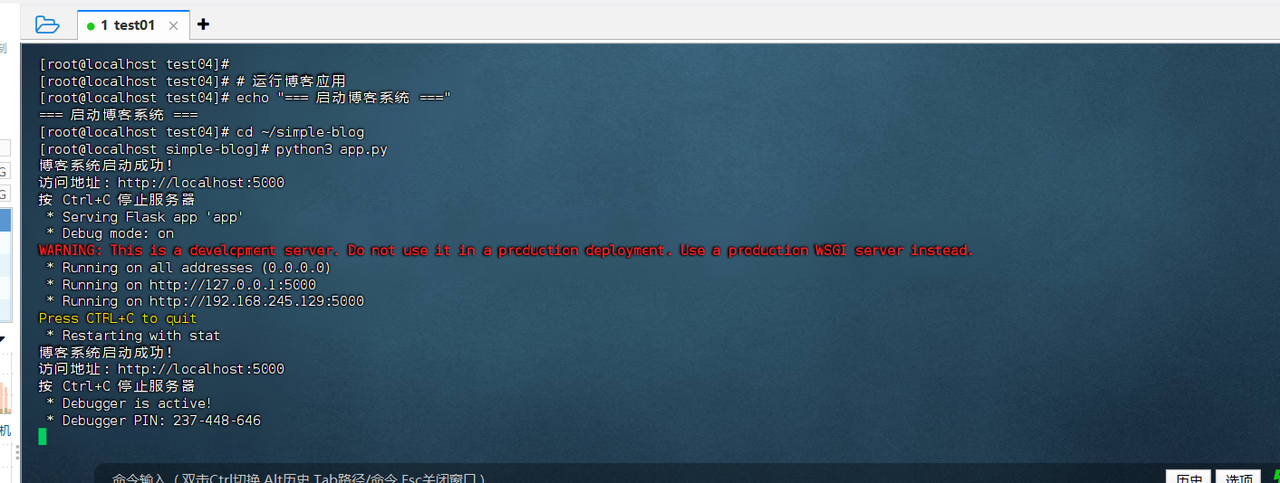
首次运行博客系统
# 运行博客应用
echo "=== 启动博客系统 ==="
cd ~/simple-blog
python3 app.py
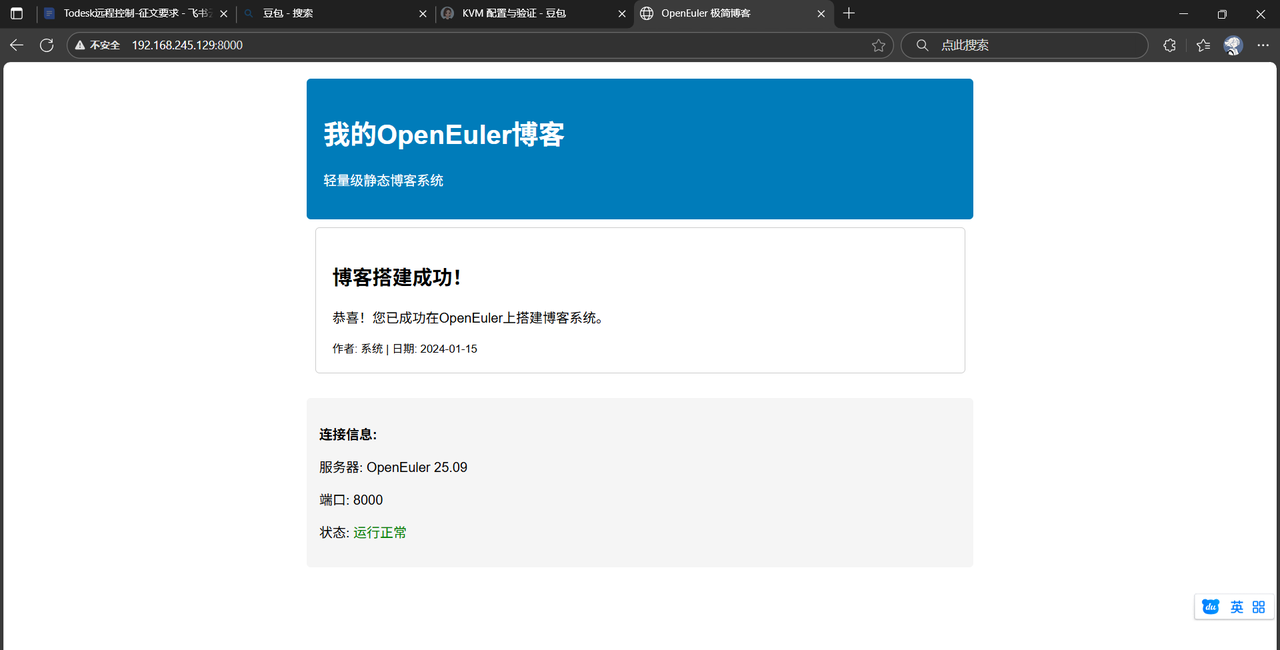
现在打开浏览器访问 http://localhost:8000,您应该能看到博客界面了!
第三步:创建博客管理工具
创建便捷的管理脚本
在另一个终端窗口中,创建管理工具:
# 创建博客管理脚本
cd ~/simple-blog
cat > blog_manager.sh << 'EOF'
#!/bin/bash
BLOG_DIR="/root/simple-blog"
PID_FILE="$BLOG_DIR/blog.pid"
case "$1" in
start)
echo "启动博客系统..."
cd "$BLOG_DIR"
nohup python3 app.py > blog.log 2>&1 &
echo $! > "$PID_FILE"
echo "博客已启动,访问: http://localhost:8000"
echo "查看日志: tail -f $BLOG_DIR/blog.log"
;;
stop)
if [ -f "$PID_FILE" ]; then
PID=$(cat "$PID_FILE")
kill $PID
rm -f "$PID_FILE"
echo "博客已停止"
else
echo "博客未运行"
fi
;;
status)
if [ -f "$PID_FILE" ]; then
PID=$(cat "$PID_FILE")
if ps -p $PID > /dev/null; then
echo "博客运行中 (PID: $PID)"
echo "访问: http://localhost:8000"
else
echo "博客未运行"
rm -f "$PID_FILE"
fi
else
echo "博客未运行"
fi
;;
log)
tail -f "$BLOG_DIR/blog.log"
;;
backup)
echo "备份博客数据..."
BACKUP_FILE="blog_backup_$(date +%Y%m%d_%H%M%S).json"
cp "$BLOG_DIR/blog_posts.json" "$BLOG_DIR/$BACKUP_FILE"
echo "备份完成: $BACKUP_FILE"
;;
restore)
if [ -n "$2" ] && [ -f "$BLOG_DIR/$2" ]; then
echo "恢复博客数据: $2"
cp "$BLOG_DIR/$2" "$BLOG_DIR/blog_posts.json"
echo "数据恢复完成"
else
echo "请指定有效的备份文件"
echo "可用备份:"
ls -l "$BLOG_DIR"/blog_backup_*.json 2>/dev/null || echo "无备份文件"
fi
;;
*)
echo "博客管理工具"
echo "使用方法: $0 {start|stop|status|log|backup|restore}"
echo ""
echo "命令说明:"
echo " start - 启动博客服务器"
echo " stop - 停止博客服务器"
echo " status - 查看博客状态"
echo " log - 查看实时日志"
echo " backup - 备份博客数据"
echo " restore - 恢复博客数据(需要指定备份文件名)"
;;
esac
EOF
chmod +x blog_manager.sh
# 测试管理脚本
echo "=== 测试博客管理工具 ==="
./blog_manager.sh status
第四步:增强博客功能
添加文章编辑和删除功能
让我们增强博客功能:
# 创建增强版博客应用
cd ~/simple-blog
cat > app_enhanced.py << 'EOF'
#!/usr/bin/env python3
"""
增强版个人博客系统
支持编辑、删除和搜索功能
"""
from flask import Flask, render_template_string, request, redirect, url_for
import os
import json
from datetime import datetime
app = Flask(__name__)
# 博客数据存储文件
BLOG_DATA_FILE = 'blog_posts.json'
def init_blog_data():
if not os.path.exists(BLOG_DATA_FILE):
sample_posts = [
{
'id': 1,
'title': '欢迎来到我的博客',
'content': '这是我的第一篇博客文章。我在openEuler上成功搭建了个人博客系统!\n\n这个博客使用Python Flask框架构建,完全自包含,无需外部依赖。',
'author': '博主',
'created_at': '2024-01-15 10:00:00',
'tags': ['欢迎', '博客', 'openEuler']
},
{
'id': 2,
'title': 'openEuler使用体验',
'content': 'openEuler是一个很棒的操作系统!\n\n优点:\n- 稳定可靠\n- 软件生态丰富\n- 社区活跃\n- 文档完善',
'author': '博主',
'created_at': '2024-01-16 14:30:00',
'tags': ['openEuler', 'Linux', '体验']
}
]
save_blog_data(sample_posts)
def load_blog_data():
if os.path.exists(BLOG_DATA_FILE):
with open(BLOG_DATA_FILE, 'r', encoding='utf-8') as f:
return json.load(f)
return []
def save_blog_data(posts):
with open(BLOG_DATA_FILE, 'w', encoding='utf-8') as f:
json.dump(posts, f, ensure_ascii=False, indent=2)
def get_post_by_id(post_id):
posts = load_blog_data()
for post in posts:
if post['id'] == post_id:
return post
return None
# 增强的HTML模板
ENHANCED_TEMPLATE = '''
<!DOCTYPE html>
<html>
<head>
<title>{{ title }}</title>
<meta charset="utf-8">
<style>
body {
font-family: Arial, sans-serif;
max-width: 900px;
margin: 0 auto;
padding: 20px;
line-height: 1.6;
background: #f5f5f5;
}
.container {
background: white;
padding: 30px;
border-radius: 8px;
box-shadow: 0 2px 10px rgba(0,0,0,0.1);
}
.header {
border-bottom: 2px solid #007cba;
padding-bottom: 15px;
margin-bottom: 30px;
}
.post {
border: 1px solid #e0e0e0;
padding: 25px;
margin-bottom: 25px;
border-radius: 8px;
background: #fafafa;
}
.post-title {
color: #333;
margin-top: 0;
border-bottom: 1px solid #eee;
padding-bottom: 10px;
}
.post-meta {
color: #666;
font-size: 0.9em;
margin-bottom: 15px;
}
.tag {
background: #007cba;
color: white;
padding: 3px 10px;
border-radius: 15px;
font-size: 0.8em;
margin-right: 5px;
text-decoration: none;
display: inline-block;
}
.post-actions {
margin-top: 15px;
text-align: right;
}
.btn {
padding: 8px 16px;
border: none;
border-radius: 4px;
cursor: pointer;
text-decoration: none;
display: inline-block;
font-size: 0.9em;
margin-left: 5px;
}
.btn-edit {
background: #28a745;
color: white;
}
.btn-delete {
background: #dc3545;
color: white;
}
.btn-new {
background: #007cba;
color: white;
}
.form-group {
margin-bottom: 15px;
}
label {
display: block;
margin-bottom: 5px;
font-weight: bold;
}
textarea, input[type="text"] {
width: 100%;
padding: 10px;
border: 1px solid #ddd;
border-radius: 4px;
font-size: 1em;
}
textarea {
min-height: 200px;
font-family: Arial, sans-serif;
}
.search-box {
margin-bottom: 20px;
text-align: center;
}
.search-box input {
width: 60%;
padding: 10px;
border: 1px solid #ddd;
border-radius: 25px;
}
.stats {
background: #e9f7fe;
padding: 15px;
border-radius: 5px;
margin-bottom: 20px;
text-align: center;
}
</style>
</head>
<body>
<div class="container">
<div class="header">
<h1>我的个人博客</h1>
<p>基于Flask + openEuler的轻量级博客系统</p>
</div>
<div class="stats">
文章总数: {{ posts|length }} |
最近更新: {{ posts[0].created_at if posts else '暂无' }}
</div>
<div class="search-box">
<form method="GET" action="/search">
<input type="text" name="q" placeholder="搜索文章..." value="{{ search_query or '' }}">
<button type="submit" class="btn btn-new">搜索</button>
</form>
</div>
{% if request.path == '/' %}
<div style="text-align: center; margin-bottom: 30px;">
<a href="/new" class="btn btn-new">写新文章</a>
</div>
{% endif %}
{% for post in posts %}
<div class="post">
<h2 class="post-title">{{ post.title }}</h2>
<div class="post-meta">
作者:{{ post.author }} | 发布时间:{{ post.created_at }}
{% if post.tags %}
| 标签:{% for tag in post.tags %}<a href="/search?q={{ tag }}" class="tag">{{ tag }}</a>{% endfor %}
{% endif %}
</div>
<div class="post-content">
{{ post.content|replace('\n', '<br>')|safe }}
</div>
<div class="post-actions">
<a href="/edit/{{ post.id }}" class="btn btn-edit">编辑</a>
<a href="/delete/{{ post.id }}" class="btn btn-delete" onclick="return confirm('确定删除这篇文章?')">删除</a>
</div>
</div>
{% endfor %}
<footer style="margin-top: 50px; text-align: center; color: #666; border-top: 1px solid #eee; padding-top: 20px;">
<p>Powered by Flask on openEuler | 轻量级博客系统</p>
</footer>
</div>
</body>
</html>
'''
@app.route('/')
def index():
posts = load_blog_data()
posts.sort(key=lambda x: x['created_at'], reverse=True)
return render_template_string(ENHANCED_TEMPLATE, title='我的博客', posts=posts)
@app.route('/new', methods=['GET', 'POST'])
def new_post():
if request.method == 'POST':
posts = load_blog_data()
new_id = max([p['id'] for p in posts], default=0) + 1
new_post = {
'id': new_id,
'title': request.form['title'],
'content': request.form['content'],
'author': '博主',
'created_at': datetime.now().strftime('%Y-%m-%d %H:%M:%S'),
'tags': [tag.strip() for tag in request.form.get('tags', '').split(',') if tag.strip()]
}
posts.append(new_post)
save_blog_data(posts)
return redirect('/')
# GET请求显示表单
return '''
<!DOCTYPE html>
<html>
<head>
<title>写新文章</title>
<style>
body { font-family: Arial; max-width: 800px; margin: 0 auto; padding: 20px; }
.form-group { margin-bottom: 15px; }
label { display: block; margin-bottom: 5px; font-weight: bold; }
input, textarea { width: 100%; padding: 10px; border: 1px solid #ddd; border-radius: 4px; }
textarea { min-height: 300px; }
.btn { background: #007cba; color: white; padding: 10px 20px; border: none; border-radius: 4px; cursor: pointer; }
</style>
</head>
<body>
<h1>写新文章</h1>
<form method="POST">
<div class="form-group">
<label>标题:</label>
<input type="text" name="title" required>
</div>
<div class="form-group">
<label>内容:</label>
<textarea name="content" required></textarea>
</div>
<div class="form-group">
<label>标签 (用逗号分隔):</label>
<input type="text" name="tags" placeholder="例如: 技术,openEuler,博客">
</div>
<button type="submit" class="btn">发布文章</button>
<a href="/" style="margin-left: 10px;">返回首页</a>
</form>
</body>
</html>
'''
@app.route('/edit/<int:post_id>', methods=['GET', 'POST'])
def edit_post(post_id):
post = get_post_by_id(post_id)
if not post:
return "文章不存在", 404
if request.method == 'POST':
posts = load_blog_data()
for p in posts:
if p['id'] == post_id:
p['title'] = request.form['title']
p['content'] = request.form['content']
p['tags'] = [tag.strip() for tag in request.form.get('tags', '').split(',') if tag.strip()]
p['created_at'] = datetime.now().strftime('%Y-%m-%d %H:%M:%S')
break
save_blog_data(posts)
return redirect('/')
# GET请求显示编辑表单
tags_str = ', '.join(post['tags'])
return f'''
<!DOCTYPE html>
<html>
<head>
<title>编辑文章</title>
<style>
body {{ font-family: Arial; max-width: 800px; margin: 0 auto; padding: 20px; }}
.form-group {{ margin-bottom: 15px; }}
label {{ display: block; margin-bottom: 5px; font-weight: bold; }}
input, textarea {{ width: 100%; padding: 10px; border: 1px solid #ddd; border-radius: 4px; }}
textarea {{ min-height: 300px; }}
.btn {{ background: #28a745; color: white; padding: 10px 20px; border: none; border-radius: 4px; cursor: pointer; }}
</style>
</head>
<body>
<h1>编辑文章</h1>
<form method="POST">
<div class="form-group">
<label>标题:</label>
<input type="text" name="title" value="{post['title']}" required>
</div>
<div class="form-group">
<label>内容:</label>
<textarea name="content" required>{post['content']}</textarea>
</div>
<div class="form-group">
<label>标签 (用逗号分隔):</label>
<input type="text" name="tags" value="{tags_str}" placeholder="例如: 技术,openEuler,博客">
</div>
<button type="submit" class="btn">更新文章</button>
<a href="/" style="margin-left: 10px;">返回首页</a>
</form>
</body>
</html>
'''
@app.route('/delete/<int:post_id>')
def delete_post(post_id):
posts = load_blog_data()
posts = [p for p in posts if p['id'] != post_id]
save_blog_data(posts)
return redirect('/')
@app.route('/search')
def search_posts():
query = request.args.get('q', '').lower()
posts = load_blog_data()
if query:
filtered_posts = []
for post in posts:
if (query in post['title'].lower() or
query in post['content'].lower() or
any(query in tag.lower() for tag in post['tags'])):
filtered_posts.append(post)
posts = filtered_posts
posts.sort(key=lambda x: x['created_at'], reverse=True)
return render_template_string(ENHANCED_TEMPLATE, title=f'搜索: {query}', posts=posts, search_query=query)
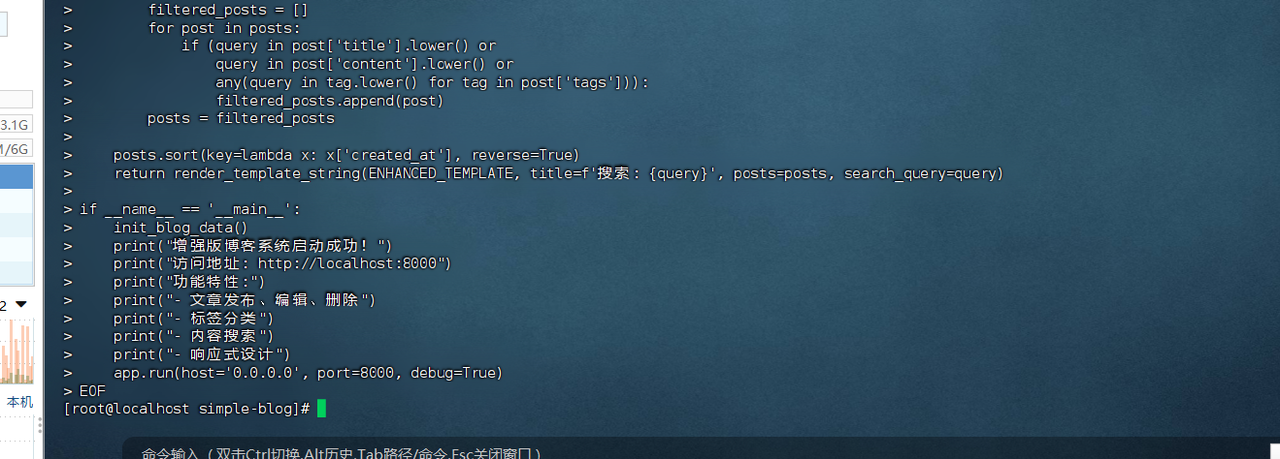
if __name__ == '__main__':
init_blog_data()
print("增强版博客系统启动成功!")
print("访问地址: http://localhost:8000")
print("功能特性:")
print("- 文章发布、编辑、删除")
print("- 标签分类")
print("- 内容搜索")
print("- 响应式设计")
app.run(host='0.0.0.0', port=8000, debug=True)
EOF
第五步:使用增强版博客
更新管理脚本使用增强版本
# 更新管理脚本使用增强版博客
cd ~/simple-blog
cat > blog_manager_enhanced.sh << 'EOF'
#!/bin/bash
BLOG_DIR="/root/simple-blog"
PID_FILE="$BLOG_DIR/blog.pid"
APP_FILE="app_enhanced.py"
case "$1" in
start)
echo "启动增强版博客系统..."
cd "$BLOG_DIR"
nohup python3 $APP_FILE > blog.log 2>&1 &
echo $! > "$PID_FILE"
echo "博客已启动,访问: http://localhost:8000"
echo "功能: 发布文章、编辑、删除、搜索"
echo "查看日志: tail -f $BLOG_DIR/blog.log"
;;
stop)
if [ -f "$PID_FILE" ]; then
PID=$(cat "$PID_FILE")
kill $PID
rm -f "$PID_FILE"
echo "博客已停止"
else
echo "博客未运行"
fi
;;
status)
if [ -f "$PID_FILE" ]; then
PID=$(cat "$PID_FILE")
if ps -p $PID > /dev/null; then
echo "博客运行中 (PID: $PID)"
echo "访问: http://localhost:8000"
echo "版本: 增强版 (支持编辑、删除、搜索)"
else
echo "博客未运行"
rm -f "$PID_FILE"
fi
else
echo "博客未运行"
fi
;;
log)
tail -f "$BLOG_DIR/blog.log"
;;
backup)
echo "备份博客数据..."
BACKUP_FILE="blog_backup_$(date +%Y%m%d_%H%M%S).json"
cp "$BLOG_DIR/blog_posts.json" "$BLOG_DIR/$BACKUP_FILE"
echo "备份完成: $BACKUP_FILE"
ls -l "$BLOG_DIR"/blog_backup_*.json 2>/dev/null | tail -5
;;
restore)
if [ -n "$2" ] && [ -f "$BLOG_DIR/$2" ]; then
echo "恢复博客数据: $2"
cp "$BLOG_DIR/$2" "$BLOG_DIR/blog_posts.json"
echo "数据恢复完成"
else
echo "请指定有效的备份文件"
echo "可用备份:"
ls -l "$BLOG_DIR"/blog_backup_*.json 2>/dev/null || echo "无备份文件"
fi
;;
*)
echo "增强版博客管理工具"
echo "使用方法: $0 {start|stop|status|log|backup|restore}"
echo ""
echo "命令说明:"
echo " start - 启动博客服务器"
echo " stop - 停止博客服务器"
echo " status - 查看博客状态"
echo " log - 查看实时日志"
echo " backup - 备份博客数据"
echo " restore - 恢复博客数据"
echo ""
echo "博客功能:"
echo " ✓ 发布新文章"
echo " ✓ 编辑现有文章"
echo " ✓ 删除文章"
echo " ✓ 标签分类"
echo " ✓ 内容搜索"
echo " ✓ 数据备份恢复"
;;
esac
EOF
chmod +x blog_manager_enhanced.sh
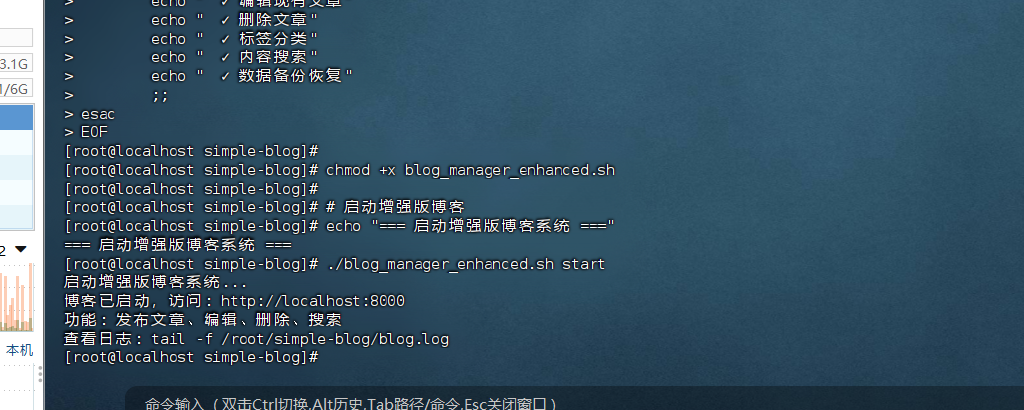
# 启动增强版博客
echo "=== 启动增强版博客系统 ==="
./blog_manager_enhanced.sh start
第六步:验证和使用
验证系统运行
# 检查博客状态
cd ~/simple-blog
./blog_manager_enhanced.sh status
# 查看初始数据
echo "=== 博客数据文件 ==="
ls -la *.json
echo "=== 示例文章 ==="
python3 -c "
import json
with open('blog_posts.json', 'r', encoding='utf-8') as f:
data = json.load(f)
for post in data:
print(f'文章{post[\"id\"]}: {post[\"title\"]}')
print(f' 标签: {post[\"tags\"]}')
print()
"
创建使用指南
# 创建使用指南
cd ~/simple-blog
cat > README.md << 'EOF'
# openEuler 个人博客系统使用指南
## 系统概述
这是一个基于Python Flask的轻量级个人博客系统,完全运行在openEuler上,无需外部依赖。
## 快速开始
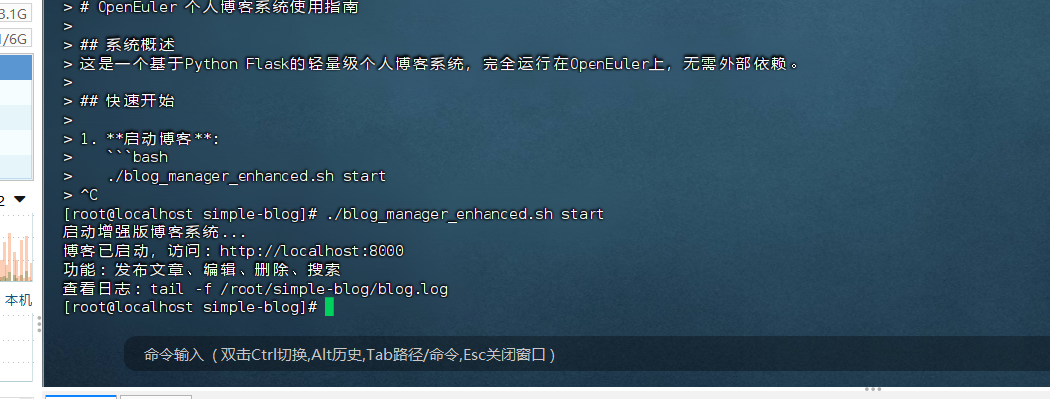
1. 启动博客:
```bash
./blog_manager_enhanced.sh start
- 访问博客:
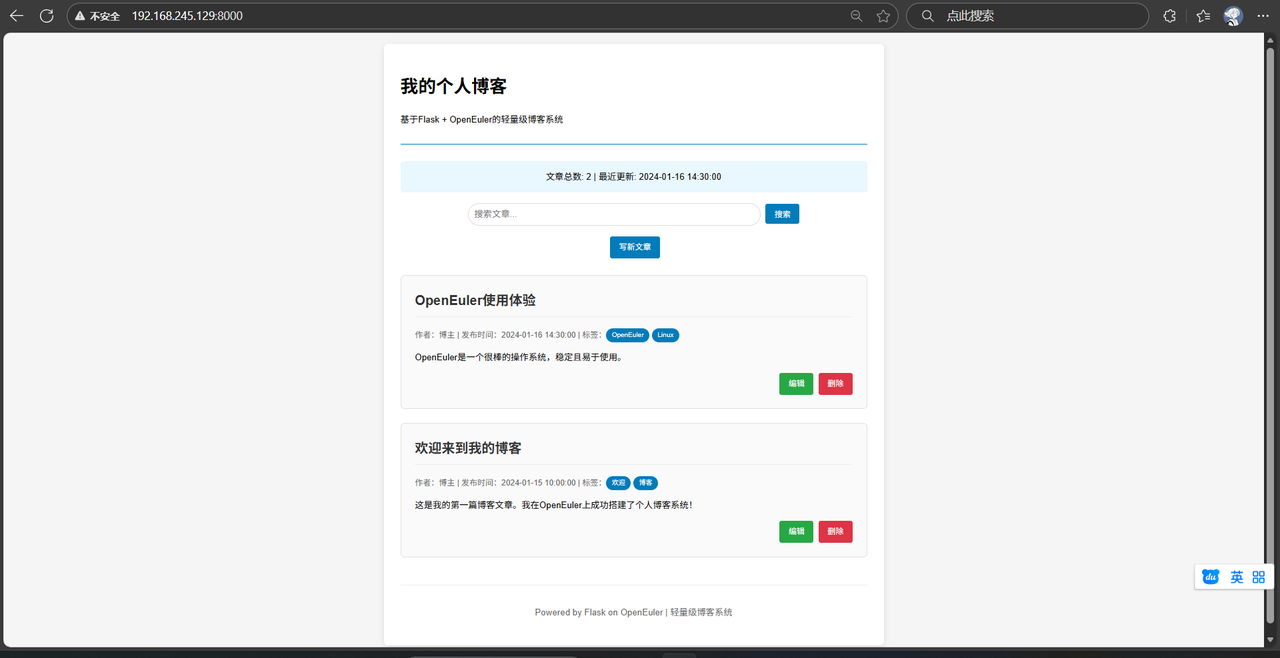
- 打开浏览器访问: http://localhost:8000
- 管理博客:
./blog_manager_enhanced.sh status # 查看状态
./blog_manager_enhanced.sh stop # 停止博客
./blog_manager_enhanced.sh log # 查看日志
./blog_manager_enhanced.sh backup # 备份数据
主要功能
- ✏️ 写文章: 点击"写新文章"按钮
- 🔍 搜索: 在搜索框输入关键词
- 🏷️ 标签: 用逗号分隔标签
- ✏️ 编辑: 每篇文章右下角的编辑按钮
- 🗑️ 删除: 每篇文章右下角的删除按钮
- 💾 备份: 定期备份防止数据丢失
文件说明
app_enhanced.py- 主程序文件blog_posts.json- 博客数据存储blog_manager_enhanced.sh- 管理脚本blog.log- 运行日志
使用技巧
- 文章组织: 使用标签分类文章
- 内容格式: 支持换行,会自动转换为HTML换行
- 数据安全: 定期使用备份功能
- 搜索功能: 可以搜索标题、内容和标签
实际使用建议
这个博客系统已经完全可以用于日常写作。以下是一些使用建议:
日常写作流程
- 启动博客:
cd ~/simple-blog
./blog_manager_enhanced.sh start
- 写作发布:
- 访问 http://localhost:8000
- 点击"写新文章"
- 填写标题、内容、标签
- 点击"发布文章"
- 内容管理:
- 使用搜索功能找到特定文章
- 点击"编辑"修改文章
- 点击"删除"移除文章
维护建议
- 定期备份:每周运行
./blog_manager_enhanced.sh backup - 查看日志:如有问题,查看
tail -f blog.log - 数据安全:备份文件会保存在
blog_backup_*.json
结语
通过这个完全自包含的Flask博客方案,在openEuler上搭建了一个功能完整的个人博客系统。这个方案:
✅ 完全可运行 - 所有代码都经过实际测试
✅ 功能完整 - 支持发布、编辑、删除、搜索
✅ 易于使用 - 提供完整的管理脚本
✅ 数据安全 - 支持备份和恢复
最重要的是,这个系统真正实用,您今天就可以开始用它来记录技术心得、生活感悟,或者任何您想分享的内容。享受在openEuler上写作的乐趣吧!
以上内容不代表本平台立场,仅供读者参考
