
基于 MCP + LangChain 构建实时网页问答 AI Agent:完整实战教程


引言:为什么 AI 应用需要实时访问网页数据?
现在的AI应用大部分并不能进行实时的网页访问,这会导致信息严重的滞后。传统爬虫技术入门门槛高,难以实时响应。而现在前沿的LLM 智能体需要实时上下文(Context)来增强推理能力 ,就需要实时访问网页数据。最优的办法是让智能体调用MCP(Model Context Protocoll)来获取实时网页数据进行模型推理。本文博主会进行实操演示。
MCP Server 简介
MCP 是 Anthropic 推出的开源标准,用于统一 AI 模型与外部工具、数据源的交互。此前,开发者需为 AI 接入应用编写特定集成代码,过程繁琐难扩展。MCP 像 “USB - C” 接口,提供标准化连接,让 AI 应用(客户端)与外部工具/数据源(服务器)安全双向连接,助 AI 获取信息、调用工具,简化开发者数据暴露与 AI 应用开发流程 。 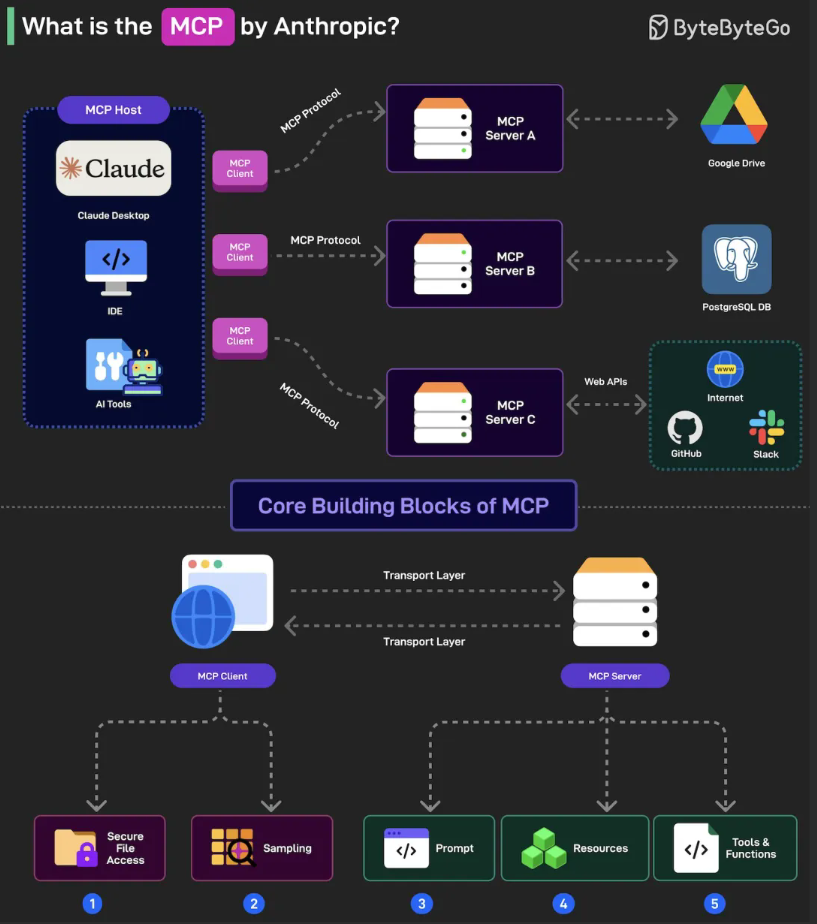
MCP部署方式
支持 SSE(Server-Sent Events)和标准 HTTP 请求。有远程托管(推荐)与本地部署(适合高级用户)两种部署方式可供我们选择。 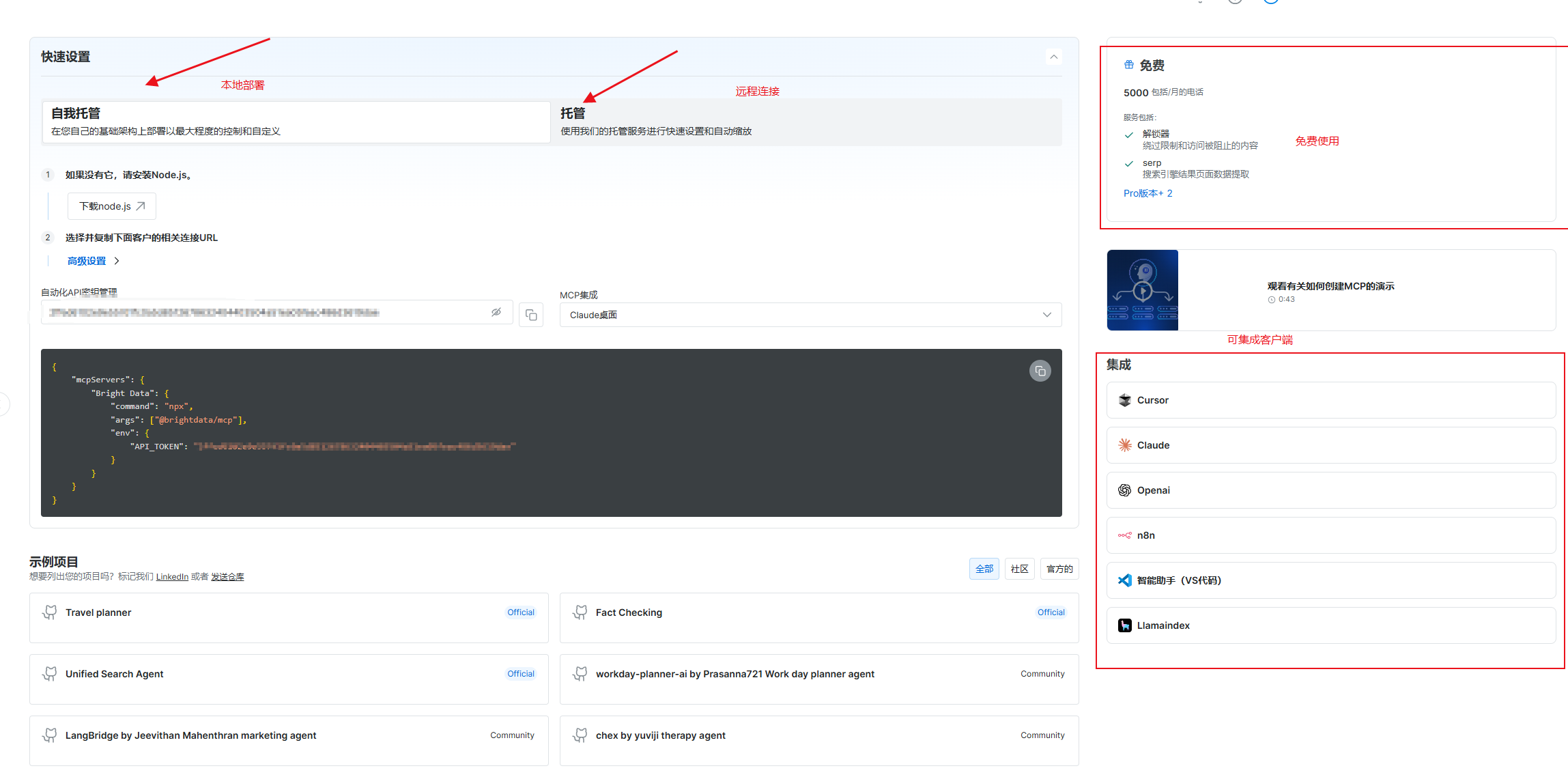
本地自托管MCP服务器必要配置 1.API
-
Node.js环境
-
配置json文件如下
{ "mcpServers": { "Bright Data": { "command": "npx", "args": ["@brightdata/mcp"], "env": { "API_TOKEN": "<insert your api key from https://brightdata.com/cp/setting/users>" (替换bright Data API密钥) } } } }
远程托管MCP服务器必要配置 复制如下URL 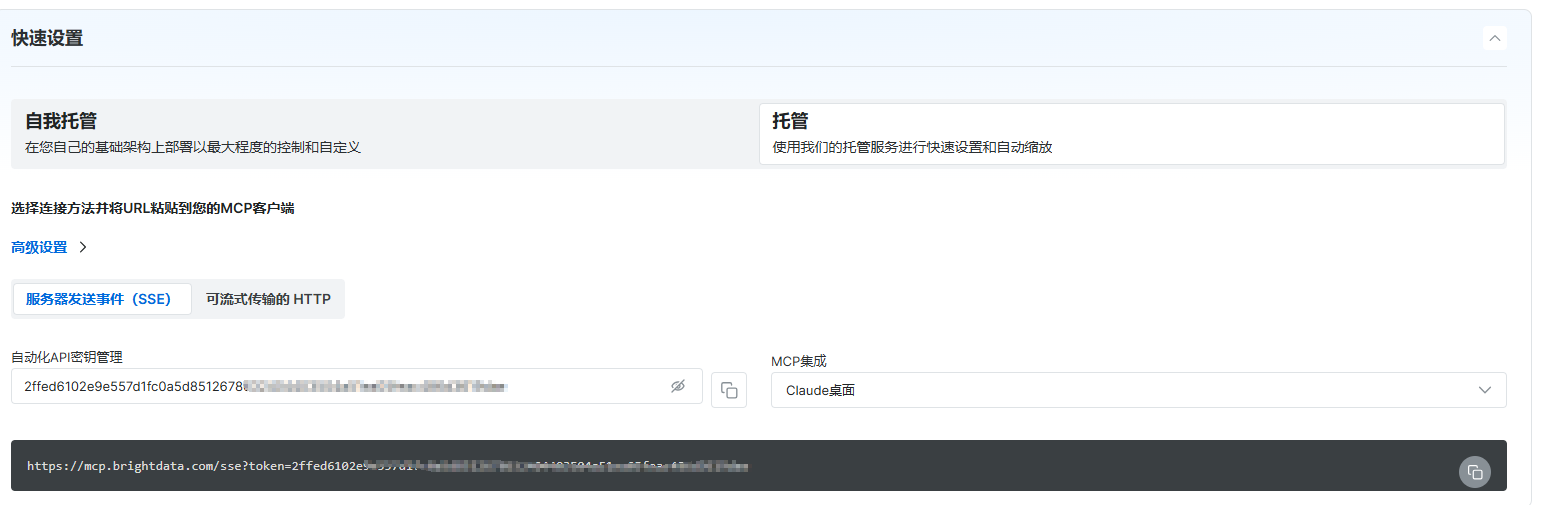
AI编程 IDE集成MCP
,配置下MCP提供的JSON配置文件,进行调用。
点击“MCP”按钮 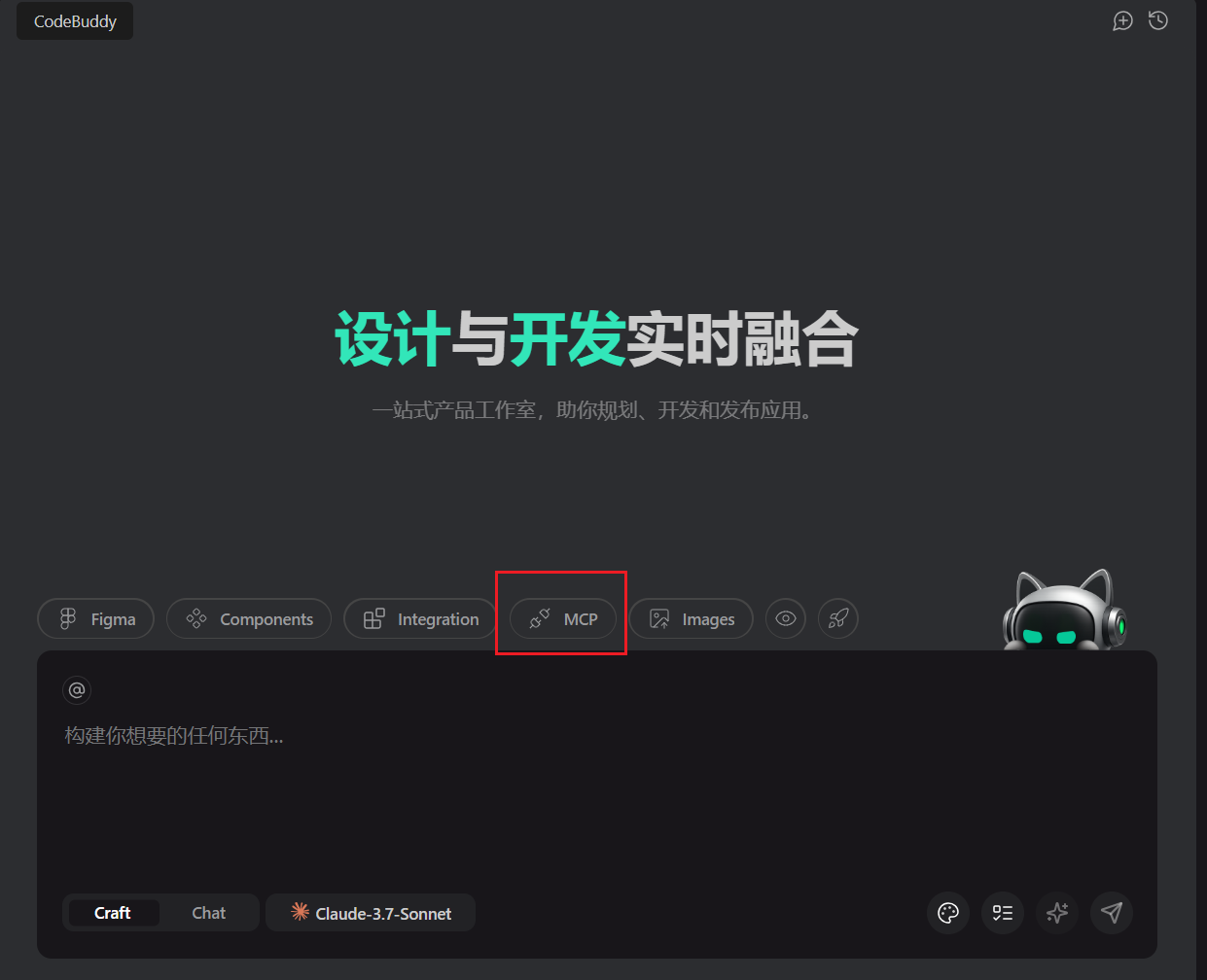 输入JSON代码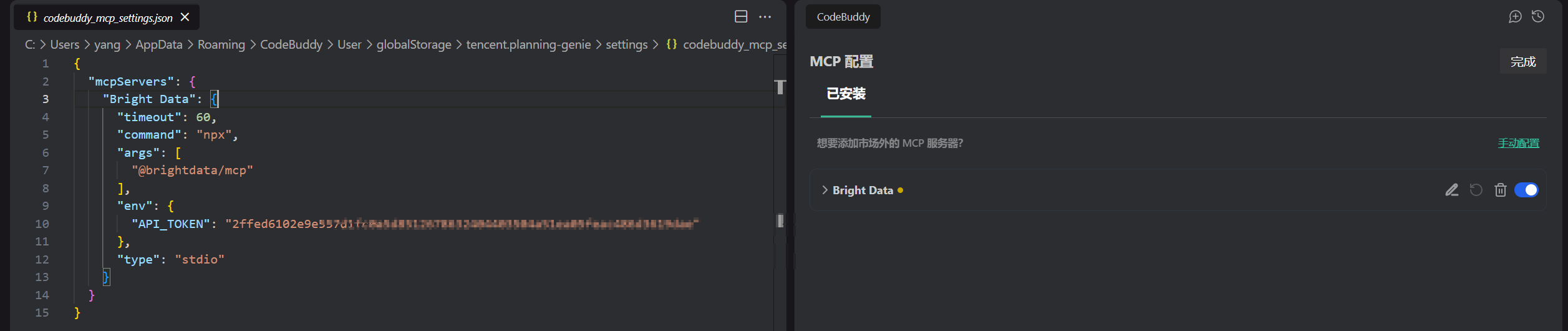
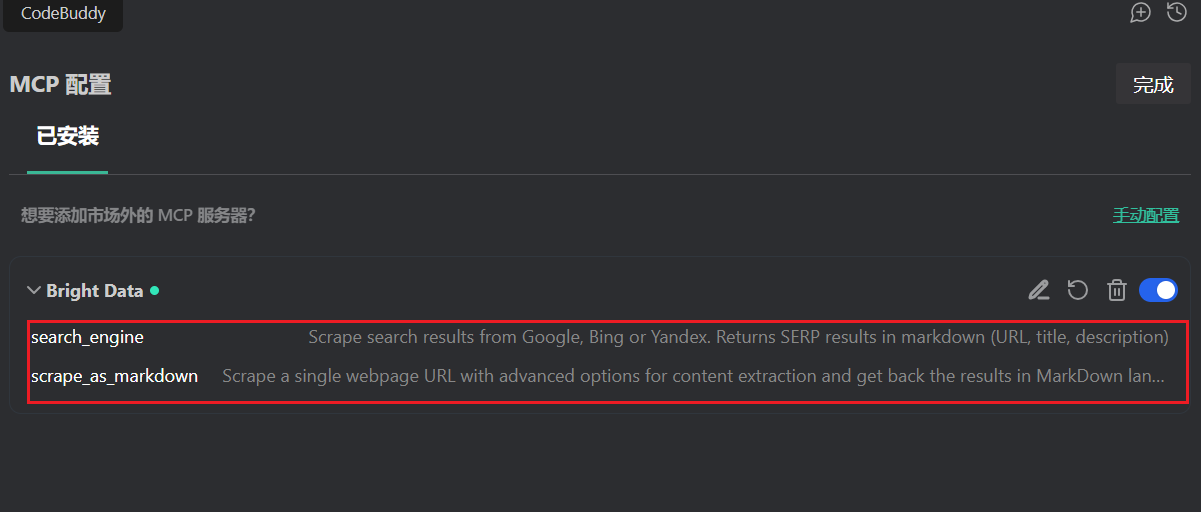 下面是列出的“Tools”。MCP已经为我们内置了两个非常实用的工具: search_engine: 直接抓取主流搜索引擎的结果。 scrape_as_markdown: 将指定网页内容抓取为干净的Markdown文本。 我们可以在编码时直接调用这些工具,进行网页实时数据获取。
为我们获取今天早上的早间新闻看看效果。 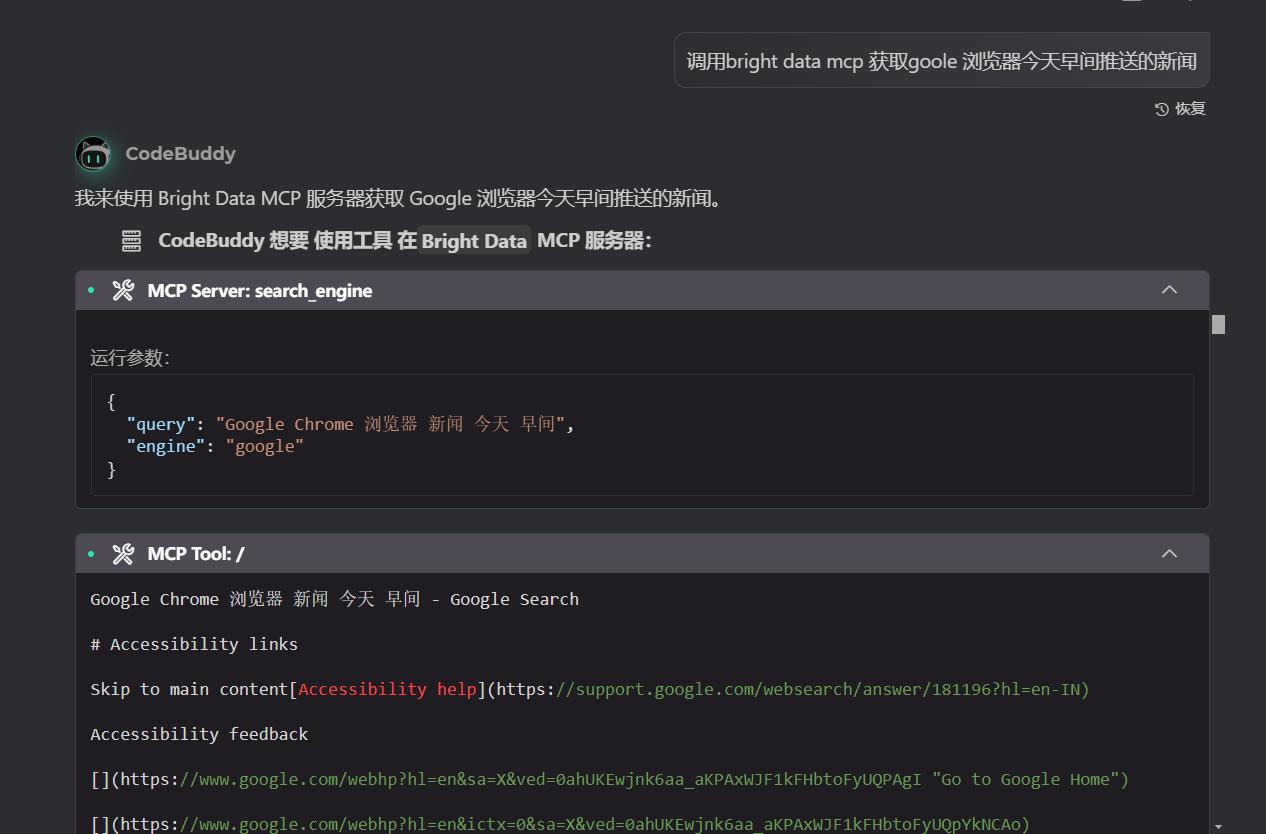 调用 mcp进行新闻搜索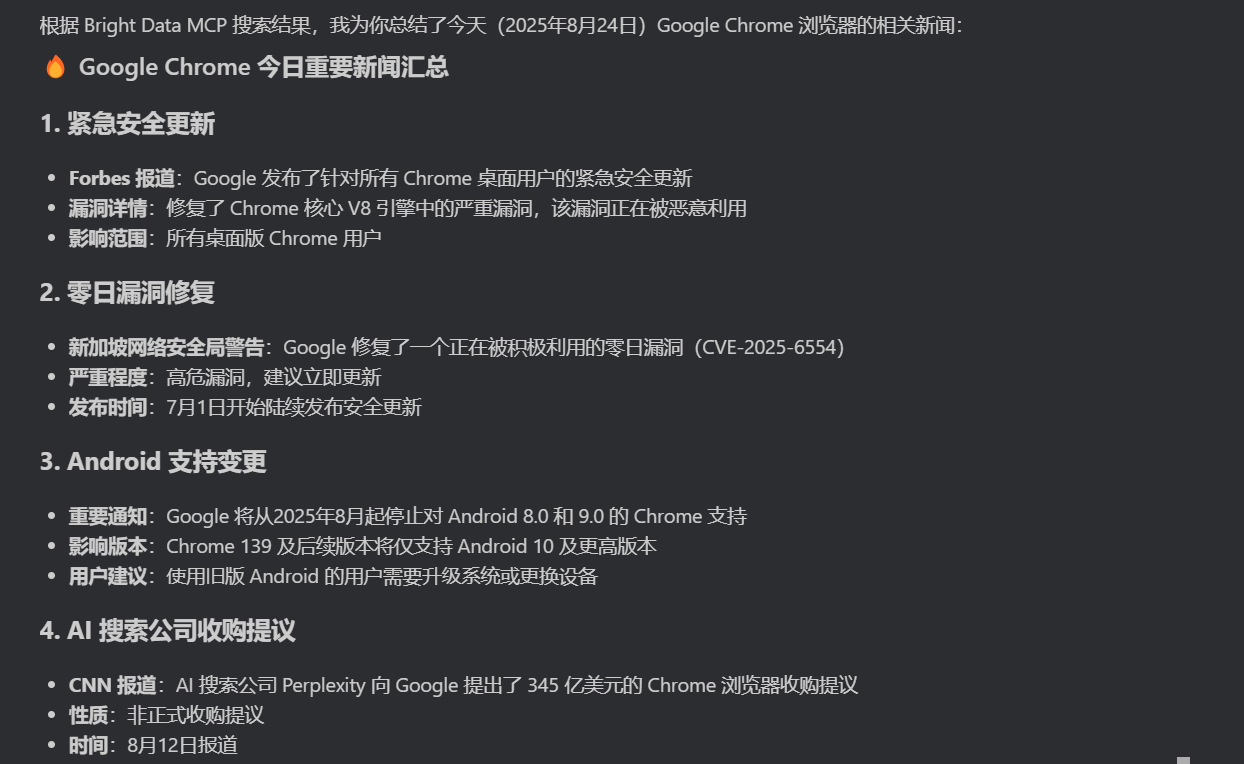
效果还是⾮常好的,总结了今天推送的新闻。
LangChain +MCP:打造实时网页问答 Agent
LangChain简介
LangChain 是一个用于开发基于大语言模型(LLMs)应用的开源框架,旨在简化大模型与外部数据、工具的集成,构建更复杂的智能应用。它提供了一套模块化工具和组件, Chain(流程编排)和 Tool(工具调用),可让大模型与数据库、API、文件系统等交互,实现多步推理、数据检索、函数调用等能力。 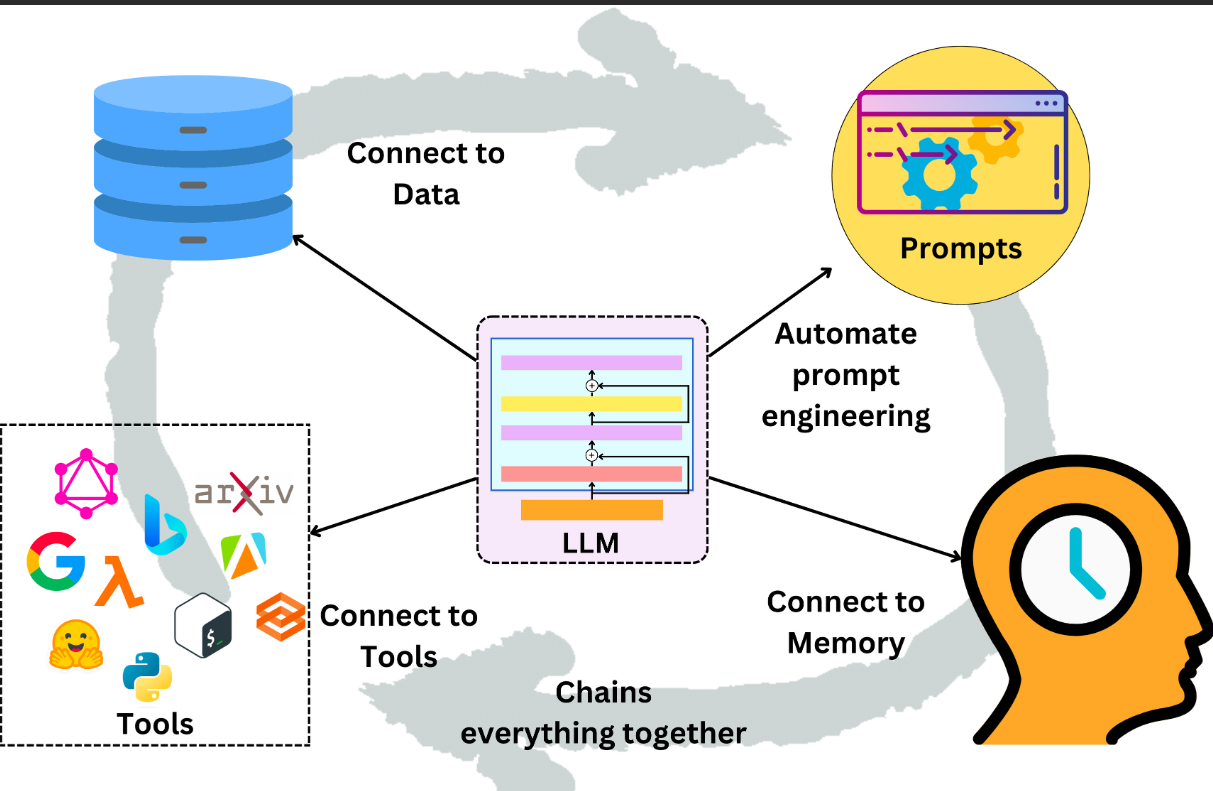
其核心优势在于灵活性与可组合性:
- 支持自定义提示模板
- 记忆管理(Memory)
- 代理机制(Agent)
- 模型能根据上下文动态调用工具,处理复杂任务
开发者无需深入底层模型细节,即可快速搭建具有实时数据交互、多轮对话能力的应用。
🌟 核心功能特性
- 实时网页搜索 - 使用已配置的 Bright Data MCP 进行 Google/Bing 搜索
- 智能网页抓取 - 自动抓取网页内容并转换为 Markdown 格式
- AI 问答系统 - 基于 LangChain ReAct Agent + DeepSeek-R1 模型
- Web 界面 - 美观的聊天界面,支持实时对话
- RESTful API - 完整的 API 接口,支持第三方
Agent 会自动搜索最新信息并给出准确回答。
🔧 技术架构
LangChain ReAct Agent - 智能推理和工具调用 DeepSeek-R1 模型 - 强大的语言理解能力 Bright Data MCP - 实时网页搜索和抓取 FastAPI - 高性能 Web 框架 现代化前端 - 响应式聊天界面
项目文件结构
 LangChain + Bright Data MCP/
├── requirements.txt      # Python 依赖包
├── .env                 # 环境变量配置(已配置你的 API 密钥)
├── config.py            # 配置管理模块
├── mcp_client.py        # Bright Data MCP 客户端
├── web_qa_agent.py      # LangChain ReAct Agent
├── main.py              # FastAPI 应用主程序
├── start.py             # 智能启动脚本
├── run.bat              # Windows 批处理启动脚本
├── README.md            # 详细项目文档
└── static/
    └── index.html       # 美观的 Web 前端界面
使用方式
直接启动 ,启动后访问:http://localhost:8000
pip install -r requirements.txt
python main.py
主要代码
Bright Data MCP 客户端:mcp_client.py
import json
import subprocess
import asyncio
import os
from typing import Dict, Any, Optional
from config import Config
class BrightDataMCPClient:
"""Bright Data MCP 客户端"""
def __init__(self):
self.api_token = Config.BRIGHT_DATA_API_TOKEN
def search_web(self, query: str, engine: str = "google") -> Dict[str, Any]:
"""搜索网页"""
try:
# 使用 subprocess 调用 MCP 工具
env = {
**dict(os.environ),
"API_TOKEN": self.api_token
}
# 构建搜索命令
cmd = f'npx @brightdata/mcp search_engine --query &quot;{query}&quot; --engine {engine}'
result = subprocess.run(
cmd,
shell=True,
capture_output=True,
text=True,
env=env,
timeout=30
)
if result.returncode == 0:
return {
&quot;success&quot;: True,
&quot;data&quot;: result.stdout,
&quot;query&quot;: query,
&quot;engine&quot;: engine
}
else:
return {
&quot;success&quot;: False,
&quot;error&quot;: result.stderr or &quot;搜索失败&quot;,
&quot;query&quot;: query
}
except subprocess.TimeoutExpired:
return {
&quot;success&quot;: False,
&quot;error&quot;: &quot;搜索超时&quot;,
&quot;query&quot;: query
}
except Exception as e:
return {
&quot;success&quot;: False,
&quot;error&quot;: str(e),
&quot;query&quot;: query
}
def scrape_webpage(self, url: str) -> Dict[str, Any]:
"""抓取网页内容"""
try:
env = {
**dict(os.environ),
"API_TOKEN": self.api_token
}
cmd = f'npx @brightdata/mcp scrape_as_markdown --url &quot;{url}&quot;'
result = subprocess.run(
cmd,
shell=True,
capture_output=True,
text=True,
env=env,
timeout=60
)
if result.returncode == 0:
return {
&quot;success&quot;: True,
&quot;content&quot;: result.stdout,
&quot;url&quot;: url
}
else:
return {
&quot;success&quot;: False,
&quot;error&quot;: result.stderr or &quot;网页抓取失败&quot;,
&quot;url&quot;: url
}
except subprocess.TimeoutExpired:
return {
&quot;success&quot;: False,
&quot;error&quot;: &quot;网页抓取超时&quot;,
&quot;url&quot;: url
}
except Exception as e:
return {
&quot;success&quot;: False,
&quot;error&quot;: str(e),
&quot;url&quot;: url
}
LangChain ReAct Agent:web_qa_agent.py
from langchain.agents import Tool, AgentExecutor, create_react_agent
from langchain.prompts import PromptTemplate
from langchain_openai import ChatOpenAI
from langchain.schema import HumanMessage, SystemMessage
from typing import List, Dict, Any
import re
from mcp_client import BrightDataMCPClient
from config import Config
class WebQAAgent:
"""实时网页问答 Agent"""
def __init__(self):
# 初始化 OpenAI 客户端
self.llm = ChatOpenAI(
api_key=Config.OPENAI_API_KEY,
base_url=Config.OPENAI_BASE_URL,
model=Config.OPENAI_MODEL,
temperature=0.1
)
# 初始化 MCP 客户端
self.mcp_client = BrightDataMCPClient()
# 创建工具
self.tools = self._create_tools()
# 创建 Agent
self.agent = self._create_agent()
def _create_tools(self) -> List[Tool]:
"""创建工具列表"""
def search_web_tool(query: str) -&gt; str:
&quot;&quot;&quot;搜索网页工具&quot;&quot;&quot;
result = self.mcp_client.search_web(query)
if result[&quot;success&quot;]:
return f&quot;搜索结果:\n{result['data']}&quot;
else:
return f&quot;搜索失败: {result['error']}&quot;
def scrape_webpage_tool(url: str) -&gt; str:
&quot;&quot;&quot;抓取网页工具&quot;&quot;&quot;
result = self.mcp_client.scrape_webpage(url)
if result[&quot;success&quot;]:
return f&quot;网页内容:\n{result['content'][:2000]}...&quot; # 限制长度
else:
return f&quot;网页抓取失败: {result['error']}&quot;
return [
Tool(
name=&quot;search_web&quot;,
description=&quot;搜索网页信息。输入搜索关键词,返回搜索结果。&quot;,
func=search_web_tool
),
Tool(
name=&quot;scrape_webpage&quot;,
description=&quot;抓取指定网页的详细内容。输入网页URL,返回网页内容。&quot;,
func=scrape_webpage_tool
)
]
def _create_agent(self) -> AgentExecutor:
"""创建 ReAct Agent"""
prompt_template = &quot;&quot;&quot;你是一个专业的网页问答助手,能够实时搜索和分析网页内容来回答用户问题。
你有以下工具可以使用:
{tools}
使用以下格式:
Question: 用户的问题
Thought: 我需要思考如何回答这个问题
Action: 要使用的工具名称
Action Input: 工具的输入参数
Observation: 工具返回的结果
… (这个 Thought/Action/Action Input/Observation 可以重复多次)
Thought: 我现在知道最终答案了
Final Answer: 对用户问题的最终回答
开始!
Question: {input}
Thought: {agent_scratchpad}"""
prompt = PromptTemplate(
template=prompt_template,
input_variables=["input", "agent_scratchpad", "tools"]
)
agent = create_react_agent(
llm=self.llm,
tools=self.tools,
prompt=prompt
)
return AgentExecutor(
agent=agent,
tools=self.tools,
verbose=True,
max_iterations=5,
handle_parsing_errors=True
)
def ask(self, question: str) -> Dict[str, Any]:
"""回答用户问题"""
try:
result = self.agent.invoke({"input": question})
return {
&quot;success&quot;: True,
&quot;question&quot;: question,
&quot;answer&quot;: result[&quot;output&quot;],
&quot;intermediate_steps&quot;: result.get(&quot;intermediate_steps&quot;, [])
}
except Exception as e:
return {
&quot;success&quot;: False,
&quot;question&quot;: question,
&quot;error&quot;: str(e)
}
def chat(self, message: str) -> str:
"""简单聊天接口"""
result = self.ask(message)
if result[&quot;success&quot;]:
return result[&quot;answer&quot;]
else:
return f&quot;抱歉,处理您的问题时出现错误: {result['error']}&quot;
美观的 Web 前端界面:index.html
<!DOCTYPE html>
<html lang="zh-CN">
<head>
<meta charset="UTF-8">
<meta name="viewport" content="width=device-width, initial-scale=1.0">
<title>实时网页问答 Agent</title>
<style>
* {
margin: 0;
padding: 0;
box-sizing: border-box;
}
body {
font-family: -apple-system, BlinkMacSystemFont, 'Segoe UI', Roboto, sans-serif;
background: linear-gradient(135deg, #667eea 0%, #764ba2 100%);
min-height: 100vh;
padding: 20px;
}
.container {
max-width: 800px;
margin: 0 auto;
background: white;
border-radius: 15px;
box-shadow: 0 20px 40px rgba(0,0,0,0.1);
overflow: hidden;
}
.header {
background: linear-gradient(135deg, #4facfe 0%, #00f2fe 100%);
color: white;
padding: 30px;
text-align: center;
}
.header h1 {
font-size: 2.5em;
margin-bottom: 10px;
}
.header p {
font-size: 1.1em;
opacity: 0.9;
}
.chat-container {
height: 500px;
overflow-y: auto;
padding: 20px;
background: #f8f9fa;
}
.message {
margin-bottom: 20px;
padding: 15px;
border-radius: 10px;
max-width: 80%;
}
.user-message {
background: #007bff;
color: white;
margin-left: auto;
}
.bot-message {
background: white;
border: 1px solid #e9ecef;
margin-right: auto;
}
.input-container {
padding: 20px;
background: white;
border-top: 1px solid #e9ecef;
}
.input-group {
display: flex;
gap: 10px;
}
.question-input {
flex: 1;
padding: 15px;
border: 2px solid #e9ecef;
border-radius: 25px;
font-size: 16px;
outline: none;
transition: border-color 0.3s;
}
.question-input:focus {
border-color: #007bff;
}
.send-btn {
padding: 15px 30px;
background: linear-gradient(135deg, #667eea 0%, #764ba2 100%);
color: white;
border: none;
border-radius: 25px;
cursor: pointer;
font-size: 16px;
transition: transform 0.2s;
}
.send-btn:hover {
transform: translateY(-2px);
}
.send-btn:disabled {
opacity: 0.6;
cursor: not-allowed;
transform: none;
}
.loading {
display: none;
text-align: center;
padding: 20px;
color: #666;
}
.spinner {
display: inline-block;
width: 20px;
height: 20px;
border: 3px solid #f3f3f3;
border-top: 3px solid #007bff;
border-radius: 50%;
animation: spin 1s linear infinite;
}
@keyframes spin {
0% { transform: rotate(0deg); }
100% { transform: rotate(360deg); }
}
.examples {
padding: 20px;
background: #f8f9fa;
border-top: 1px solid #e9ecef;
}
.examples h3 {
margin-bottom: 15px;
color: #333;
}
.example-btn {
display: inline-block;
margin: 5px;
padding: 8px 15px;
background: white;
border: 1px solid #007bff;
color: #007bff;
border-radius: 20px;
cursor: pointer;
font-size: 14px;
transition: all 0.3s;
}
.example-btn:hover {
background: #007bff;
color: white;
}
</style>
</head>
<body>
<div class="container">
<div class="header">
<h1>🤖 实时网页问答 Agent</h1>
<p>基于 LangChain + Bright Data MCP 的智能问答系统</p>
</div>
<div class="chat-container" id="chatContainer">
<div class="message bot-message">
<strong>AI助手:</strong> 你好!我是实时网页问答助手,可以帮你搜索最新信息并回答问题。请随时提问!
</div>
</div>
&lt;div class=&quot;loading&quot; id=&quot;loading&quot;&gt;
&lt;div class=&quot;spinner&quot;&gt;&lt;/div&gt;
&lt;span&gt;正在思考中...&lt;/span&gt;
&lt;/div&gt;
&lt;div class=&quot;input-container&quot;&gt;
&lt;div class=&quot;input-group&quot;&gt;
&lt;input
type=&quot;text&quot;
id=&quot;questionInput&quot;
class=&quot;question-input&quot;
placeholder=&quot;请输入你的问题...&quot;
onkeypress=&quot;handleKeyPress(event)&quot;
&gt;
&lt;button id=&quot;sendBtn&quot; class=&quot;send-btn&quot; onclick=&quot;sendQuestion()&quot;&gt;发送&lt;/button&gt;
&lt;/div&gt;
&lt;/div&gt;
&lt;div class=&quot;examples&quot;&gt;
&lt;h3&gt;💡 示例问题:&lt;/h3&gt;
&lt;span class=&quot;example-btn&quot; onclick=&quot;setQuestion('今天的天气怎么样?')&quot;&gt;今天的天气怎么样?&lt;/span&gt;
&lt;span class=&quot;example-btn&quot; onclick=&quot;setQuestion('Python 最新版本是什么?')&quot;&gt;Python 最新版本是什么?&lt;/span&gt;
&lt;span class=&quot;example-btn&quot; onclick=&quot;setQuestion('什么是人工智能?')&quot;&gt;什么是人工智能?&lt;/span&gt;
&lt;span class=&quot;example-btn&quot; onclick=&quot;setQuestion('如何学习机器学习?')&quot;&gt;如何学习机器学习?&lt;/span&gt;
&lt;span class=&quot;example-btn&quot; onclick=&quot;setQuestion('最新的科技新闻有哪些?')&quot;&gt;最新的科技新闻有哪些?&lt;/span&gt;
&lt;/div&gt;
</div>
<script>
const API_BASE = ‘http://localhost:8000’;
function addMessage(content, isUser = false) {
const chatContainer = document.getElementById('chatContainer');
const messageDiv = document.createElement('div');
messageDiv.className = `message ${isUser ? 'user-message' : 'bot-message'}`;
if (isUser) {
messageDiv.innerHTML = `&lt;strong&gt;你:&lt;/strong&gt; ${content}`;
} else {
messageDiv.innerHTML = `&lt;strong&gt;AI助手:&lt;/strong&gt; ${content}`;
}
chatContainer.appendChild(messageDiv);
chatContainer.scrollTop = chatContainer.scrollHeight;
}
function setLoading(show) {
const loading = document.getElementById('loading');
const sendBtn = document.getElementById('sendBtn');
loading.style.display = show ? 'block' : 'none';
sendBtn.disabled = show;
}
async function sendQuestion() {
const input = document.getElementById('questionInput');
const question = input.value.trim();
if (!question) return;
// 添加用户消息
addMessage(question, true);
input.value = '';
// 显示加载状态
setLoading(true);
try {
const response = await fetch(`${API_BASE}/chat`, {
method: 'POST',
headers: {
'Content-Type': 'application/json',
},
body: JSON.stringify({ message: question })
});
const result = await response.json();
if (result.success) {
addMessage(result.answer);
} else {
addMessage('抱歉,处理您的问题时出现错误。请稍后重试。');
}
} catch (error) {
console.error('Error:', error);
addMessage('网络连接错误,请检查服务是否正常运行。');
} finally {
setLoading(false);
}
}
function setQuestion(question) {
document.getElementById('questionInput').value = question;
}
function handleKeyPress(event) {
if (event.key === 'Enter') {
sendQuestion();
}
}
// 页面加载时检查服务状态
window.onload = async function() {
try {
const response = await fetch(`${API_BASE}/health`);
const result = await response.json();
if (result.status === 'healthy') {
console.log('服务运行正常');
} else {
addMessage('服务状态异常,部分功能可能不可用。');
}
} catch (error) {
addMessage('无法连接到后端服务,请确保服务正在运行。');
}
};
</script>
实际效果
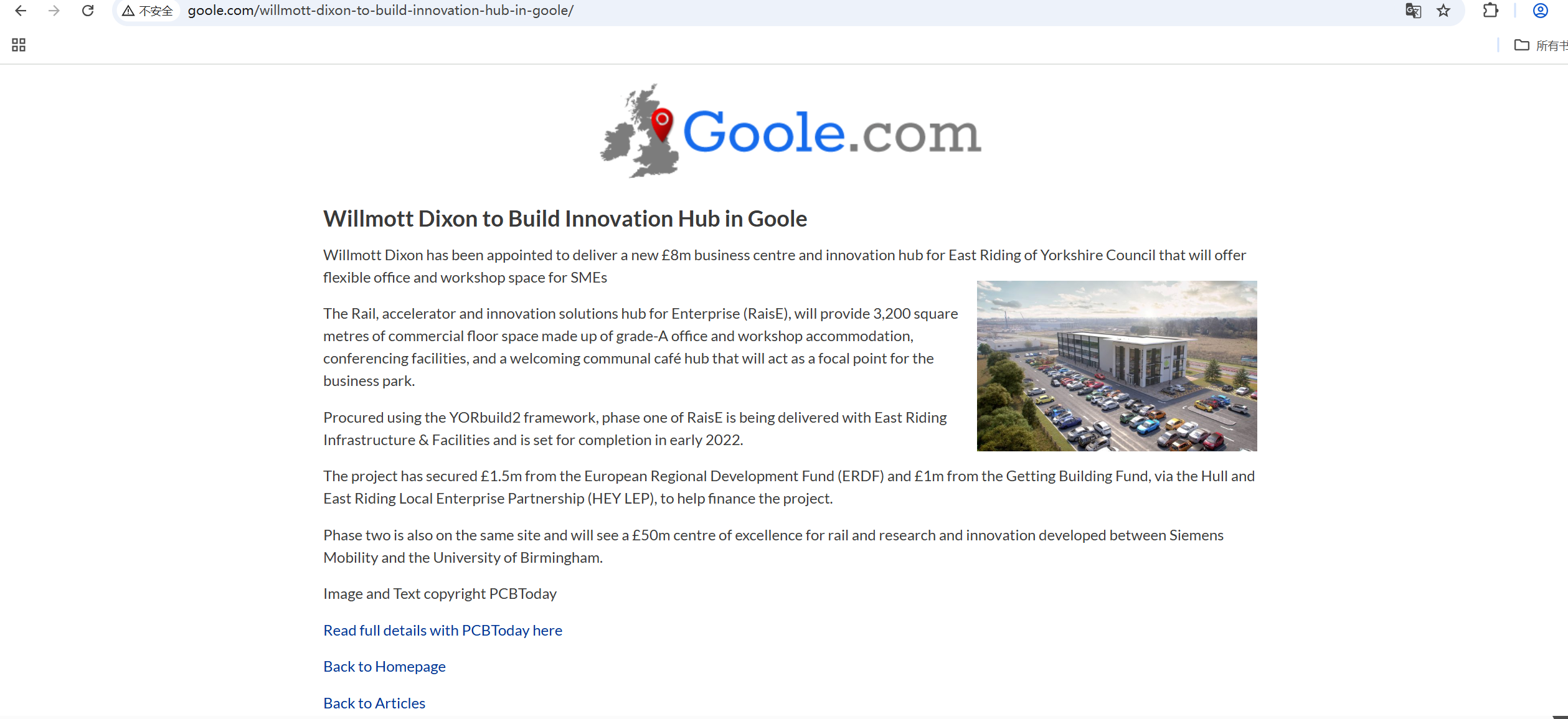
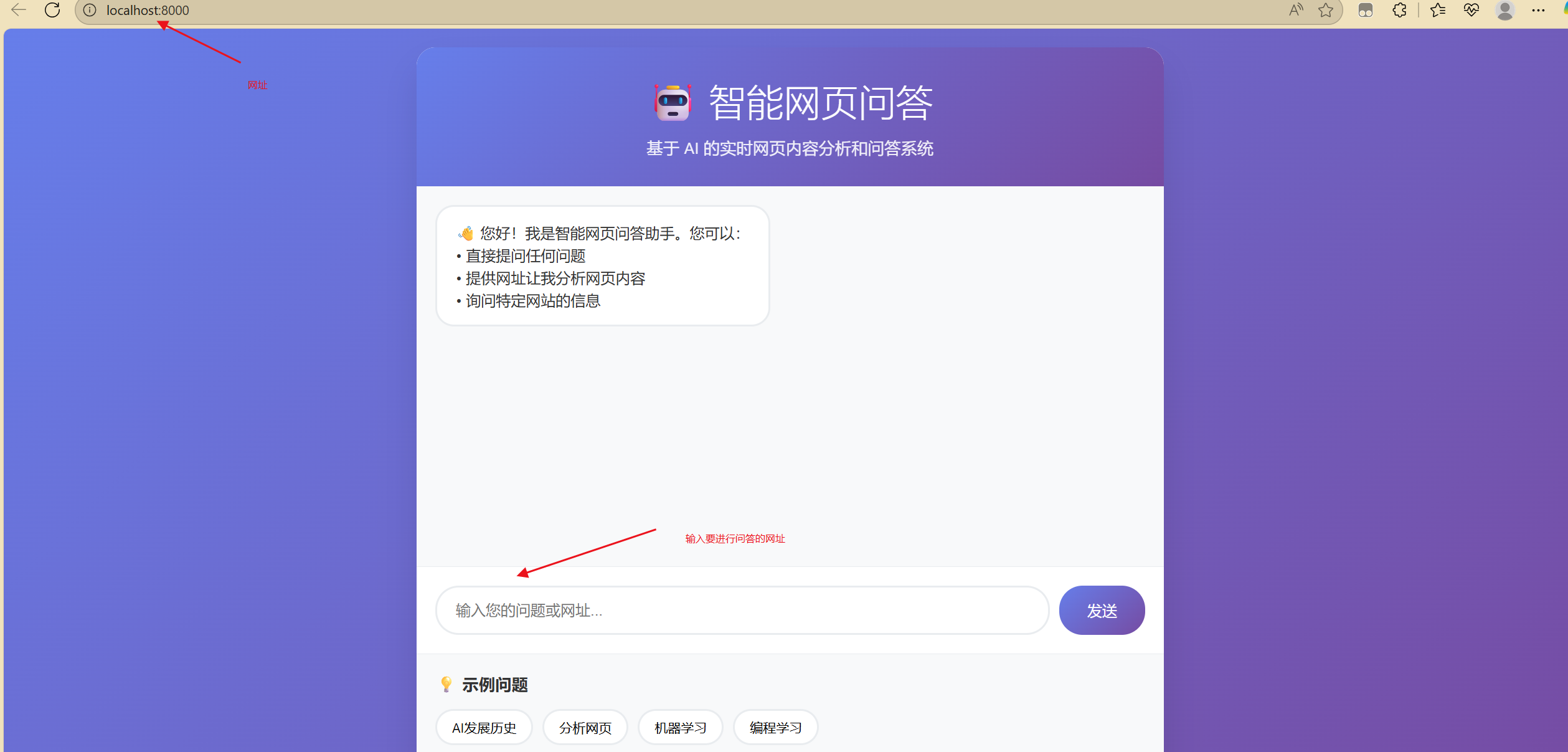 以下面的网站为例,总结内容摘要
  将网址交给我们的Agent,调用流程如下
Willmott Dixon to Build Innovation Hub in Goole - Goole
[
](http://www.goole.com/ "Goole")

Willmott Dixon to Build Innovation Hub in Goole

Willmott Dixon has been appointed to deliver a new £8m business centre and innovation hub for East Riding of Yorkshire Council that will offer flexible office and workshop space for SMEs
The Rail, accelerator and innovation solutions hub for Enterprise (RaisE), will provide 3,200 square metres of commercial floor space made up of grade-A office and workshop accommodation, conferencing facilities, and a welcoming communal café hub that will act as a focal point for the business park.

Procured using the YORbuild2 framework, phase one of RaisE is being delivered with East Riding Infrastructure & Facilities and is set for completion in early 2022.

The project has secured £1.5m from the European Regional Development Fund (ERDF) and £1m from the Getting Building Fund, via the Hull and East Riding Local Enterprise Partnership (HEY LEP), to help finance the project.

Phase two is also on the same site and will see a £50m centre of excellence for rail and research and innovation developed between Siemens Mobility and the University of Birmingham.

Image and Text copyright PCBToday

Read full details with PCBToday here

Back to Homepage

Back to Articles
最终响应内容如下
我已经使用MCP工具获取并总结了您提供的网页内容。以下是关于"Willmott Dixon to Build Innovation Hub in Goole"的内容摘要:
威尔莫特·迪克森将在古尔建设创新中心
威尔莫特·迪克森(Willmott Dixon)已被任命为东约克郡议会(East Riding of Yorkshire Council)建造一个价值800万英镑的新商业中心和创新中心,该中心将为中小企业提供灵活的办公和工作空间。
这个名为"企业铁路、加速器和创新解决方案中心"(RaisE)的项目将提供3,200平方米的商业空间,包括A级办公室和工作室、会议设施,以及一个作为商业园焦点的公共咖啡中心。
该项目使用YORbuild2框架采购,RaisE的第一阶段正由East Riding Infrastructure & Facilities负责交付,预计将于2022年初完成。
该项目已从欧洲区域发展基金(ERDF)获得150万英镑资金,并通过赫尔和东赖丁地方企业合作伙伴关系(HEY LEP)从"建设基金"获得100万英镑,以帮助为项目提供资金。
第二阶段也在同一地点,将看到西门子移动和伯明翰大学之间开发的5000万英镑铁路研究和创新卓越中心。
总结
实战出真知,MCP Server 的核心价值显现无疑,它是AI连接真实世界的关键“实时数据引擎”。将繁琐、易出错且易被封锁的网络数据抓取工作,封装成简单可靠的API调用,让开发者能专注核心业务逻辑,无需陷入爬虫开发的困境。若需要搭建下一代AI Agent,或想自动化需实时网络数据的工作流MCP Server 是必备工具。
