Ascend C编程语言从入门到精通:算子开发实战指南
昇腾CANN训练营简介
2025年昇腾CANN训练营焕新升级,依托CANN全面开源开放,推出四大定制化专题课程,满足开发者不同阶段的学习需求,快速提升Ascend C算子开发技术。无论你是零基础入门还是进阶提升,都能在这里找到适合自己的学习路径。完成Ascend C算子中级认证和社区任务,即可领取精美证书,更有机会赢取华为手机、平板、开发板等大奖。
报名链接:https://www.hiascend.com/developer/activities/cann20252
一、Ascend C编程语言概述
1.1 Ascend C简介
Ascend C是CANN针对算子开发场景推出的编程语言,原生支持C和C++标准规范,兼具开发效率和运行性能。基于Ascend C编写的算子程序,通过编译器编译和运行时调度,运行在昇腾AI处理器上。
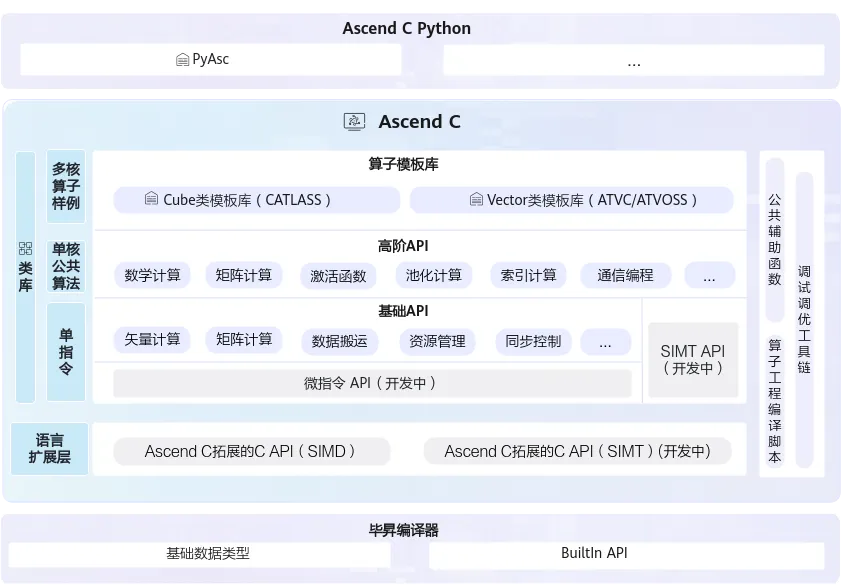 图1:Ascend C多层级API体系(图片来源:昇腾官方文档)
1.2 Ascend C的核心优势
Ascend C作为面向昇腾AI处理器的专用编程语言,具有以下核心优势:
1.3 Ascend C的应用场景
Ascend C主要应用于以下算子开发场景:
- 自定义算子开发:开发标准库中不存在的创新算法算子
- 性能优化:对现有算子进行性能优化
- 算法移植:将其他平台的算法移植到昇腾平台
- 大模型优化:开发Transformer等大模型的专用融合算子
二、Ascend C编程模型
2.1 编程模型概述
Ascend C采用SPMD(Single Program, Multiple Data)并行编程模型,这意味着同一个程序在多个处理单元上并行执行不同的数据。这种模型简化了并行编程的复杂度,开发者只需编写单程序逻辑,编译器和运行时系统会自动将其分配到多个核上并行执行。

2.2 两种编程范式
Ascend C支持两种编程范式,开发者可以根据需求选择:
范式一:基于Kernel的编程
这是最基础的编程范式,开发者直接编写Kernel函数来实现算子逻辑:
// 基于Kernel的编程范式示例
#include "kernel_operator.h"
using namespace AscendC;
// 定义Kernel函数
extern "C" __global__ __aicore__ void add_kernel(
LocalTensor<half> x,
LocalTensor<half> y,
LocalTensor<half> z,
uint32_t total_length
) {
// 获取当前核的起始位置
uint32_t block_offset = GetBlockIdx() * GetBlockLength();
// 计算当前核需要处理的数据长度
uint32_t current_length = std::min(
GetBlockLength(),
total_length - block_offset
);
// 创建LocalTensor的视图
auto x_local = x[block_offset];
auto y_local = y[block_offset];
auto z_local = z[block_offset];
// 执行向量加法
Add(z_local, x_local, y_local, current_length);
}
范式二:基于类(Class)的编程
这是更高级的编程范式,通过继承OpKernel类来实现算子:
// 基于类的编程范式示例
#include "kernel_operator.h"
using namespace AscendC;
class AddKernel : public OpKernel {
public:
// 核心计算函数
void Compute() override {
// 获取输入输出Tensor
Tensor x = context->GetInputTensor(0);
Tensor y = context->GetInputTensor(1);
Tensor z = context->GetOutputTensor(0);
// 获取Tensor大小
uint32_t total_length = x.GetSize();
// 分配Unified Buffer
LocalTensor<half> x_ub;
LocalTensor<half> y_ub;
LocalTensor<half> z_ub;
x_ub = x.GetValue<half>();
y_ub = y.GetValue<half>();
z_ub = z.GetValue<half>();
// 执行向量加法
Add(z_ub, x_ub, y_ub, total_length);
// 设置输出
z.SetValue<half>(z_ub);
}
};
// 注册算子
REG_OP(AddKernel)
.Input("x")
.Input("y")
.Output("z")
.Kernel<AddKernel>()
.LaunchType(KernelType::AUTO_KERNEL);
三、Ascend C多层级API详解
3.1 基础API(Tensor API)
基础API是基于Tensor进行编程的C++类库API,提供单指令级抽象,为底层算子开发提供灵活控制能力。
// 基础API使用示例
#include "kernel_operator.h"
using namespace AscendC;
class BasicAPIExample {
public:
void VectorOperations() {
// 分配Unified Buffer空间
LocalTensor<float> input = AllocaUB<float>(1024);
LocalTensor<float> weight = AllocaUB<float>(1024);
LocalTensor<float> output = AllocaUB<float>(1024);
LocalTensor<float> bias = AllocaUB<float>(256);
// ========== 向量加法 ==========
Add(output, input, bias, 256);
// ========== 向量乘法 ==========
Mul(output, input, weight, 1024);
// ========== 激活函数 ==========
// ReLU
Relu(output, input, 1024);
// Sigmoid
Sigmoid(output, input, 1024);
// GELU(用于Transformer)
Gelu(output, input, 1024);
// ========== 数学运算 ==========
// 平方根
Sqrt(output, input, 1024);
// 指数运算
Exp(output, input, 1024);
// 对数运算
Ln(output, input, 1024);
}
void DataManipulation() {
LocalTensor<float> src = AllocaUB<float>(1024);
LocalTensor<float> dst = AllocaUB<float>(1024);
// ========== 数据复制 ==========
DataCopy(dst, src, 1024);
// ========== 数据重复 ==========
// 将前256个数据重复4次
Duplicate(dst, src[0], 256, 4);
// ========== 数据填充 ==========
float fill_value = 0.0f;
Fixes(dst, fill_value, 1024);
}
};
3.2 高阶API(高级算法封装)
高阶API封装了单核公共算法,涵盖一些常见的计算算法(如卷积、矩阵运算等),显著降低复杂算法开发门槛。
// 高阶API使用示例
#include "kernel_operator.h"
#include "kernel_adv_api.h"
using namespace AscendC;
class AdvancedAPIExample {
public:
void MatrixOperations() {
// 定义矩阵维度
const uint32_t M = 64;
const uint32_t K = 64;
const uint32_t N = 64;
// 分配Unified Buffer
LocalTensor<half> A = AllocaUB<half>(M * K);
LocalTensor<half> B = AllocaUB<half>(K * N);
LocalTensor<half> C = AllocaUB<half>(M * N);
// ========== 矩阵乘法 ==========
// C = A * B
// 使用高阶API的MatMul函数
MatMul(C, A, B, M, N, K);
// ========== 矩阵转置 ==========
LocalTensor<half> At = AllocaUB<half>(M * K);
Transpose(At, A, M, K);
}
void ConvolutionOperations() {
// 卷积参数
const int C_in = 3; // 输入通道数
const int C_out = 64; // 输出通道数
const int H = 224; // 输入高度
const int W = 224; // 输入宽度
const int K_h = 3; // 卷积核高度
const int K_w = 3; // 卷积核宽度
// 分配内存
LocalTensor<half> input = AllocaUB<half>(C_in * H * W);
LocalTensor<half> filter = AllocaUB<half>(C_out * C_in * K_h * K_w);
LocalTensor<half> output = AllocaUB<half>(C_out * H * W);
// ========== 卷积运算 ==========
// 使用高阶API的卷积函数
Conv2d(output, input, filter,
{C_in, H, W}, // 输入shape
{C_out, C_in, K_h, K_w}, // filter shape
{1, 1}, // stride
{1, 1, 1, 1}); // padding
}
};
3.3 算子模板库(CATLASS)
算子模板库基于模板提供算子完整实现参考,简化Tiling(切分算法)开发,支撑用户自定义扩展。
// 算子模板库使用示例
#include "catlass/matmul.h"
using namespace catlass;
// 使用模板库的矩阵乘法
void MatMulExample() {
// 定义矩阵类型和维度
using MatTypeA = typename MatMulConfig<
half, // 数据类型
16, 16, // 分块大小
true // 是否转置
>::TypeA;
using MatTypeB = typename MatMulConfig<
half,
16, 16,
false
>::TypeB;
// 执行矩阵乘法
MatMulKernel<MatTypeA, MatTypeB> matmul_kernel;
matmul_kernel(
A, // 输入矩阵A
B, // 输入矩阵B
C, // 输出矩阵C
M, N, K // 矩阵维度
);
}
四、实战案例:从零开发自定义算子
4.1 案例一:向量加法算子
这是最基础的算子示例,帮助理解Ascend C的基本编程模式。
// add_op.cpp - 向量加法算子完整实现
#include "kernel_operator.h"
using namespace AscendC;
class VectorAddKernel : public OpKernel {
public:
// 核心计算函数
void Compute() override {
// 1. 获取输入输出Tensor
Tensor x = context->GetInputTensor(0);
Tensor y = context->GetInputTensor(1);
Tensor z = context->GetOutputTensor(0);
// 2. 获取Tensor信息
uint32_t total_length = x.GetSize();
GAddr x_addr = x.GetAddr();
GAddr y_addr = y.GetAddr();
GAddr z_addr = z.GetAddr();
// 3. 计算分块参数
uint32_t block_length = GetBlockLength();
uint32_t block_offset = GetBlockIdx() * block_length;
// 4. 分配LocalTensor(Unified Buffer)
LocalTensor<half> x_ub = AllocaUB<half>();
LocalTensor<half> y_ub = AllocaUB<half>();
LocalTensor<half> z_ub = AllocaUB<half>();
// 5. 数据搬运:Global Memory -> Unified Buffer
DataCopy(x_ub, x_addr + block_offset, block_length);
DataCopy(y_ub, y_addr + block_offset, block_length);
// 6. 执行向量加法计算
Add(z_ub, x_ub, y_ub, block_length);
// 7. 结果写回:Unified Buffer -> Global Memory
DataCopy(z_addr + block_offset, z_ub, block_length);
}
};
// 注册算子
REG_OP(VectorAddKernel)
.Input("x")
.Input("y")
.Output("z")
.Kernel<VectorAddKernel>()
.LaunchType(KernelType::AUTO_KERNEL);
4.2 案例二:LeakyReLU激活函数算子
LeakyReLU是深度学习中常用的激活函数,这个示例展示了如何实现带参数的算子。
// leaky_relu_op.cpp - LeakyReLU激活函数算子
#include "kernel_operator.h"
using namespace AscendC;
class LeakyReLUKernel : public OpKernel {
public:
void Compute() override {
// 获取输入输出
Tensor input = context->GetInputTensor(0);
Tensor output = context->GetOutputTensor(0);
// 获取负斜率参数(默认0.01)
float alpha = context->GetAttr<float>("alpha");
// 分配Unified Buffer
LocalTensor<half> input_ub = AllocaUB<half>();
LocalTensor<half> output_ub = AllocaUB<half>();
LocalTensor<half> temp_ub = AllocaUB<half>();
// 数据搬运
uint32_t length = input.GetSize();
DataCopy(input_ub, input.GetAddr(), length);
// LeakyReLU实现:f(x) = max(alpha * x, x)
// 当x > 0时,输出x;当x <= 0时,输出alpha * x
// 方法1:使用Muls(向量乘标量)和Mins(元素级最大值)
Muls(temp_ub, input_ub, alpha, length); // temp = alpha * input
Mins(output_ub, temp_ub, input_ub, length); // output = max(temp, input)
// 方法2:使用条件判断
for (uint32_t i = 0; i < length; ++i) {
if (input_ub[i] <= 0) {
output_ub[i] = input_ub[i] * alpha;
} else {
output_ub[i] = input_ub[i];
}
}
// 结果写回
DataCopy(output.GetAddr(), output_ub, length);
}
};
// 注册算子
REG_OP(LeakyReLUKernel)
.Input("input")
.Output("output")
.Attr("alpha:float=0.01") // 默认参数值
.Kernel<LeakyReLUKernel>()
.LaunchType(KernelType::AUTO_KERNEL);
4.3 案例三:LayerNorm算子
LayerNorm是Transformer模型中的核心组件,这个示例展示了复杂算子的实现。
// layer_norm_op.cpp - LayerNorm算子实现
#include "kernel_operator.h"
using namespace AscendC;
class LayerNormKernel : public OpKernel {
public:
void Compute() override {
// 获取输入输出
Tensor input = context->GetInputTensor(0);
Tensor gamma = context->GetInputTensor(1);
Tensor beta = context->GetInputTensor(2);
Tensor output = context->GetOutputTensor(0);
Tensor mean = context->GetOutputTensor(1); // 可选输出
Tensor rstd = context->GetOutputTensor(2); // 可选输出
// 获取归一化维度
auto normalized_shape = context->GetAttr<std::vector<int>>("normalized_shape");
float epsilon = context->GetAttr<float>("epsilon");
// 计算归一化的元素数量
uint32_t norm_size = 1;
for (int dim : normalized_shape) {
norm_size *= dim;
}
// 分配Unified Buffer
LocalTensor<float> input_ub = AllocaUB<float>();
LocalTensor<float> gamma_ub = AllocaUB<float>();
LocalTensor<float> beta_ub = AllocaUB<float>();
LocalTensor<float> output_ub = AllocaUB<float>();
LocalTensor<float> mean_ub = AllocaUB<float>();
LocalTensor<float> rstd_ub = AllocaUB<float>();
LocalTensor<float> temp_ub = AllocaUB<float>();
// 搬运数据
uint32_t total_size = input.GetSize();
DataCopy(input_ub, input.GetAddr(), total_size);
DataCopy(gamma_ub, gamma.GetAddr(), norm_size);
DataCopy(beta_ub, beta.GetAddr(), norm_size);
// ========== 计算均值 ==========
// 沿归一化维度求和
ReduceSum(mean_ub, input_ub, norm_size);
// 除以元素数量得到均值
float inv_norm_size = 1.0f / norm_size;
Muls(mean_ub, mean_ub, inv_norm_size, norm_size);
// ========== 计算方差 ==========
// (x - mean)^2
Sub(temp_ub, input_ub, mean_ub, total_size);
Mul(temp_ub, temp_ub, temp_ub, total_size);
// 求和
ReduceSum(rstd_ub, temp_ub, norm_size);
// 除以元素数量
Muls(rstd_ub, rstd_ub, inv_norm_size, norm_size);
// 加上epsilon防止除零
Adds(rstd_ub, rstd_ub, epsilon, norm_size);
// 计算标准差的倒数:1 / sqrt(var)
Sqrt(rstd_ub, rstd_ub, norm_size);
Reciprocal(rstd_ub, rstd_ub, norm_size);
// ========== 归一化 ==========
// (x - mean) / std
Sub(temp_ub, input_ub, mean_ub, total_size);
Mul(temp_ub, temp_ub, rstd_ub, total_size);
// ========== 缩放和偏移 ==========
// output = x * gamma + beta
Mul(temp_ub, temp_ub, gamma_ub, total_size);
Add(output_ub, temp_ub, beta_ub, total_size);
// 输出均值和标准差倒数(用于反向传播)
DataCopy(mean.GetAddr(), mean_ub, norm_size);
DataCopy(rstd.GetAddr(), rstd_ub, norm_size);
// 输出结果
DataCopy(output.GetAddr(), output_ub, total_size);
}
};
// 注册算子
REG_OP(LayerNormKernel)
.Input("input")
.Input("gamma")
.Input("beta")
.Output("output")
.Output("mean")
.Output("rstd")
.Attr("normalized_shape:vector<int>")
.Attr("epsilon:float=1e-5")
.Kernel<LayerNormKernel>()
.LaunchType(KernelType::AUTO_KERNEL);
4.4 案例四:矩阵乘法算子
矩阵乘法是深度学习中最核心的计算操作,这个示例展示了如何利用Cube单元实现高性能矩阵乘法。
// matmul_op.cpp - 高性能矩阵乘法算子
#include "kernel_operator.h"
using namespace AscendC;
class MatMulKernel : public OpKernel {
public:
void Compute() override {
// 获取输入输出
Tensor A = context->GetInputTensor(0); // [M, K]
Tensor B = context->GetInputTensor(1); // [K, N]
Tensor C = context->GetOutputTensor(0); // [M, N]
// 获取矩阵维度
int M = context->GetAttr<int>("M");
int K = context->GetAttr<int>("K");
int N = context->GetAttr<int>("N");
// 判断是否使用转置
bool transpose_a = context->GetAttr<bool>("transpose_a");
bool transpose_b = context->GetAttr<bool>("transpose_b");
// ========== 计算分块参数 ==========
const uint32_t TILE_M = 16;
const uint32_t TILE_K = 16;
const uint32_t TILE_N = 16;
uint32_t tiles_m = (M + TILE_M - 1) / TILE_M;
uint32_t tiles_k = (K + TILE_K - 1) / TILE_K;
uint32_t tiles_n = (N + TILE_N - 1) / TILE_N;
// 分配L0 Buffer(Cube单元专用存储)
LocalTensor<half> l0_a = AllocaL0Buffer<half>();
LocalTensor<half> l0_b = AllocaL0Buffer<half>();
LocalTensor<half> l0_c = AllocaL0Buffer<half>();
// 初始化输出为0
Fixes(l0_c, static_cast<half>(0.0), TILE_M * TILE_N);
// ========== 分块矩阵乘法 ==========
for (uint32_t tm = 0; tm < tiles_m; ++tm) {
for (uint32_t tn = 0; tn < tiles_n; ++tn) {
// 每次计算C的一个分块
uint32_t m_start = tm * TILE_M;
uint32_t n_start = tn * TILE_N;
uint32_t m_end = std::min(m_start + TILE_M, M);
uint32_t n_end = std::min(n_start + TILE_N, N);
// 累加K维度
for (uint32_t tk = 0; tk < tiles_k; ++tk) {
uint32_t k_start = tk * TILE_K;
uint32_t k_end = std::min(k_start + TILE_K, K);
// 搬运A的分块到L0A
DataCopy(l0_a, A.GetAddr() + m_start * K + k_start,
(m_end - m_start) * (k_end - k_start));
// 搬运B的分块到L0B
DataCopy(l0_b, B.GetAddr() + k_start * N + n_start,
(k_end - k_start) * (n_end - n_start));
// Cube矩阵乘法:C += A * B
uint32_t current_m = m_end - m_start;
uint32_t current_k = k_end - k_start;
uint32_t current_n = n_end - n_start;
// 使用Cube单元执行矩阵乘法
// L0C = L0A * L0B + L0C
MatMul(l0_c, l0_a, l0_b, current_m, current_n, current_k);
}
// 将结果写回
DataCopy(C.GetAddr() + m_start * N + n_start, l0_c,
(m_end - m_start) * (n_end - n_start));
}
}
}
};
// 注册算子
REG_OP(MatMulKernel)
.Input("A")
.Input("B")
.Output("C")
.Attr("M:int")
.Attr("K:int")
.Attr("N:int")
.Attr("transpose_a:bool=false")
.Attr("transpose_b:bool=false")
.Kernel<MatMulKernel>()
.LaunchType(KernelType::AUTO_KERNEL);
五、Host侧调用与算子使用
5.1 Host侧调用接口
开发完Kernel侧算子后,需要在Host侧进行调用。以下是完整的调用流程:
// host调用示例 - main.cpp
#include "acl/acl.h"
#include "add_op.h" // 包含自定义算子头文件
int main() {
// 1. 初始化ACL
aclError ret = aclInit(nullptr);
if (ret != ACL_ERROR_NONE) {
std::cerr << "aclInit failed: " << ret << std::endl;
return -1;
}
// 2. 设置设备
int32_t deviceId = 0;
ret = aclrtSetDevice(deviceId);
if (ret != ACL_ERROR_NONE) {
std::cerr << "aclrtSetDevice failed: " << ret << std::endl;
return -1;
}
// 3. 创建Stream
aclrtStream stream;
ret = aclrtCreateStream(&stream);
if (ret != ACL_ERROR_NONE) {
std::cerr << "aclrtCreateStream failed: " << ret << std::endl;
return -1;
}
// 4. 准备输入输出数据
const uint32_t DATA_SIZE = 1024;
std::vector<half> host_x(DATA_SIZE, 1.0f);
std::vector<half> host_y(DATA_SIZE, 2.0f);
std::vector<half> host_z(DATA_SIZE, 0.0f);
// 5. 分配Device内存
void* dev_x;
void* dev_y;
void* dev_z;
aclrtMalloc(&dev_x, DATA_SIZE * sizeof(half), ACL_MEM_MALLOC_HUGE_FIRST);
aclrtMalloc(&dev_y, DATA_SIZE * sizeof(half), ACL_MEM_MALLOC_HUGE_FIRST);
aclrtMalloc(&dev_z, DATA_SIZE * sizeof(half), ACL_MEM_MALLOC_HUGE_FIRST);
// 6. 数据拷贝:Host -> Device
aclrtMemcpy(dev_x, DATA_SIZE * sizeof(half), host_x.data(),
DATA_SIZE * sizeof(half), ACL_MEMCPY_HOST_TO_DEVICE);
aclrtMemcpy(dev_y, DATA_SIZE * sizeof(half), host_y.data(),
DATA_SIZE * sizeof(half), ACL_MEMCPY_HOST_TO_DEVICE);
// 7. 创建Tensor对象
Tensor tensor_x;
Tensor tensor_y;
Tensor tensor_z;
tensor_x.SetAddr(reinterpret_cast<uint64_t>(dev_x));
tensor_x.SetSize(DATA_SIZE);
tensor_x.SetDataType(DataType::DT_FLOAT16);
tensor_y.SetAddr(reinterpret_cast<uint64_t>(dev_y));
tensor_y.SetSize(DATA_SIZE);
tensor_y.SetDataType(DataType::DT_FLOAT16);
tensor_z.SetAddr(reinterpret_cast<uint64_t>(dev_z));
tensor_z.SetSize(DATA_SIZE);
tensor_z.SetDataType(DataType::DT_FLOAT16);
// 8. 创建OpContext
OpContext context;
context.SetInputTensor(0, tensor_x);
context.SetInputTensor(1, tensor_y);
context.SetOutputTensor(0, tensor_z);
// 9. 创建并执行Kernel
VectorAddKernel kernel;
kernel.SetContext(&context);
kernel.Compute();
// 10. 数据拷贝:Device -> Host
aclrtMemcpy(host_z.data(), DATA_SIZE * sizeof(half), dev_z,
DATA_SIZE * sizeof(half), ACL_MEMCPY_DEVICE_TO_HOST);
// 11. 同步Stream
aclrtSynchronizeStream(stream);
// 12. 验证结果
bool correct = true;
for (uint32_t i = 0; i < DATA_SIZE; ++i) {
float expected = 1.0f + 2.0f; // x + y
if (std::abs(host_z[i] - expected) > 1e-3f) {
correct = false;
break;
}
}
std::cout << "Result: " << (correct ? "PASS" : "FAIL") << std::endl;
// 13. 释放资源
aclrtFree(dev_x);
aclrtFree(dev_y);
aclrtFree(dev_z);
aclrtDestroyStream(stream);
aclrtResetDevice(deviceId);
aclFinalize();
return 0;
}
5.2 在PyTorch中使用自定义算子
可以通过PyTorch的扩展机制在Python中调用Ascend C算子:
# pytorch_extension.py - PyTorch扩展
import torch
import torch_npu
class VectorAddOp(torch.autograd.Function):
@staticmethod
def forward(ctx, x, y):
# 调用Ascend C算子
output = torch_npu.npu_custom_add(x, y)
return output
@staticmethod
def backward(ctx, grad_output):
# 反向传播
grad_x = grad_output
grad_y = grad_output
return grad_x, grad_y
def vector_add(x, y):
return VectorAddOp.apply(x, y)
# 使用示例
if __name__ == "__main__":
# 创建输入张量
x = torch.randn(1024).npu()
y = torch.randn(1024).npu()
# 调用自定义算子
z = vector_add(x, y)
print("Input x:", x[:5])
print("Input y:", y[:5])
print("Output z:", z[:5])
六、性能优化最佳实践
6.1 Tiling策略优化
Tiling(分块)是Ascend C算子优化的核心技术之一。合理的Tiling策略可以充分利用片上存储,减少访存开销。
// Tiling策略优化示例
class TilingOptimization {
public:
void OptimizedMatMul() {
// 获取硬件规格
auto soc_spec = GetSocSpec();
uint32_t ub_size = soc_spec.GetUnfiedBufferSize();
uint32_t l0_size = soc_spec.GetL0BufferSize();
// 计算最优Tiling大小
// 目标:充分利用L0 Buffer,减少数据搬运
uint32_t TILE_M = l0_size / (2 * sizeof(half)); // A和C各占一半
uint32_t TILE_K = TILE_M;
uint32_t TILE_N = TILE_M;
// 确保Tiling大小是16的倍数(Cube单元要求)
TILE_M = (TILE_M / 16) * 16;
TILE_K = (TILE_K / 16) * 16;
TILE_N = (TILE_N / 16) * 16;
// 使用计算得到的Tiling大小进行分块计算
for (uint32_t m = 0; m < M; m += TILE_M) {
for (uint32_t n = 0; n < N; n += TILE_N) {
// 当前块的实际大小
uint32_t cur_m = std::min(TILE_M, M - m);
uint32_t cur_n = std::min(TILE_N, N - n);
// 执行计算...
}
}
}
};
6.2 双缓冲优化
双缓冲技术可以在计算的同时进行数据搬运,隐藏访存延迟:
// 双缓冲优化示例
class DoubleBufferOptimization {
public:
void ProcessWithDoubleBuffer() {
// 分配两个缓冲区
LocalTensor<half> buffer1[2];
LocalTensor<half> buffer2[2];
for (int i = 0; i < 2; ++i) {
buffer1[i] = AllocaUB<half>();
buffer2[i] = AllocaUB<half>();
}
int current = 0;
int next = 1;
// 预取第一块数据
DataTransfer(buffer1[current], src_addr, block_size);
for (uint32_t i = 0; i < num_blocks; ++i) {
// ========== 当前块计算 ==========
// 在buffer1[current]上进行计算
Compute(buffer1[current], buffer2[current]);
// ========== 下一块预取 ==========
if (i + 1 < num_blocks) {
// 在计算的同时,预取下一块数据到buffer1[next]
DataTransferAsync(buffer1[next],
src_addr + (i + 1) * block_size,
block_size);
}
// 交换缓冲区
current = next;
next = 1 - current;
}
}
};
6.3 数据对齐优化
确保数据正确对齐可以提高访存效率:
// 数据对齐优化示例
class AlignmentOptimization {
public:
void ProcessAlignedData() {
// 确保数据32字节对齐(Vector指令要求)
const uint32_t ALIGNMENT = 32;
// 计算对齐后的大小
uint32_t size = 1000;
uint32_t aligned_size = ((size + ALIGNMENT - 1) / ALIGNMENT) * ALIGNMENT;
// 分配对齐的内存
LocalTensor<half> data = AllocaUB<half>();
data.SetAlignment(ALIGNMENT);
// 使用对齐的数据进行计算
// 编译器会生成更高效的指令
Process(data, aligned_size);
}
};
6.4 性能对比
以下是不同优化策略的性能对比:
七、调试与测试
7.1 CPU孪生调试
Ascend C支持CPU模拟调试,方便开发者快速定位问题:
// CPU调试示例
#include "cpu_sim.h"
void DebugOnCPU() {
// 启用CPU模拟模式
SetCpuSimMode(true);
// 分配CPU内存
void* host_x = malloc(DATA_SIZE * sizeof(half));
void* host_y = malloc(DATA_SIZE * sizeof(half));
void* host_z = malloc(DATA_SIZE * sizeof(half));
// 初始化数据
InitializeData(host_x, DATA_SIZE);
InitializeData(host_y, DATA_SIZE);
// 在CPU上执行算子
VectorAddKernel kernel;
kernel.SetInputs(host_x, host_y);
kernel.SetOutputs(host_z);
kernel.ComputeOnCPU();
// 验证结果
ValidateResult(host_z, DATA_SIZE);
// 释放内存
free(host_x);
free(host_y);
free(host_z);
}
7.2 NPU验证
在CPU上调试通过后,需要在NPU上进行验证:
// NPU验证示例
void VerifyOnNPU() {
// 1. CPU上计算参考结果
std::vector<float> cpu_result;
ComputeOnCPU(input, cpu_result);
// 2. NPU上计算
std::vector<float> npu_result;
ComputeOnNPU(input, npu_result);
// 3. 比对结果
bool passed = CompareResults(cpu_result, npu_result, 1e-3f);
if (passed) {
std::cout << "NPU verification: PASS" << std::endl;
} else {
std::cout << "NPU verification: FAIL" << std::endl;
// 输出差异信息
PrintDiff(cpu_result, npu_result);
}
}
八、学习路径与资源
8.1 Ascend C学习路径

8.2 推荐学习资源
九、总结与展望
9.1 技术要点总结
本文系统介绍了Ascend C编程语言的核心概念与实战应用,主要结论如下:
Ascend C的定位:Ascend C是面向昇腾AI处理器算子开发的专用编程语言,通过多层级API设计,既提供了底层硬件的控制能力,又通过高阶API降低了开发门槛。
编程模型:采用SPMD并行编程模型,开发者编写单程序逻辑,编译器和运行时系统自动实现多核并行,大大简化了并行编程的复杂度。
实战应用:通过向量加法、LeakyReLU、LayerNorm、矩阵乘法等四个实战案例,展示了从简单到复杂的算子开发全流程。
性能优化:Tiling策略、双缓冲、数据对齐等优化技术可以显著提升算子性能,实测可带来30-70%的性能提升。
9.2 发展趋势展望
随着AI技术的持续发展,Ascend C也在不断演进:
更简洁的API:提供更高层次的抽象,进一步降低开发门槛
更智能的优化:基于AI的自动优化技术,自动选择最优的实现策略
更丰富的模板库:提供更多常用算子的模板实现,开箱即用
9.3 学习建议
对于希望深入掌握Ascend C的开发者,建议按以下路径进行:
- 打好基础:首先掌握C/C++编程基础
- 理解模型:深入理解SPMD并行编程模型
- 实践编程:通过实际编码掌握API使用
- 性能调优:学习性能分析和优化技巧
- 参考范例:学习开源项目中的最佳实践
参考资源
- Ascend C官方文档:https://www.hiascend.com/document/detail/zh/CANNCommunityEdition/850alpha002/opdevg/Ascendcopdevg/atlas_ascendc_10_00046.html
- Ascend C主页:https://www.hiascend.com/zh/ascend-c
- CANN社区版:https://www.hiascend.com/document/detail/zh/CANNCommunityEdition/850alpha002/index/index.html
- MindSpeed加速库:https://gitee.com/ascend/MindSpeed
- 2025昇腾CANN训练营:https://www.hiascend.com/developer/activities/cann20252
讨论问题
- 如何选择合适的数据类型(FP16/FP32/INT8)来平衡精度和性能?
- 在实现复杂算子时,如何划分Host侧和Device侧的职责?
- 面对大模型场景,如何设计高效的融合算子?
本文基于CANN 8.5.0.alpha002版本编写,如有更新请参考昇腾社区最新官方文档。