
DeepSeek-OCR医疗应用实战:病历、检验单自动录入系统

文章摘要
医院每天产生大量纸质病历和检验单,人工录入既慢又容易出错。DeepSeek-OCR是新推出的开源视觉语言模型,能自动识别手写病历、复杂表格、化学公式和多语言文本,轻松将纸质资料转成结构化数据。文章详解模型特点、部署方案、HIS对接及批量处理方法。

医院每天产生大量纸质文档(手写病历、化验单、影像报告),人工录入耗时且易错。
DeepSeek-OCR是一个30亿参数的开源视觉语言模型,能自动识别表格、公式、手写文字和多语言文本,帮你把纸质材料转成结构化数据。
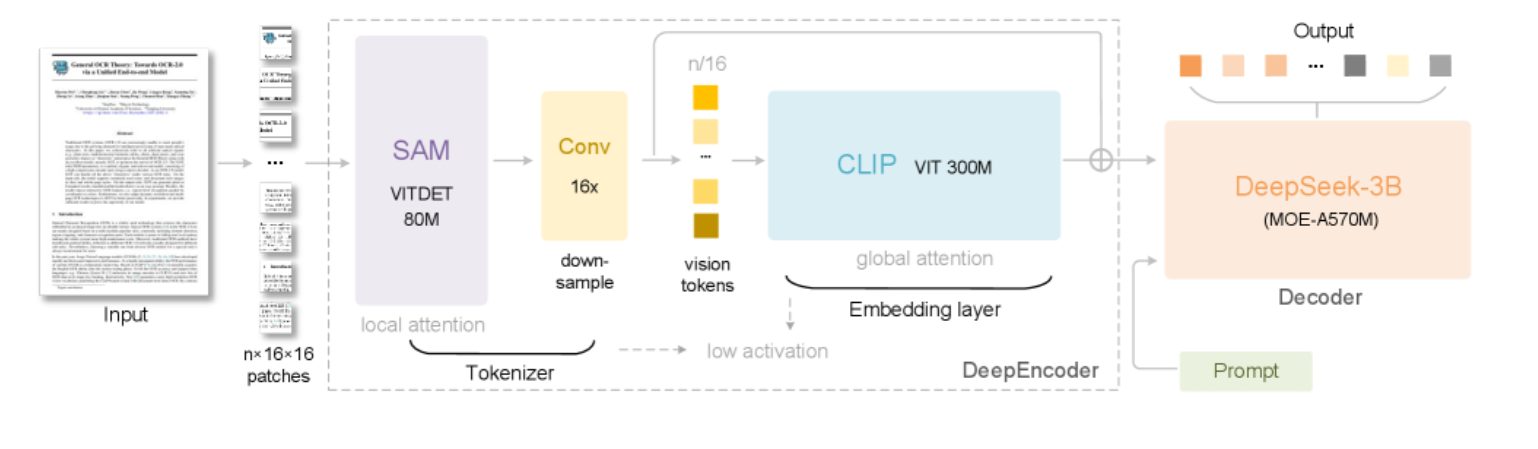
一、为什么医疗场景需要专业OCR
传统OCR(如Tesseract)只能识别印刷体文字,遇到以下场景就失效
● 复杂表格:检验报告的多层表头、化验单的网格数据
● 手写病历:医生龙飞凤舞的处方和主诉记录
● 化学公式:药物分子式(如C₆H₁₂O₆)、SMILES结构
● 多语言混排:中英文病历、外籍患者的双语报告
DeepSeek-OCR的突破
1. 结构化提取:把表格转成HTML/Markdown,直接导入HIS系统
2. 公式识别:支持LaTeX数学公式和化学结构式
3. 手写识别:能读懂医生的潦草字迹
4. 多语言:同时处理中文、英文、日文病历
二、方案推荐
预算紧张:DeepSeek-OCR(本地部署)
医院级应用:阿里云医疗OCR(支持HIPAA合规,私有化部署)+ DeepSeek作为补充(处理复杂公式和手写)
三、完整代码实现(Gradio应用)
1. 环境准备(10分钟)
硬件要求:
● GPU:NVIDIA L4或T4(显存≥16GB)
● RAM:≥32GB
● 存储:≥50GB(模型文件约6GB)
软件依赖:
# 第一步:配置pip镜像源(清华源)
pip config set global.index-url https://pypi.tuna.tsinghua.edu.cn/simple

# 第二步:创建虚拟环境
conda create -n deepseek-ocr python=3.10
conda activate deepseek-ocr

# 第三步:安装核心依赖
pip install torch==2.3.0 torchvision==0.18.0 --index-url https://download.pytorch.org/whl/cu118
pip install transformers==4.46.3 tokenizers==0.20.3 \
    einops addict easydict pillow gradio \
    modelscope accelerate bitsandbytes
● 使用清华镜像加速pip下载
● 跳过flash-attn,代码中已设置attn_implementation="eager"兼容
● 安装bitsandbytes用于模型量化(降低显存需求)
2. 核心代码:搭建Web应用
import os, time, torch, gradio as gr
from PIL import Image
from transformers import AutoModel, AutoTokenizer, BitsAndBytesConfig
from datetime import datetime
import random, string

# ===============================
# 1. 从魔搭ModelScope下载模型(国内加速)
# ===============================
from modelscope import snapshot_download

print("🔄 正在从魔搭ModelScope下载模型(首次运行约10分钟)...")
model_cache_dir = snapshot_download(
    "deepseek-ai/DeepSeek-OCR",
    cache_dir="./models"  # 下载到本地,避免重复下载
)
print(f"✅ 模型已缓存到: {model_cache_dir}")

# ===============================
# 2. 加载模型(启用8bit量化,显存占用减半)
# ===============================
tok = AutoTokenizer.from_pretrained(model_cache_dir, trust_remote_code=True)
if tok.pad_token is None:
    tok.pad_token = tok.eos_token

# 配置8bit量化
quantization_config = BitsAndBytesConfig(
    load_in_8bit=True,
    bnb_8bit_compute_dtype=torch.float16  # 计算精度
)

print("🚀 加载模型中(启用8bit量化)...")
model = AutoModel.from_pretrained(
    model_cache_dir,
    trust_remote_code=True,
    use_safetensors=True,
    attn_implementation="eager",  # 兼容无flash-attn环境
    quantization_config=quantization_config,  # 启用量化
    device_map="auto"  # 自动分配GPU/CPU
).eval()
print("✅ 模型加载完成!")

# ===============================
# 3. 创建输出目录
# ===============================
def new_run_dir(base="./runs"):
    """为每次OCR创建独立目录"""
    os.makedirs(base, exist_ok=True)
    ts = datetime.now().strftime("%Y%m%d-%H%M%S")
    rid = ''.join(random.choices(string.ascii_lowercase + string.digits, k=5))
    path = os.path.join(base, f"run_{ts}_{rid}")
    os.makedirs(path)
    return path

# ===============================
# 4. OCR处理函数
# ===============================
def gr_ocr(image, mode, custom_prompt, base_size, image_size, crop_mode):
    """核心OCR处理逻辑"""
    # 图像预处理
    img = image.convert("RGB")
    if max(img.size) > 2000:
        scale = 2000 / max(img.size)
        img = img.resize(
            (int(img.width*scale), int(img.height*scale)),
            Image.LANCZOS
        )

    # 保存输入图像
    run_dir = new_run_dir()
    img_path = os.path.join(run_dir, "input.png")
    img.save(img_path, optimize=True)

    # 选择预设Prompt或自定义
    if mode == "自定义提示词" and custom_prompt.strip():
        prompt = custom_prompt.strip()
    else:
        prompt = DEMO_MODES[mode]["prompt"]

    # 模型推理
    t0 = time.time()
    try:
        with torch.inference_mode():
            _ = model.infer(
                tok,
                prompt=prompt,
                image_file=img_path,
                output_path=run_dir,
                base_size=base_size,       # 图像压缩基准尺寸
                image_size=image_size,     # 最终输入尺寸
                crop_mode=crop_mode,       # 是否动态裁剪
                save_results=True,
                test_compress=True
            )
    except ZeroDivisionError:
        print("⚠️ 压缩率计算出错(token数为0),已忽略")
    except Exception as e:
        print(f"⚠️ 推理出错: {e}")

    dt = time.time() - t0

    # 读取结果
    result_file = os.path.join(run_dir, "result.mmd")
    if not os.path.exists(result_file):
        result_file = os.path.join(run_dir, "result.txt")

    result = "[未提取到文本]"
    if os.path.exists(result_file):
        with open(result_file, "r", encoding="utf-8") as f:
            result = f.read().strip() or "[未提取到文本]"

    # 加载带边界框的可视化结果
    boxed_path = os.path.join(run_dir, "result_with_boxes.jpg")
    boxed_img = Image.open(boxed_path) if os.path.exists(boxed_path) else None

    stats = f"""
**耗时:{dt:.1f}秒** | 图像尺寸:{img.size[0]}×{img.size[1]} px
**输出目录:** {run_dir}
**量化模式:** 8bit(显存占用约50%)
"""
    return result, stats, boxed_img

# ===============================
# 5. 预设应用场景
# ===============================
DEMO_MODES = {
    "检验报告表格提取": {
        "prompt": "<image>\n<|grounding|>提取表格数据,输出HTML格式",
        "desc": "把检验单转成可编辑的表格",
        "base_size": 1024, "image_size": 640, "crop_mode": False
    },
    "手写病历识别": {
        "prompt": "<image>\n<|grounding|>识别手写文字,保留换行结构",
        "desc": "读懂医生的草书病历",
        "base_size": 1024, "image_size": 768, "crop_mode": False
    },
    "药物化学式提取": {
        "prompt": "<image>\n提取所有化学分子式和SMILES结构",
        "desc": "识别化学式如C₆H₁₂O₆",
        "base_size": 1024, "image_size": 768, "crop_mode": False
    },
    "数学公式识别": {
        "prompt": "<image>\n将公式转为LaTeX格式",
        "desc": "适用于科研论文、教材",
        "base_size": 1024, "image_size": 640, "crop_mode": False
    },
    "多语言病历": {
        "prompt": "<image>\n<|grounding|>提取文本,保留所有语言和结构",
        "desc": "处理中英文混排或外籍患者病历",
        "base_size": 1024, "image_size": 640, "crop_mode": False
    },
    "自定义提示词": {
        "prompt": "",
        "desc": "自由定制提取内容",
        "base_size": 1024, "image_size": 640, "crop_mode": False
    }
}

# ===============================
# 6. Gradio界面
# ===============================
with gr.Blocks(theme=gr.themes.Soft()) as demo:
    gr.Markdown("""
    <div style="text-align:center;">
        <h1>🏥 医疗文档OCR助手(DeepSeek-OCR 国内优化版)</h1>
        <p>支持检验单、手写病历、化学式、多语言识别 | 已启用8bit量化</p>
    </div>
    """)

    with gr.Row():
        with gr.Column():
            gr.Markdown("### 📤 上传文档")
            image_input = gr.Image(type="pil", label="上传图片", height=350)

            gr.Markdown("#### 🎯 应用场景")
            mode = gr.Radio(
                choices=list(DEMO_MODES.keys()),
                value="检验报告表格提取",
                label="选择识别模式"
            )
            desc = gr.Markdown(DEMO_MODES["检验报告表格提取"]["desc"])
            custom_prompt = gr.Textbox(label="自定义提示词", visible=False)

            with gr.Accordion("⚙️ 高级设置", open=False):
                base_size = gr.Slider(512, 1280, value=1024, step=64, label="基准尺寸")
                image_size = gr.Slider(512, 1280, value=640, step=64, label="输入尺寸")
                crop_mode = gr.Checkbox(value=False, label="动态分辨率(裁剪模式)")

            gr.Markdown("""
            **优化说明**:
            - ✅ 模型已从魔搭ModelScope下载
            - ✅ 启用8bit量化(显存需求减半)
            - ✅ 跳过flash-attn(兼容国内环境)
            """)

            process_btn = gr.Button("🚀 开始识别", variant="primary")

        with gr.Column():
            gr.Markdown("### 📋 识别结果")
            ocr_output = gr.Textbox(label="提取内容", lines=22, show_copy_button=True)
            status_out = gr.Markdown("_上传图片后显示统计信息_")
            boxed_output = gr.Image(label="边界框可视化", type="pil")

    # 模式切换逻辑
    def update_mode(selected):
        d = DEMO_MODES[selected]
        return (
            d["desc"],
            gr.update(visible=selected=="自定义提示词"),
            d["base_size"],
            d["image_size"],
            d["crop_mode"]
        )

    mode.change(
        update_mode,
        inputs=mode,
        outputs=[desc, custom_prompt, base_size, image_size, crop_mode]
    )

    # 处理按钮
    process_btn.click(
        gr_ocr,
        inputs=[image_input, mode, custom_prompt, base_size, image_size, crop_mode],
        outputs=[ocr_output, status_out, boxed_output]
    )

# 启动应用
demo.launch(
    server_name="0.0.0.0",  # 允许局域网访问
    server_port=7860,
    share=False,  # 国内网络不建议用share
    debug=True
)
四、生产环境部署方案
1. Docker容器化
FROM nvidia/cuda:11.8.0-cudnn8-runtime-ubuntu22.04

# 配置apt镜像源(清华源)
RUN sed -i 's/archive.ubuntu.com/mirrors.tuna.tsinghua.edu.cn/g' /etc/apt/sources.list

# 安装Python和依赖
RUN apt-get update && apt-get install -y python3.10 python3-pip
COPY requirements.txt /app/
RUN pip install --no-cache-dir -r /app/requirements.txt \
    -i https://pypi.tuna.tsinghua.edu.cn/simple

# 复制代码和模型
COPY medical_ocr.py /app/
COPY models/ /app/models/  # 预下载的模型
WORKDIR /app

# 启动Gradio
EXPOSE 7860
CMD ["python3", "medical_ocr.py"]
部署命令:
docker build -t medical-ocr:v1 .
docker run --gpus all -p 7860:7860 medical-ocr:v1
2. 对接HIS系统
import requests

def upload_to_his(patient_id, ocr_result):
    """将OCR结果提交到医院信息系统"""
    # 适配东软/卫宁/创业慧康等HIS系统
    payload = {
        "patient_id": patient_id,
        "document_type": "检验报告",
        "content": ocr_result,
        "source": "DeepSeek-OCR",
        "review_required": True,  # 标记需人工审核
        "create_time": datetime.now().isoformat()
    }

    response = requests.post(
        "http://his.hospital.local/api/documents",
        json=payload,
        headers={
            "Authorization": f"Bearer {HIS_TOKEN}",
            "Content-Type": "application/json; charset=utf-8"  # 支持中文
        },
        timeout=10
    )

    if response.status_code == 201:
        print(f"✅ 已提交到HIS,文档ID: {response.json()['doc_id']}")
    else:
        print(f"❌ 提交失败: {response.text}")
3. 批量处理脚本
import os
from pathlib import Path
from tqdm import tqdm  # 进度条

def batch_process(input_dir, output_dir):
    """批量处理文件夹内的所有图片"""
    os.makedirs(output_dir, exist_ok=True)

    image_files = list(Path(input_dir).glob("*.png")) + \
                  list(Path(input_dir).glob("*.jpg"))

    for img_file in tqdm(image_files, desc="批量OCR"):
        print(f"处理: {img_file.name}")

        try:
            img = Image.open(img_file)
            result, _, _ = gr_ocr(
                img,
                mode="检验报告表格提取",
                custom_prompt="",
                base_size=1024,
                image_size=640,
                crop_mode=False
            )

            # 保存结果(支持中文文件名)
            output_file = Path(output_dir) / f"{img_file.stem}_ocr.txt"
            with open(output_file, "w", encoding="utf-8") as f:
                f.write(result)
        except Exception as e:
            print(f"⚠️ {img_file.name} 处理失败: {e}")

# 使用示例
batch_process("/data/检验单扫描件", "/data/识别结果")
五、合规与安全建议
1. 数据脱敏
def anonymize_patient_info(text):
    """自动脱敏患者隐私信息"""
    # 脱敏姓名(匹配"患者:张三"、"姓名:李四"等常见格式)
    text = re.sub(r'(患者|姓名)[::\s]*[\u4e00-\u9fa5]{2,4}', r'\1:***', text)
    # 脱敏身份证号
    text = re.sub(r'\b[1-9]\d{5}(18|19|20)\d{2}(0[1-9]|1[0-2])(0[1-9]|[12]\d|3[01])\d{3}[\dXx]\b', '******************', text)
    # 脱敏手机号
    text = re.sub(r'\b1[3-9]\d{9}\b', '***********', text)
    # 脱敏病历号、住院号等(根据医院实际编号规则调整)
    text = re.sub(r'(病历号|住院号)[::\s]*[A-Za-z0-9]+', r'\1:***', text)
    return text
2. 审计日志
import logging
from datetime import datetime

logging.basicConfig(
    filename='ocr_audit.log',
    level=logging.INFO,
    format='%(asctime)s - %(message)s'
)

def log_ocr_operation(user_id, file_name, result_status):
    """记录每次OCR操作"""
    logging.info(f"用户:{user_id} | 文件:{file_name} | 状态:{result_status}")

# 使用示例
log_ocr_operation("doctor_001", "检验单_20250107.png", "成功")
常见问题(FAQ)
Q1:识别出的表格格式混乱怎么办?
A:使用pandas清洗数据
import pandas as pd
df = pd.read_html(html_output)[0]  # 读取第一个表格
df = df.dropna(how='all')  # 删除全空行
df.to_excel('清洗后.xlsx', index=False)
Q2:能否离线运行?
A:可以,但需下载模型文件(约6GB)
model = AutoModel.from_pretrained(
    "/path/to/local/model",  # 本地路径
    trust_remote_code=True
)
Q3:GPU显存不足怎么办?
A:降低batch_size或使用量化版本
model = AutoModel.from_pretrained(
    model_id,
    load_in_8bit=True  # 8位量化,显存减半
)
以上内容不代表本平台立场,仅供读者参考
