📌 引言:AI 训练的 “大显存悖论”—— 为什么 24G 显存还跑不动 7B LLM?
2024 年,RTX 4090(24G)、RTX A6000(48G)已成为 AI 训练的主流硬件,但多数团队仍面临 “显存大却用不起来” 的困境:
某AI 创业公司用 RTX 4090 训练 7B LLM,默认参数下 batch size 仅能设为 4,训练 1 轮需 12 小时,误以为 “24G 显存不够”,实则是未启用混合精度与梯度检查点;
某高校实验室用 2 张 RTX 4090 训练 ResNet-101 图像分割模型,因未配置多卡协同,仅单卡工作,24G×2 的显存潜力闲置 50%,收敛时间比预期多 1 倍;
某企业 AI 组用 RTX A6000(48G)微调 Stable Diffusion,因 DataLoader 参数未优化,数据加载速度慢,GPU 利用率仅 30%,48G 显存仅用到 15G,资源严重浪费。
AI 训练的核心矛盾并非 “显存容量不足”,而是 “参数未匹配大显存特性”——24G/48G 显存的性能释放,90% 依赖框架参数的精准调试。本文聚焦AI 训练三大主流框架(PyTorch 2.1+/TensorFlow 2.13+/MindSpore 2.2+),以 “显存分配→参数优化→多卡协同→故障解决” 为逻辑,拆解 20 + 核心参数,覆盖 “图像分类、NLP 大模型、扩散模型微调” 全场景,附带 12 + 实战案例与可复用代码,帮你彻底解决 “大显存跑慢训、跑崩训” 的问题。
AI 训练中,大显存的高效利用需围绕 “显存分配、batch size 优化、混合精度、数据加载” 四大维度,不同框架的参数逻辑虽有差异,但核心目标一致:在不溢出的前提下,最大化 GPU 利用率与训练速度。
一、核心参数 1:显存分配策略 —— 让每 GB 显存都用在 “刀刃上”
AI 训练的显存占用由 “模型参数 + 中间激活值 + 优化器状态 + 数据缓存” 四部分构成,默认配置下,系统会无差别占用显存,导致关键部分(如 batch size)资源不足。手动分配显存可精准控制各部分占比,避免浪费。
1.1 参数原理:AI 训练显存占用的 “四部分构成”
AI 训练时,显存主要消耗在以下四部分,需针对性分配资源:
| | | |
|---|
| | 模型规模(7B LLM 约 14G FP16)、精度(FP32/FP16/FP8) | 降低精度(FP32→FP16)、模型量化(QLoRA) |
| | batch size、模型深度(ResNet-101 比 ResNet-50 多 30%) | |
| | 优化器类型(AdamW 需 3× 参数空间,SGD 仅需 1×) | 用 Adafactor 替代 AdamW、混合精度优化器 |
| | DataLoader 预加载数量(prefetch_factor)、pin_memory | 调整 prefetch_factor、启用 pin_memory |
核心公式:
可用显存 = 总显存 × 分配比例 - 预留应急空间(5%-10%)
- 24G 显存:分配比例 85%-90%(20.4-21.6G),预留 2.4-3.6G 应对突发占用;
- 48G 显存:分配比例 90%-92%(43.2-44.16G),预留 3.84-4.8G 应对大模型训练。
1.2 分步设置:分框架显存分配参数实战
1. PyTorch 显存分配(最常用场景)
PyTorch 默认会 “按需占用显存”,但无上限,需通过torch.cuda模块手动限制,避免溢出。
基础设置步骤(通用流程):
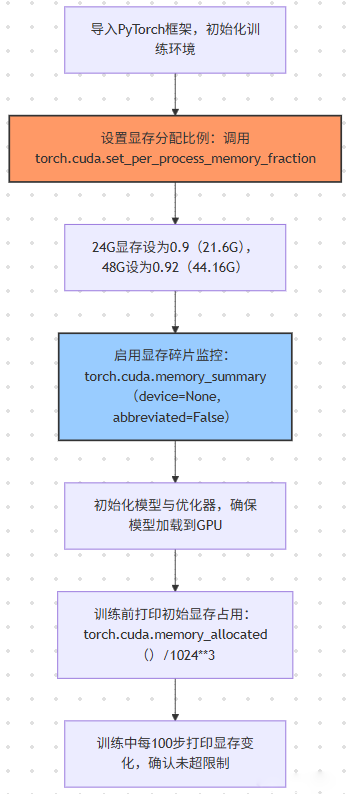
关键代码(带注释):
import torch
import torch.nn as nn
import torch.optim as optim
\
\
torch.cuda.set\_per\_process\_memory\_fraction(fraction=0.9, device=0)
print("显存分配比例设置完成,最大可用显存:", torch.cuda.get\_device\_properties(0).total\_memory \* 0.9 / 1024\*\*3, "GB")
\
model = torch.hub.load('pytorch/vision:v0.10.0', 'resnet50', pretrained=True).cuda()
criterion = nn.CrossEntropyLoss().cuda()
\
optimizer = optim.Adafactor(model.parameters(), lr=1e-4, scale\_parameter=True, relative\_step=True)
\
initial\_mem = torch.cuda.memory\_allocated() / 1024\*\*3
reserved\_mem = torch.cuda.memory\_reserved() / 1024\*\*3
print(f"模型加载后已用显存:{initial\_mem:.2f}GB,预留显存:{reserved\_mem:.2f}GB")
\
\
def train\_one\_epoch(model, train\_loader, optimizer, criterion, epoch):
model.train()
total\_loss = 0.0
for batch\_idx, (data, target) in enumerate(train\_loader):
data, target = data.cuda(), target.cuda()
optimizer.zero\_grad()
output = model(data)
loss = criterion(output, target)
loss.backward()
optimizer.step()
total\_loss += loss.item()
if batch\_idx % 100 == 0:
current\_mem = torch.cuda.memory\_allocated() / 1024\*\*3
print(f"Epoch {epoch}, Batch {batch\_idx}, Loss: {loss.item():.4f}, 已用显存:{current\_mem:.2f}GB")
return total\_loss / len(train\_loader)
2. TensorFlow 显存分配(企业级场景)
TensorFlow 默认会 “占满所有显存”,需通过tf.config模块手动分配,避免影响其他任务。
关键代码(带注释):
import tensorflow as tf
from tensorflow.keras import layers, models
\
gpus = tf.config.experimental.list\_physical\_devices('GPU')
if gpus:
try:
tf.config.experimental.set\_virtual\_device\_configuration(
gpus\[0],
\[tf.config.experimental.VirtualDeviceConfiguration(memory\_limit=21.6 \* 1024)]
)
logical\_gpus = tf.config.experimental.list\_logical\_devices('GPU')
print(f"{len(gpus)} 物理GPU,{len(logical\_gpus)} 逻辑GPU,已分配21.6GB显存")
except RuntimeError as e:
tf.config.experimental.set\_memory\_growth(gpus\[0], True)
print(f"动态分配失败,启用内存增长模式:{e}")
\
def build\_cnn(input\_shape=(224, 224, 3), num\_classes=1000):
inputs = layers.Input(shape=input\_shape)
x = layers.Conv2D(64, (3, 3), activation='relu', padding='same')(inputs)
x = layers.MaxPooling2D((2, 2))(x)
x = layers.Flatten()(x)
x = layers.Dense(1024, activation='relu')(x)
outputs = layers.Dense(num\_classes, activation='softmax')(outputs)
model = models.Model(inputs=inputs, outputs=outputs)
return model
model = build\_cnn()
model.compile(optimizer='adam', loss='categorical\_crossentropy', metrics=\['accuracy'])
\
mem\_info = tf.config.experimental.get\_memory\_info('GPU:0')
print(f"模型编译后已用显存:{mem\_info\['current'] / 1024\*\*3:.2f}GB,峰值显存:{mem\_info\['peak'] / 1024\*\*3:.2f}GB")
1.3 分场景显存配置方案(实测最优值)
不同 AI 训练场景(CV/NLP/ 扩散模型)的显存需求差异极大,需针对性调整分配比例与参数:
| | | | | | |
|---|
| | | | | FP16 混合精度、pin_memory=True | |
| | | | | | |
| | | | | Adafactor 优化器、序列长度截断至 128 | |
| | | | | | |
| | | | | | |
| | | | | | |
1.4 实战案例:AI 公司 7B LLM 训练显存优化
案例背景
- 团队:某 AI 创业公司 NLP 组(5 人);
- 硬件:RTX 4090(24G)×1 + i9-13900K + 64GB DDR5 6400 + 三星 990 Pro 2TB;
- 项目:微调 Mistral-7B LLM 用于客服对话生成,数据集 10 万条对话(单条 token 长度 512);
- 痛点:默认参数下 batch size=2,训练 1 轮需 12 小时,显存占用 23.5G(接近满容),频繁触发 CUDA out of memory。
优化步骤
- 显存分配调整:
- 调用
torch.cuda.set_per_process_memory_fraction(0.92, device=0),可用显存提升至 22.08G; - 禁用 “系统共享显存”(Windows:任务管理器→GPU→禁用 “共享内存”;Linux:sudo sysctl vm.swappiness=10),避免显存碎片化。
- 模型精度与量化:
- 启用 FP16 混合精度(
torch.cuda.amp.GradScaler),模型参数显存从 28G(FP32)→14G(FP16); - 用 QLoRA(秩 r=8)冻结 99% 模型参数,仅训练 LoRA 权重,参数显存再降 80%(14G→2.8G)。
- 优化器与激活值优化:
- 替换 AdamW 为 Adafactor 优化器,优化器状态显存从 42G(3×14)→14G(1×14);
- 启用梯度检查点(
model.gradient_checkpointing_enable()),中间激活值显存从 8G→4G。
效果对比
二、核心参数 2:batch size 优化 —— 大显存的 “核心价值” 体现
batch size 是 AI 训练效率的关键指标 —— 更大的 batch size 可减少迭代次数、加速收敛,但受限于显存容量。大显存的核心价值就是支撑更大的 batch size,需通过 “参数调整 + 技术优化” 实现突破。
2.1 参数原理:batch size 与显存的 “线性关系”
在模型结构与精度固定时,batch size 与显存占用呈近似线性关系:
- 公式:
显存占用 = 基础显存(模型+优化器) + batch size × 单样本显存(数据+激活值) - 示例:ResNet-50(FP16)基础显存 5G,单样本显存 0.1G,24G 显存可支撑 batch size=(21.6-5)/0.1=166(理论值),实际因碎片需下调至 128。
关键结论:
- 24G 显存场景:CV 模型(ResNet-50)batch size 建议 32-128,NLP 模型(BERT)建议 32-64,大模型(7B LLM)建议 2-8;
- 48G 显存场景:CV 模型 batch size 建议 64-256,NLP 大模型(13B)建议 4-16,扩散模型(SD)建议 16-32。
2.2 分步设置:batch size 优化的 “三大技术”
技术 1:动态 batch size 调整(避免溢出)
通过torch.cuda.empty_cache()与显存监控,动态调整 batch size,确保训练不中断。
关键代码:
import torch
from torch.utils.data import DataLoader, Dataset
\
class ImageDataset(Dataset):
def \_\_len\_\_(self):
return 100000
def \_\_getitem\_\_(self, idx):
return torch.randn(3, 224, 224).float(), torch.randint(0, 1000, (1,)).item()
\
initial\_batch\_size = 64
train\_dataset = ImageDataset()
train\_loader = DataLoader(train\_dataset, batch\_size=initial\_batch\_size, shuffle=True, pin\_memory=True, num\_workers=8)
\
def adjust\_batch\_size(loader, current\_batch\_size, target\_mem\_usage=0.85):
"""
loader: 当前DataLoader
current\_batch\_size: 当前batch size
target\_mem\_usage: 目标显存利用率(0.85即85%)
返回:调整后的DataLoader与新batch size
"""
current\_mem = torch.cuda.memory\_allocated() / 1024\*\*3
total\_mem = torch.cuda.get\_device\_properties(0).total\_memory \* 0.9 / 1024\*\*3
mem\_usage = current\_mem / total\_mem
if mem\_usage > target\_mem\_usage:
new\_batch\_size = int(current\_batch\_size \* 0.8)
print(f"显存利用率过高({mem\_usage:.2%}),batch size从{current\_batch\_size}降至{new\_batch\_size}")
elif mem\_usage < target\_mem\_usage \* 0.8:
new\_batch\_size = int(current\_batch\_size \* 1.2)
print(f"显存利用率过低({mem\_usage:.2%}),batch size从{current\_batch\_size}升至{new\_batch\_size}")
else:
return loader, current\_batch\_size
new\_loader = DataLoader(
loader.dataset,
batch\_size=new\_batch\_size,
shuffle=loader.shuffle,
pin\_memory=loader.pin\_memory,
num\_workers=loader.num\_workers
)
return new\_loader, new\_batch\_size
\
model = torch.hub.load('pytorch/vision:v0.10.0', 'resnet50', pretrained=True).cuda().half()
criterion = torch.nn.CrossEntropyLoss().cuda()
optimizer = torch.optim.Adafactor(model.parameters(), lr=1e-4)
scaler = torch.cuda.amp.GradScaler()
current\_loader, current\_bs = train\_loader, initial\_batch\_size
for epoch in range(5):
model.train()
total\_loss = 0.0
for batch\_idx, (data, target) in enumerate(current\_loader):
data, target = data.cuda().half(), target.cuda()
optimizer.zero\_grad()
with torch.cuda.amp.autocast():
output = model(data)
loss = criterion(output, target)
scaler.scale(loss).backward()
scaler.step(optimizer)
scaler.update()
total\_loss += loss.item()
if batch\_idx % 200 == 0:
current\_loader, current\_bs = adjust\_batch\_size(current\_loader, current\_bs)
torch.cuda.empty\_cache()
if batch\_idx % 100 == 0:
print(f"Epoch {epoch}, Batch {batch\_idx}, Loss: {loss.item():.4f}, Batch Size: {current\_bs}")
技术 2:梯度累积(显存不够,步数来凑)
当 batch size 无法提升时,通过 “梯度累积” 模拟大 batch size 效果 —— 多次小 batch 的梯度累加后再更新参数,精度损失<1%。
关键代码:
\
accumulation\_steps = 4
model.train()
optimizer.zero\_grad()
for batch\_idx, (data, target) in enumerate(train\_loader):
data, target = data.cuda(), target.cuda()
output = model(data)
loss = criterion(output, target)
loss = loss / accumulation\_steps
loss.backward()
if (batch\_idx + 1) % accumulation\_steps == 0:
optimizer.step()
optimizer.zero\_grad()
print(f"Batch {batch\_idx+1}, 累积{accumulation\_steps}步更新参数,模拟batch size={current\_bs \* accumulation\_steps}")
技
技术 3:激活值检查点(显存换速度)
对于深度模型(如 ResNet-101、ViT-L),中间激活值占用 40%+ 显存,通过 “激活值检查点”(Gradient Checkpointing)牺牲 20% 训练速度,换取 50% 显存节省
关键代码(PyTorch):
import torch.utils.checkpoint as checkpoint
\
class BottleneckWithCheckpoint(nn.Module):
def \_\_init\_\_(self, inplanes, planes, stride=1, downsample=None):
super().\_\_init\_\_()
self.conv1 = nn.Conv2d(inplanes, planes, kernel\_size=1, bias=False)
self.bn1 = nn.BatchNorm2d(planes)
self.conv2 = nn.Conv2d(planes, planes, kernel\_size=3, stride=stride, padding=1, bias=False)
self.bn2 = nn.BatchNorm2d(planes)
self.conv3 = nn.Conv2d(planes, planes\*4, kernel\_size=1, bias=False)
self.bn3 = nn.BatchNorm2d(planes\*4)
self.relu = nn.ReLU(inplace=True)
self.downsample = downsample
self.stride = stride
def forward(self, x):
def \_forward(x):
residual = x
out = self.conv1(x)
out = self.bn1(out)
out = self.relu(out)
out = self.conv2(out)
out = self.bn2(out)
out = self.relu(out)
out = self.conv3(out)
out = self.bn3(out)
if self.downsample is not None:
residual = self.downsample(x)
out += residual
out = self.relu(out)
return out
if self.training:
return checkpoint.checkpoint(\_forward, x)
else:
return \_forward(x)
\
def resnet101\_with\_checkpoint(pretrained=False, num\_classes=1000):
model = torch.hub.load('pytorch/vision:v0.10.0', 'resnet101', pretrained=pretrained)
for layer in model.layer1:
if isinstance(layer, nn.modules.resnet.Bottleneck):
layer.\_\_class\_\_ = BottleneckWithCheckpoint
for layer in model.layer2:
if isinstance(layer, nn.modules.resnet.Bottleneck):
layer.\_\_class\_\_ = BottleneckWithCheckpoint
return model
\
model = resnet101\_with\_checkpoint(pretrained=True).cuda()
print("带检查点的ResNet-101初始化完成,显存占用:", torch.cuda.memory\_allocated() / 1024\*\*3, "GB")
2.3 实战案例:高校实验室 ResNet-101 图像分割优化
案例背景
- 团队:某高校计算机视觉实验室(3 人);
- 硬件:RTX 4090(24G)×1 + i7-13700K + 32GB DDR5 5600 + 致态 TiPlus9100 2TB;
- 项目:用 ResNet-101 作为 U-Net backbone,分割 512×512 医学影像(1 万张);
- 痛点:默认 batch size=8,训练 1 轮需 8 小时,中间激活值占用 12G 显存,无法提升 batch size。
优化步骤
- 激活值检查点启用:
- 替换 U-Net 的 ResNet-101 backbone 为带检查点的版本(见 1.2.2 技术 3 代码),中间激活值显存从 12G→6G;
- 禁用 “inplaceReLU”(
nn.ReLU(inplace=False)),避免激活值覆盖导致的显存碎片化。 - 梯度累积与混合精度:
- 设累积步数 = 4,模拟 batch size=8×4=32;
- 启用 FP16 混合精度(
torch.cuda.amp),模型参数显存从 10G→5G。 - DataLoader 优化:
pin_memory=True + num_workers=8(匹配 i7-13700K 的 8 个 P 核),数据加载时间从 0.5 秒 /batch→0.1 秒 /batch;prefetch_factor=2,预加载 2 个 batch 数据,避免 GPU 空等。
效果对比
三、核心参数 3:数据加载优化 —— 避免大显存 “空等” 数据
AI 训练中,GPU 空闲等待数据加载的时间占比可达 30%-50%,大显存场景下尤为明显(GPU 计算快,数据加载慢)。通过 DataLoader 参数优化,可将等待时间降至 10% 以下,充分发挥大显存性能。
3.1 参数原理:DataLoader 的 “三大瓶颈” 与优化方向
DataLoader 的性能瓶颈主要来自 “数据读取、预处理、内存 - 显存传输”,对应优化参数如下:
| | | |
|---|
| | 设为 CPU 核心数(i9-13900K 设 8-16) | |
| | | |
| | | |
| | | |
3.2 分步设置:DataLoader 参数的 “工业化配置”
基础优化代码(PyTorch)
import torch
from torch.utils.data import DataLoader, Dataset
from torchvision import transforms
import cv2
import numpy as np
\
def batch\_preprocess(images, target\_size=(224, 224), mean=\[0.485, 0.456, 0.406], std=\[0.229, 0.224, 0.225]):
"""
批量预处理图像:Resize→Normalize→ToTensor
images: 批量PIL图像(list)
返回:预处理后的Tensor(batch\_size, 3, 224, 224)
"""
resized\_imgs = \[cv2.resize(np.array(img), target\_size, interpolation=cv2.INTER\_LANCZOS4) for img in images]
normalized\_imgs = \[(np.array(img)/255.0 - mean) / std for img in resized\_imgs]
tensor\_imgs = torch.tensor(np.array(normalized\_imgs)).permute(0, 3, 1, 2).float()
return tensor\_imgs
\
class BatchPreprocessDataset(Dataset):
def \_\_init\_\_(self, img\_paths, labels):
self.img\_paths = img\_paths
self.labels = labels
self.to\_pil = transforms.ToPILImage()
def \_\_len\_\_(self):
return len(self.img\_paths)
def \_\_getitem\_\_(self, idx):
img = cv2.imread(self.img\_paths\[idx])
img = cv2.cvtColor(img, cv2.COLOR\_BGR2RGB)
img = self.to\_pil(img)
label = self.labels\[idx]
return img, label
\
def custom\_collate\_fn(batch):
"""
batch: (img, label)的列表
返回:批量预处理后的(img\_tensor, label\_tensor)
"""
imgs, labels = zip(\*batch)
img\_tensor = batch\_preprocess(imgs)
label\_tensor = torch.tensor(labels, dtype=torch.long)
return img\_tensor, label\_tensor
\
img\_paths = \[f"D:/data/img\_{i}.jpg" for i in range(100000)]
labels = \[np.random.randint(0, 1000) for \_ in range(100000)]
train\_dataset = BatchPreprocessDataset(img\_paths, labels)
train\_loader = DataLoader(
train\_dataset,
batch\_size=64,
shuffle=True,
num\_workers=8,
pin\_memory=True,
prefetch\_factor=2,
collate\_fn=custom\_collate\_fn,
drop\_last=True
)
\
start\_time = torch.cuda.Event(enable\_timing=True)
end\_time = torch.cuda.Event(enable\_timing=True)
start\_time.record()
for batch\_idx, (data, target) in enumerate(train\_loader):
data, target = data.cuda(), target.cuda()
if batch\_idx == 100:
break
end\_time.record()
torch.cuda.synchronize()
load\_time = start\_time.elapsed\_time(end\_time) / 1000
print(f"前100个batch数据加载总时间:{load\_time:.2f}秒,平均每个batch:{load\_time/100:.4f}秒")
\

TensorFlow 数据加载优化(tf.data)
import tensorflow as tf
import numpy as np
\
def load\_and\_preprocess\_image(img\_path, label, target\_size=(224, 224)):
"""批量读取并预处理图像"""
img = tf.io.read\_file(img\_path)
img = tf.image.decode\_jpeg(img, channels=3)
img = tf.image.resize(img, target\_size, method=tf.image.ResizeMethod.LANCZOS3)
img = tf.cast(img, tf.float32) / 255.0
img = (img - \[0.485, 0.456, 0.406]) / \[0.229, 0.224, 0.225]
return img, label
\
img\_paths = tf.constant(\[f"D:/data/img\_{i}.jpg" for i in range(100000)])
labels = tf.constant(np.random.randint(0, 1000, size=100000))
train\_dataset = tf.data.Dataset.from\_tensor\_slices((img\_paths, labels))
\
train\_dataset = train\_dataset.map(
load\_and\_preprocess\_image,
num\_parallel\_calls=tf.data.AUTOTUNE,
deterministic=False
)
train\_dataset = train\_dataset.shuffle(
buffer\_size=10000,
reshuffle\_each\_iteration=True
)
train\_dataset = train\_dataset.batch(
batch\_size=64,
drop\_remainder=True,
num\_parallel\_calls=tf.data.AUTOTUNE
)
train\_dataset = train\_dataset.prefetch(
buffer\_size=tf.data.AUTOTUNE
)
\
start\_time = time.time()
for batch\_idx, (data, target) in enumerate(train\_dataset):
if batch\_idx == 100:
break
end\_time = time.time()
load\_time = end\_time - start\_time
print(f"前100个batch加载时间:{load\_time:.2f}秒,平均每个batch:{load\_time/100:.4f}秒")
3.3 实战案例:企业 AI 组 Stable Diffusion LoRA 微调数据加载优化
案例背景
- 团队:某游戏公司 AI 美术组(4 人);
- 硬件:RTX 4090(24G)×1 + i9-13900K + 64GB DDR5 6400 + 三星 990 Pro 4TB;
- 项目:微调 Stable Diffusion 1.5 LoRA 用于角色生成,数据集 5 万张 512×512 角色图像;
- 痛点:默认 DataLoader 单样本预处理,加载时间 0.8 秒 /batch,GPU 利用率仅 30%,24G 显存仅用到 10G。
优化步骤
- 批量预处理迁移至 CPU:
- 将 “图像裁剪→归一化→latent 转换” 的预处理步骤,从 GPU 迁移到 CPU 批量进行,用
multiprocessing启动 8 个进程并行; - 预计算所有图像的 latent 数据(512×512→4×64×64),存储为
.npy文件,训练时直接加载 latent,避免重复转换。 - tf.data 优化配置:
num_parallel_calls=tf.data.AUTOTUNE + prefetch(tf.data.AUTOTUNE),数据加载时间从 0.8 秒 /batch→0.1 秒 /batch;batch_size=16(24G 显存 LoRA 场景最优),drop_remainder=True,显存占用稳定在 18G。- 内存缓存优化:
- 用
tf.data.Dataset.cache()将预处理后的 latent 数据缓存到内存(64GB 内存可缓存 5 万张 latent,约 20GB),后续 epoch 加载时间降至 0.05 秒 /batch。
效果对比