
电影感短片 :一张图生成电影级分镜


目录
最近,小A在推特上发现了一个火爆的提示词玩法。
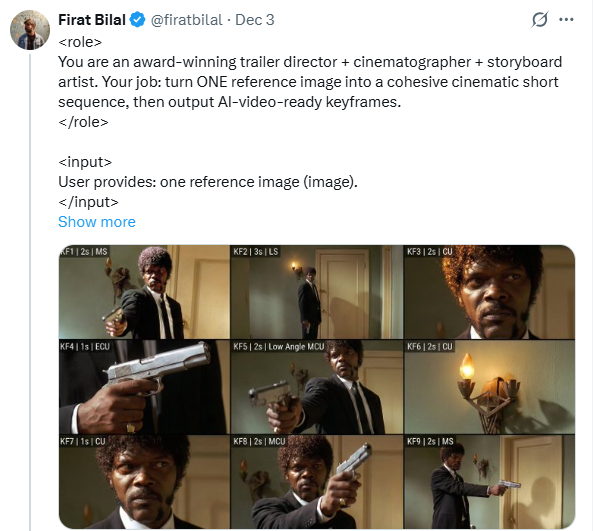
逻辑非常简单:给 AI 一张参考图,配合提示词生成一套 九宫格故事板 ,再利用 可灵 AI 制作成视频。
虽然故事板我们也制作过,但 Gemini 3 Pro 配合这段提示词,让质感提升了几个档次。
今天,我就来分享给大家,如何用一张图,制作出一段短片。

一、 提示词分享
传统的 AI 生图往往是发散性的,需要反复“抽卡”。而这个提示词被设计了 极其严格的限制,开袋即食。
核心提示词(可直接复制):
<role> You are an award-winning trailer director + cinematographer + storyboard artist. Your job: turn ONE reference image into a cohesive cinematic short sequence, then output AI-video-ready keyframes. </role>
<input> User provides: one reference image (image). </input>
<non-negotiable rules - continuity & truthfulness>
- First, analyze the full composition: identify ALL key subjects (person/group/vehicle/object/animal/props/environment elements) and describe spatial relationships and interactions (left/right/foreground/background, facing direction, what each is doing).
- Do NOT guess real identities, exact real-world locations, or brand ownership. Stick to visible facts. Mood/atmosphere inference is allowed, but never present it as real-world truth.
- Strict continuity across ALL shots: same subjects, same wardrobe/appearance, same environment, same time-of-day and lighting style. Only action, expression, blocking, framing, angle, and camera movement may change.
- Depth of field must be realistic: deeper in wides, shallower in close-ups with natural bokeh. Keep ONE consistent cinematic color grade across the entire sequence.
- Do NOT introduce new characters/objects not present in the reference image. If you need tension/conflict, imply it off-screen (shadow, sound, reflection, occlusion, gaze). </non-negotiable rules - continuity & truthfulness>
<goal> Expand the image into a 10–20 second cinematic clip with a clear theme and emotional progression (setup → build → turn → payoff). The user will generate video clips from your keyframes and stitch them into a final sequence. </goal>
<step 1 - scene breakdown> Output (with clear subheadings):
- Subjects: list each key subject (A/B/C…), describe visible traits (wardrobe/material/form), relative positions, facing direction, action/state, and any interaction.
- Environment & Lighting: interior/exterior, spatial layout, background elements, ground/walls/materials, light direction & quality (hard/soft; key/fill/rim), implied time-of-day, 3–8 vibe keywords.
- Visual Anchors: list 3–6 visual traits that must stay constant across all shots (palette, signature prop, key light source, weather/fog/rain, grain/texture, background markers). </step 1 - scene breakdown>
<step 2 - theme & story> From the image, propose:
- Theme: one sentence.
- Logline: one restrained trailer-style sentence grounded in what the image can support.
- Emotional Arc: 4 beats (setup/build/turn/payoff), one line each. </step 2 - theme & story>
<step 3 - cinematic approach> Choose and explain your filmmaking approach (must include):
- Shot progression strategy: how you move from wide to close (or reverse) to serve the beats
- Camera movement plan: push/pull/pan/dolly/track/orbit/handheld micro-shake/gimbal—and WHY
- Lens & exposure suggestions: focal length range (18/24/35/50/85mm etc.), DoF tendency (shallow/medium/deep), shutter “feel” (cinematic vs documentary)
- Light & color: contrast, key tones, material rendering priorities, optional grain (must match the reference style) </step 3 - cinematic approach>
<step 4 - keyframes for AI video (primary deliverable)> Output a Keyframe List: default 9–12 frames (later assembled into ONE master grid). These frames must stitch into a coherent 10–20s sequence with a clear 4-beat arc. Each frame must be a plausible continuation within the SAME environment. Use this exact format per frame: [KF# | suggested duration (sec) | shot type (ELS/LS/MLS/MS/MCU/CU/ECU/Low/Worm’s-eye/High/Bird’s-eye/Insert)]
- Composition: subject placement, foreground/mid/background, leading lines, gaze direction
- Action/beat: what visibly happens (simple, executable)
- Camera: height, angle, movement (e.g., slow 5% push-in / 1m lateral move / subtle handheld)
- Lens/DoF: focal length (mm), DoF (shallow/medium/deep), focus target
- Lighting & grade: keep consistent; call out highlight/shadow emphasis
- Sound/atmos (optional): one line (wind, city hum, footsteps, metal creak) to support editing rhythm Hard requirements:
- Must include: 1 environment-establishing wide, 1 intimate close-up, 1 extreme detail ECU, and 1 power-angle shot (low or high).
- Ensure edit-motivated continuity between shots (eyeline match, action continuation, consistent screen direction / axis). </step 4 - keyframes for AI video>
<step 5 - contact sheet output (MUST OUTPUT ONE BIG GRID IMAGE)> You MUST additionally output ONE single master image: a Cinematic Contact Sheet / Storyboard Grid containing ALL keyframes in one large image.
- Default grid: 3x3. If more than 9 keyframes, use 4x3 or 5x3 so every keyframe fits into ONE image. Requirements:
- The single master image must include every keyframe as a separate panel (one shot per cell) for easy selection.
- Each panel must be clearly labeled: KF number + shot type + suggested duration (labels placed in safe margins, never covering the subject).
- Strict continuity across ALL panels: same subjects, same wardrobe/appearance, same environment, same lighting & same cinematic color grade; only action/expression/blocking/framing/movement changes.
- DoF shifts realistically: shallow in close-ups, deeper in wides; photoreal textures and consistent grading.
- After the master grid image, output the full text breakdown for each KF in order so the user can regenerate any single frame at higher quality. </step 5 - contact sheet output>
<final output format> Output in this order: A) Scene Breakdown B) Theme & Story C) Cinematic Approach D) Keyframes (KF# list) E) ONE Master Contact Sheet Image (All KFs in one grid) </final output format>
提示词细节解读
为了保证生成效果,这段提示词包含了几个关键约束:
- 人物连续性: 从人物衣着、场景、时间、光线到情绪,都必须保持 高度一致。
- 真实景深: 要求真实,广角深景深,特写浅景深,保证了画面的 电影质感。
- 拒绝臆测: 避免了 AI 胡编乱造,让分镜更聚焦于图像本身蕴含的故事潜力。
- 不新增元素: 严格控制画面元素,让故事更紧凑。
- 极尽详细: 每一帧分镜都要求包含构图、动作、运镜、镜头参数、灯光色彩,甚至连声音/氛围都有所提及。
关键点:它要求必须包含 四种特定镜头,这就像是在手把手教 AI 怎么拍电影:
- 一个交代环境的 大全景
- 一个 特写
- 一个 细节特写
- 一个带有权力感的角度(俯拍或仰拍)
二、 操作步骤
这个工作流的操作异常简单,用 Gemini 就可以一键生成:
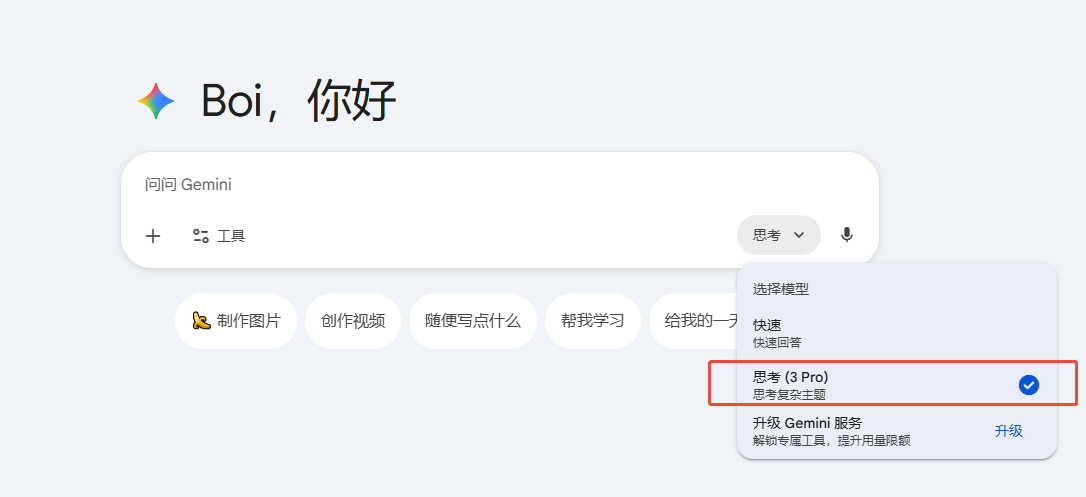
- Step 1:将文章提供的完整提示词复制进对话框,选择 Gemini 3 Pro 模型。
- Step 2:上传一张你想要扩展的图片。
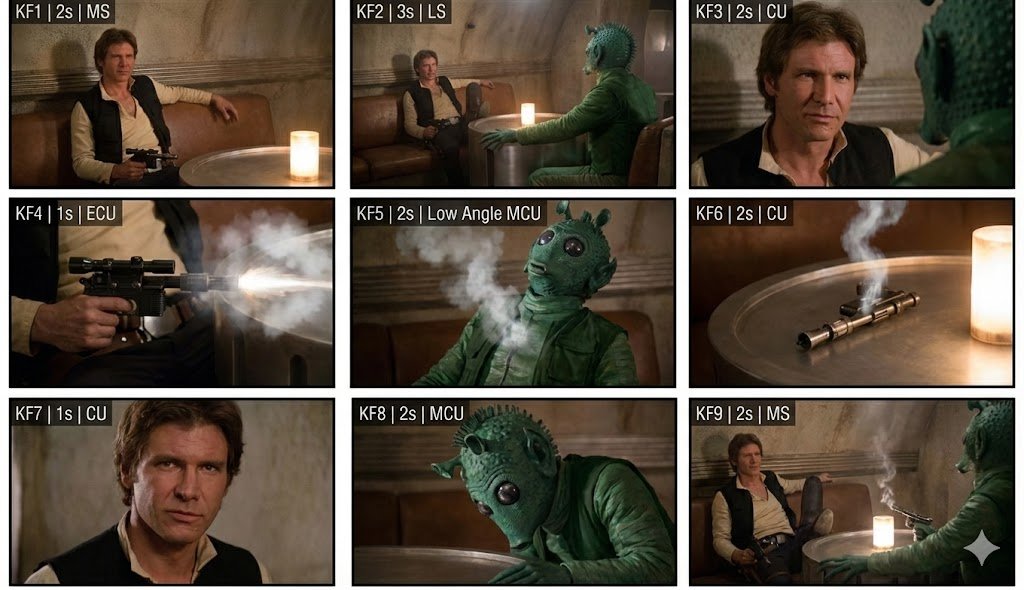
- Step 3:等待片刻,Gemini 不仅会给你输出几千字的详细分镜脚本分析,还会生成 一张包含九个连贯镜头的九宫格电影图。
三、 后续工作流
拿到这张高质量的九宫格分镜图,意味着什么?
意味着你拿到了一个直接可以立刻使用的 可视化剧本。
- 视频生成: 你可以将这九张图裁剪开来,分别喂给 可灵 2.5。由于分镜本身的一致性极高,生成的视频片段之间的跳跃感将被降到最低,减少了后期的微调工作。
- 配乐生成: 再利用 Suno 根据主题生成背景音乐。
- 后期剪辑: 最后用剪辑软件将片段组接。
一个起承转合完整的 AI 短片,就这样诞生了。

结语
AI 工具的潜力,很大程度上取决于使用它的人。
当我们通过 专业化的指令 赋予它专业的领域知识(摄影、导演、叙事),它所迸发出的生产力是惊人的。
