文章摘要
SeekTune是基于Shazam核心算法的开源音乐识别系统,可实现音频指纹生成、特征匹配和歌曲识别。文章介绍了系统的架构、环境要求、必需组件安装方法,提供了Docker部署和原生安装两种方式,还阐述了系统使用教程、核心功能、实际应用案例、故障排除、性能优化建议和扩展开发思路,能助用户构建自己的音乐识别系统。

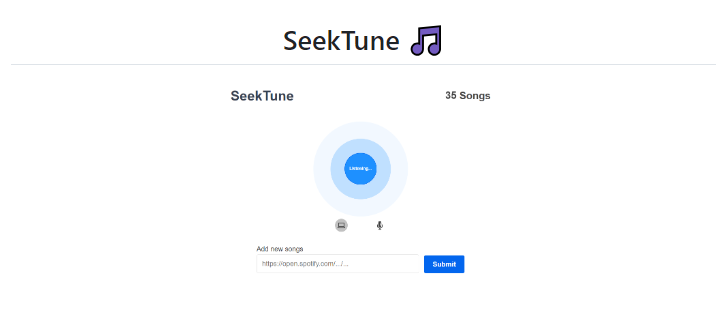
SeekTune 是一个基于 Shazam 核心算法的开源音乐识别系统,它完整实现了音频指纹生成、特征匹配和歌曲识别功能。通过集成 Spotify 和 YouTube API,系统不仅能识别未知音频,还能自动搜索并下载对应的完整歌曲。
1. 音频处理:FFmpeg + 自定义频谱分析算法
- 2. 后端服务:Golang + 多数据库支持
- 3. 前端界面:Node.js + 现代化 Web 技术
- 4. API 集成:Spotify Web API + YouTube Data API
- 5. 部署方案:Docker 容器化 + 原生部署
环境准备
系统要求
1. 操作系统:Windows 10/11, macOS 10.14+, Ubuntu 16.04+
2. 内存:最低 4GB,推荐 8GB
3. 存储:至少 2GB 可用空间
4. 网络:稳定的互联网连接
必需组件安装
1 安装 Golang
# Ubuntu/Debian
wget https://golang.org/dl/go1.19.linux-amd64.tar.gz
sudo tar -C /usr/local -xzf go1.19.linux-amd64.tar.gz
echo 'export PATH=$PATH:/usr/local/go/bin' >> ~/.bashrc
source ~/.bashrc
# macOS
brew install go
# Windows
# 从 https://golang.org/dl/ 下载安装包
安装 FFmpeg
# Ubuntu/Debian
sudo apt update && sudo apt install ffmpeg
# macOS
brew install ffmpeg
# Windows
# 从 https://ffmpeg.org/download.html 下载编译版本
安装 Node.js 和 NPM
# 使用 nvm(推荐)
curl -o- https://raw.githubusercontent.com/nvm-sh/nvm/v0.39.0/install.sh | bash
nvm install 16
nvm use 16
详细安装教程
方法一:Docker 部署(推荐用于生产环境)
步骤 1:安装 Docker 和 Docker Compose
# Ubuntu/Debian
sudo apt update
sudo apt install docker.io docker-compose
sudo systemctl enable docker
sudo systemctl start docker
# 将用户添加到 docker 组
sudo usermod -aG docker $USER
newgrp docker
步骤 2:获取项目代码
git clone https:
cd seek-tune
步骤 3:配置环境变量
创建 server/.env 文件:
# Spotify API 配置
SPOTIFY_CLIENT_ID=your_spotify_client_id_here
SPOTIFY_CLIENT_SECRET=your_spotify_client_secret_here
# 数据库配置(可选)
DB_TYPE=sqlite
# 或者使用 MongoDB
# DB_TYPE=mongo
# DB_HOST=localhost
# DB_PORT=27017
# DB_NAME=seektune
步骤 4:构建和启动服务
# 构建镜像并启动服务
docker-compose up --build -d
# 查看服务状态
docker-compose ps
# 查看日志
docker-compose logs -f
步骤 5:验证安装
访问 http://localhost:8080,应该能看到 SeekTune 的 Web 界面。
方法二:原生安装(推荐用于开发)
步骤 1:获取代码
git clone https://github.com/cgzirim/seek-tune.git
cd seek-tune
步骤 2:后端依赖安装
cd server
# 安装 Go 依赖
go mod download
go mod tidy
# 验证安装
go version
步骤 3:前端依赖安装
cd ../client
# 安装 Node.js 依赖
npm install
# 构建前端资源
npm run build
步骤 4:配置 Spotify API
- 4. 访问 spotify-for-developers
- 5. 点击 "Create App"
- 6. 填写应用信息:
- a. App name: SeekTune
- b. App description: Music recognition system
- c. Redirect URI: http://localhost:5000/callback
- 7. 保存后获取 Client ID 和 Client Secret
- 8. 在 server 目录创建
.env 文件:
SPOTIFY_CLIENT_ID=你的客户端ID
SPOTIFY_CLIENT_SECRET=你的客户端密钥
系统使用教程
启动服务
启动后端服务
cd server
# 开发模式(自动重载)
go run *.go serve -port 5000
# 生产模式
go build -o seektune
./seektune serve -port 5000 -proto http
启动前端服务
cd client
# 开发模式
npm start
# 生产模式
npm run build
npm run serve
核心功能使用
1. 歌曲下载功能
# 从 Spotify 链接下载歌曲
go run *.go download https://open.spotify.com/track/4pqwGuGu34g8KtfN8LDGZm
# 批量下载(从文件读取链接)
cat song_links.txt | xargs -I {} go run *.go download {}
2. 本地歌曲入库
# 单文件入库
go run *.go save /path/to/song.mp3
# 目录批量入库
go run *.go save /path/to/music/folder
# 强制入库(即使没有 YouTube 匹配)
go run *.go save --force /path/to/song.flac
3 3.音频识别功能
# 识别单个音频文件
go run *.go find /path/to/recording.wav
# 识别麦克风输入(需要额外配置)
go run *.go find --device 0 --duration 10
4.数据库管理
# 清空所有数据
go run *.go erase
# 导出指纹数据
go run *.go export --format json
# 导入指纹数据
go run *.go import fingerprints.json
实际应用案例
案例 1:创建个人音乐库
# 1. 下载喜爱的歌曲
go run *.go download https://open.spotify.com/track/0V3wPSX9ygBnCm8psDIegu # Blinding Lights
go run *.go download https://open.spotify.com/track/5QDLhrAOJJdNAmCTJ8xMyW # Shape of You
# 2. 导入现有音乐文件
go run *.go save ~/Music/
# 3. 验证识别效果
go run *.go find test_samples/sample_recording.wav
案例 2:音频识别服务部署
# 构建生产版本
cd server
go build -ldflags "-s -w" -o seektune
# 创建系统服务
sudo tee /etc/systemd/system/seektune.service > /dev/null <<EOF
[Unit]
Description=SeekTune Music Recognition Service
After=network.target
[Service]
Type=simple
User=seektune
WorkingDirectory=/opt/seektune/server
ExecStart=/opt/seektune/server/seektune serve -port 5000
Restart=always
[Install]
WantedBy=multi-user.target
EOF
# 启动服务
sudo systemctl daemon-reload
sudo systemctl enable seektune
sudo systemctl start seektune
故障排除
常见问题解决
1. Spotify API 认证失败
# 检查环境变量
echo $SPOTIFY_CLIENT_ID
echo $SPOTIFY_CLIENT_SECRET
# 重新获取令牌
curl -X POST "https://accounts.spotify.com/api/token" \
-H "Content-Type: application/x-www-form-urlencoded" \
-d "grant_type=client_credentials&client_id=$CLIENT_ID&client_secret=$CLIENT_SECRET"
2 2.频处理错误
# 验证 FFmpeg 安装
ffmpeg -version
# 测验音频转换
ffmpeg -i input.mp3 -acodec pcm_s16le -ar 44100 -ac 1 output.wav
3. 数据库连接问题
# 检查 SQLite 数据库
sqlite3 fingerprints.db "SELECT count(*) FROM fingerprints;"
# 检查 MongoDB 连接
mongo --eval "db.adminCommand('ismaster')"
性能优化建议
系统调优
1. 内存优化:为大型音乐库增加内存至 16GB
2. 存储优化:使用 SSD 提高指纹数据库访问速度
3. 网络优化:配置 CDN 用于音频文件分发
数据库优化
-- SQLite 索引优化
CREATE INDEX idx_fingerprint_hash ON fingerprints(hash);
CREATE INDEX idx_song_id ON fingerprints(song_id);
-- MongoDB 索引优化
db.fingerprints.createIndex({ "hash": 1 })
db.songs.createIndex({ "title": "text", "artist": "text" })
扩展开发
添加新的音频源
在 server/sources/ 目录创建新的源处理器:
type CustomSource struct {
// 实现 Source 接口
}
func (c *CustomSource) Download(url string) (*Song, error) {
// 实现下载逻辑
}
集成其他识别算法
// 在 server/matchers/ 添加新的匹配算法
type AdvancedMatcher struct {
// 实现更精准的匹配逻辑
}
结语
SeekTune 提供了一个完整的音乐识别解决方案,从音频指纹生成到歌曲搜索下载的全流程。通过本教程,你可以成功部署自己的音乐识别系统,无论是用于个人娱乐还是商业应用。
项目持续更新,建议关注 GitHub 仓库获取最新功能和改进。如果在使用过程中遇到问题,欢迎在项目的 Issue 页面提交反馈。
项目:GitHub - cgzirim/seek-tune: An implementation of Shazam's song recognition algorithm.